Why AI Search Skips Your Content: A Technical Diagnosis Framework for Site Owners
Your pages get crawled by GPTBot and OAI-SearchBot. Google indexes them fine. So why does ChatGPT recommend your competitor? This diagnostic framework separates the four failure layers — crawl access, indexability, content quality, and citation worthiness — so you can fix the right problem instead of guessing.
Quick answer
AI search systems skip content for one of four reasons: (1) crawl access is blocked — your robots.txt or login walls prevent AI bots from reading the page; (2) the page isn't indexed or is marked noindex; (3) the content doesn't pass a quality threshold — thin, ambiguous, or unattributed claims get filtered out; or (4) the content is eligible but loses the selection round to sources with stronger authority signals. Each failure layer needs a different fix. Start by checking which layer is the problem before changing anything.
The Gap Between Being Crawled and Being Cited
There's a specific frustration that comes up constantly in technical SEO right now: a site owner confirms GPTBot is crawling their pages, their Google Search Console shows clean indexing, and yet ChatGPT, Perplexity, and Google's AI Overviews consistently cite competitors instead. The instinct is to assume a content quality problem. Often it isn't. Or it isn't only that.
The reason this is confusing is that AI search systems run multiple sequential filters before they surface any content. Passing one filter doesn't mean you pass the next. A page that's perfectly crawlable can still fail on indexability. A well-indexed page can fail a quality threshold. A high-quality page can still lose the final selection round. Each failure looks identical from the outside — your content doesn't appear — but the fixes are completely different.
This article walks through the four-layer diagnostic framework so you can identify precisely where your content is getting dropped, check it in Google Search Console and your server logs, and hand the right fix to the right person.
The Four-Layer AI Content Retrieval Stack
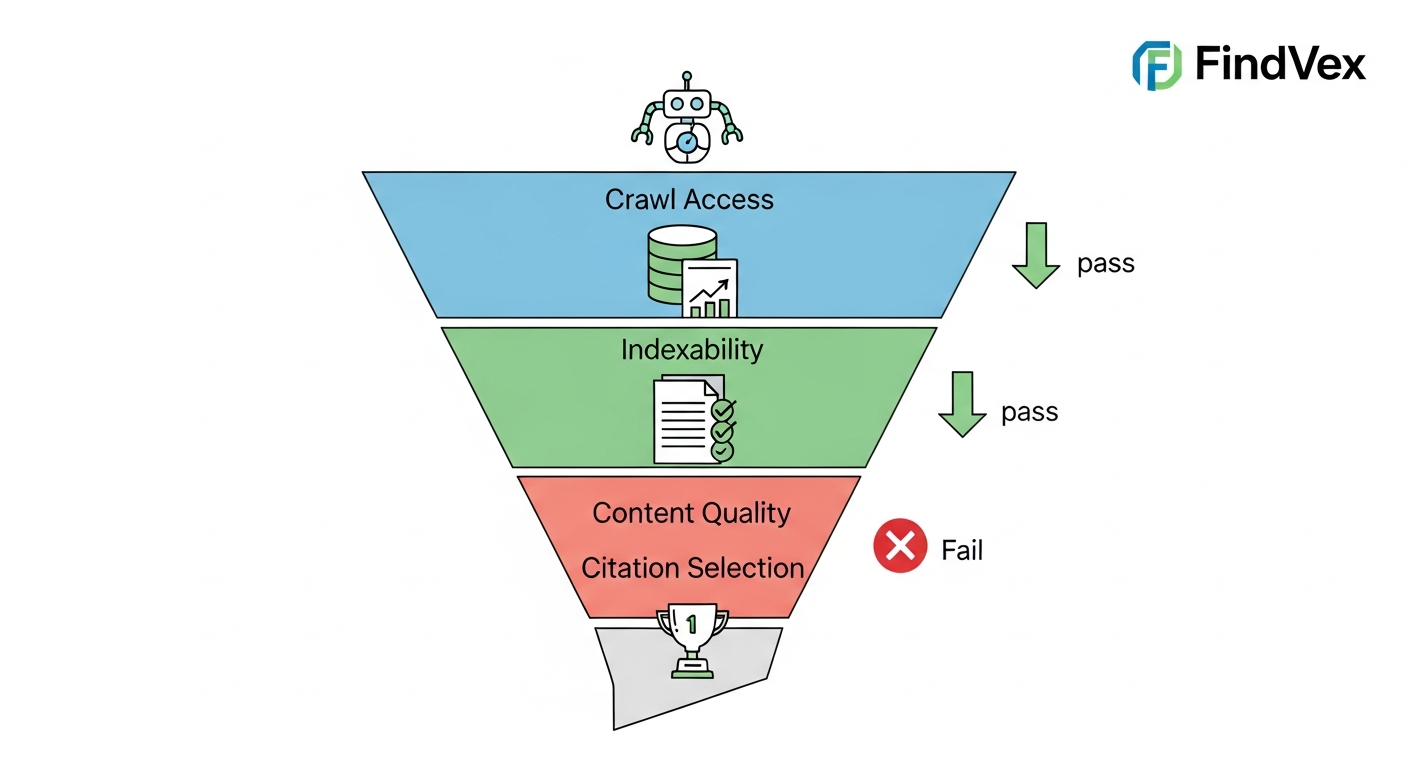
Think of AI content retrieval as a funnel with four gates. Your content has to pass all four to be eligible for citation. If it fails at gate two, gates three and four are irrelevant.
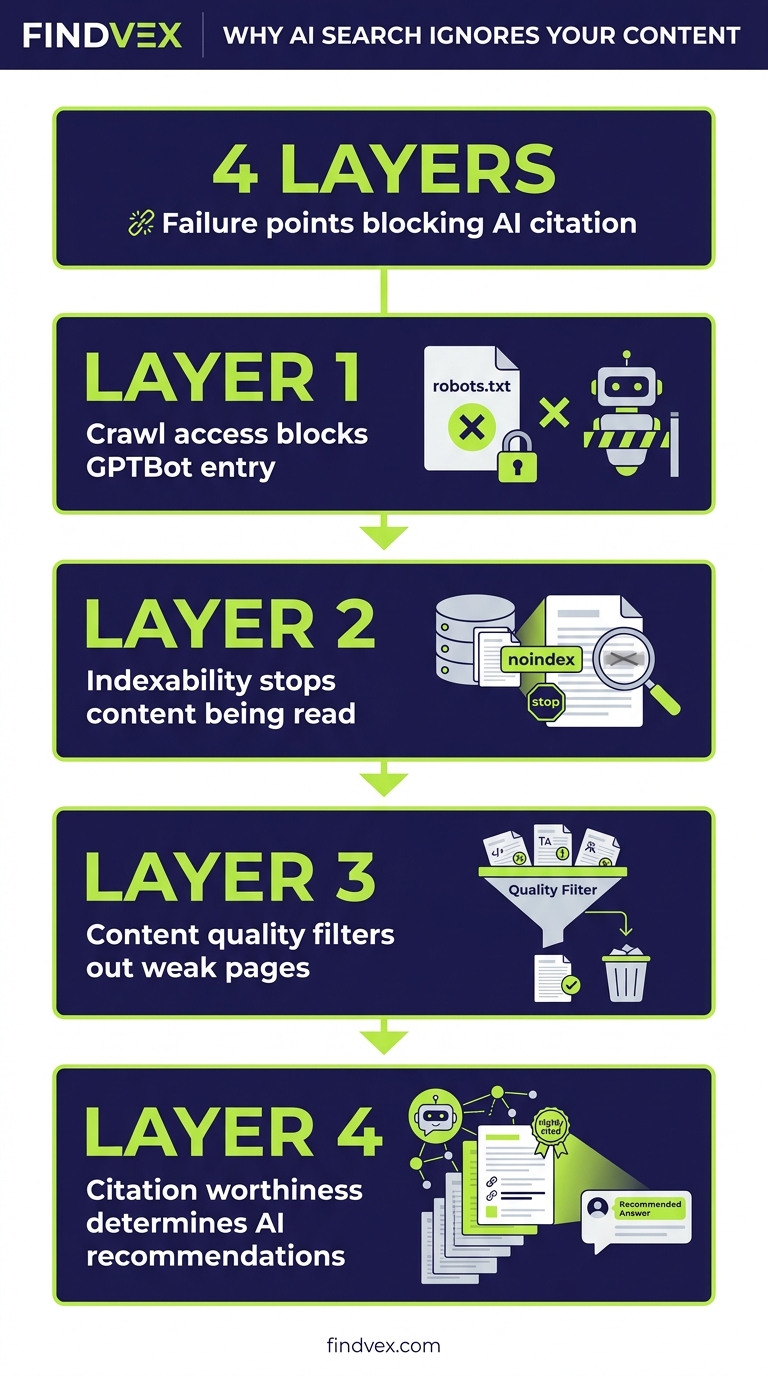
- Layer 1 — Crawl Access: Can the AI bot physically read the page?
- Layer 2 — Indexability: Is the page eligible to enter the knowledge base at all?
- Layer 3 — Content Quality: Does the content meet the threshold for extraction?
- Layer 4 — Citation Selection: When multiple eligible sources exist, does yours win?
“AI agents do in hours what teams used to do in weeks. The advantage compounds.”
Layer 1: Crawl Access — Is the AI Bot Being Blocked?
AI crawlers operate under different user-agent strings than Googlebot. GPTBot handles OpenAI's training and search data. OAI-SearchBot is used specifically for ChatGPT's live search feature. PerplexityBot, ClaudeBot, and Amazonbot each have their own identifiers. A robots.txt rule that blocks one of these agents — intentionally or by accident — cuts off that platform's access to your entire site.
The most common accidental block pattern looks like this: a developer adds Disallow: / under a wildcard User-agent to prevent scraping, and it catches AI crawlers alongside the scraper bots they were trying to stop. Another common scenario is a Cloudflare Bot Fight Mode setting that's configured broadly enough to block legitimate AI crawlers at the network level before they ever reach robots.txt.
Symptom: Your content appears in Google results but not in ChatGPT or Perplexity answers, even for queries where you'd expect to be cited. Risk level of the fix: Low — editing robots.txt is a text file change, but it's worth having a developer review it rather than editing blind.
Diagnosis Checklist: Crawl Access
- Fetch your robots.txt at yourdomain.com/robots.txt and search for GPTBot, OAI-SearchBot, PerplexityBot, ClaudeBot, and Amazonbot
- Check for wildcard Disallow rules that might catch AI bots unintentionally
- If you use Cloudflare, review your Bot Fight Mode settings — confirm it isn't treating known AI crawlers as threats
- Check your server access logs for 403 or 429 responses to these user-agent strings
- If pages require login or are behind a paywall, AI bots cannot access them regardless of robots.txt
What to Check in Google Search Console
GSC's robots.txt Tester (under the Legacy Tools section) lets you test specific user agents against your current robots.txt rules. While it won't test every AI bot, it's useful for catching overly broad Disallow rules. The URL Inspection tool shows you what Googlebot sees — if Googlebot is being blocked, AI bots almost certainly are too. For non-Google AI bots, you'll need to review your server logs or use a dedicated crawl testing tool.
Layer 2: Indexability — Is the Page Eligible to Enter the Knowledge Base?
Even if AI crawlers can access a page, several signals can mark it as ineligible. A noindex meta tag tells crawlers not to include the page in any index. Canonical tags pointing to a different URL consolidate signals on the canonical version and deprioritize the current page. Pages with thin content or excessive boilerplate may be crawled but not retained. Pages Google itself has chosen not to index — visible in GSC's Coverage report as 'Crawled - currently not indexed' — are not reliable sources for AI systems that pull from web indices.
There's a specific technical nuance worth flagging: some JavaScript-heavy sites render their key content only after the initial HTML loads. If an AI crawler fetches the HTML but doesn't execute the JavaScript, it sees a near-empty page. This is the same JavaScript rendering problem that affects Googlebot, but AI crawlers are generally less capable of executing JS than Google's infrastructure. If your page depends on client-side rendering to display its main content, AI crawlers may be seeing a shell.
Symptom: The page ranks in Google but never appears in AI-generated answers. Or GSC shows 'Crawled - currently not indexed' for affected URLs. Risk level of the fix: Medium — fixing noindex tags is low risk; addressing JS rendering may require server-side rendering changes that need developer involvement.
Diagnosis Checklist: Indexability
- Use GSC URL Inspection on affected pages — check the 'Coverage' status for noindex or 'Crawled - currently not indexed'
- View page source (Ctrl+U) and search for 'noindex' in meta tags or X-Robots-Tag headers
- Check canonical tags — confirm they point to the intended URL, not a redirect or alternate version
- Disable JavaScript in your browser (Chrome DevTools → Coverage) and reload the page — if the main content disappears, you have a JS rendering dependency
- Review your CMS settings — WordPress, Shopify, and others sometimes add noindex to paginated pages, tag archives, or search results pages that you may not realize are being crawled
What to Check in Google Search Console
Go to Index → Pages in GSC and filter by 'Crawled - currently not indexed' and 'Excluded by noindex tag.' The first bucket is particularly telling — pages Google chose to crawl but decided not to index are a strong signal that the content isn't passing a quality threshold even for traditional search. If you see important content pages in this bucket, that's a Layer 2 and Layer 3 problem simultaneously.
Layer 3: Content Quality — Does Your Content Pass the Extraction Threshold?
This is where most AI search optimization advice focuses, and it's genuinely important — but only after Layers 1 and 2 are clean. AI retrieval systems are built to extract specific, attributable, unambiguous information. Content that fails this extraction threshold gets passed over even when it's perfectly crawlable and indexed.
The key distinction is between content that's readable by humans and content that's extractable by machines. A paragraph that hedges every claim, uses vague qualifiers, and never commits to a specific answer may be perfectly good editorial writing. An AI system scanning for a direct answer to a user query will skip it. Similarly, content that states facts without any supporting context — no authorship signals, no evidence of expertise, no connection to verifiable entities — ranks low on the trust hierarchy AI systems use when selecting sources.
The practical implication: AI systems prefer content that answers a specific question in the first 2–3 sentences, uses concrete specifics (numbers, named entities, dates, locations), cites or references verifiable sources, and demonstrates clear expertise on the topic rather than summarizing what other sites say. Content that's entirely derivative — paraphrasing other articles without adding a distinct perspective or original detail — is the lowest-value input for any AI system.
Diagnosis Checklist: Content Quality
- Read the first 100 words of the page — does it answer a specific question directly, or does it wind up to the answer?
- Count concrete specifics: are there named entities (people, places, products, dates, prices)?
- Check for authorship signals: is there a named author, a credentials line, or an 'About' section that AI can associate with the content?
- Assess depth: does the page add a distinct claim or insight that can't be found verbatim on the top 3 Google results for the same query?
- Review internal link context: do your own pages cite and reinforce this content as authoritative on its topic?
- Check schema markup — LocalBusiness, Article, FAQPage, and HowTo schema give AI systems structured signals about what the content contains and who produced it
Layer 4: Citation Selection — Why Eligible Content Still Loses
This is the least-understood layer, and it's where the frustration usually lives for sites that have done everything else right. When multiple pieces of eligible, high-quality content exist for a given query, AI systems make a selection decision. The factors that influence this decision are not fully public, but the observable patterns are consistent.
Domain authority matters in the traditional sense — a new site with thin backlink profiles will lose to an established site on equal content quality. Recency matters for queries where the answer changes over time; AI systems generally prefer recently published or recently updated content. Cross-source corroboration matters significantly: if your claim appears on your site only, and the same claim appears corroborated across three other sites, AI systems prefer the corroborated version. This is why earning citations and placements on third-party sites — not just optimizing your own — is the correct strategy for Layer 4.
Finally, structured data density matters. A page with clean FAQPage schema, properly marked-up author entities, and accurate LocalBusiness or Organization schema gives AI systems unambiguous signals. A page without schema forces the AI to infer context, and inference introduces uncertainty that deprioritizes the source.
Symptom at Layer 4: Your content appears occasionally in AI answers for low-competition queries but not for the primary queries you care about. Risk level of the fix: High effort, low risk — building domain authority and third-party placements takes time.
Diagnosis Checklist: Citation Selection
- Run the target query in ChatGPT, Perplexity, and Google AI Overviews — note which domains are consistently cited (these are your benchmark competitors)
- Check the Domain Rating or Domain Authority of cited competitors vs. your own domain
- Assess how recently the cited pages were published or updated vs. your content
- Search for your core claims on third-party sites — do other sources corroborate what you're saying?
- Run a schema validation check on your key pages using Google's Rich Results Test
- Review your Organization or LocalBusiness schema — does it accurately describe your entity, include your NAP, and link to your social profiles?
The Google Search Console Checks That Span All Four Layers
GSC remains the most actionable free tool for diagnosing Layers 1 and 2. Use it systematically before spending time on content rewrites.
- Index → Pages: Review all 'Excluded' buckets — noindex, crawled but not indexed, blocked by robots.txt
- URL Inspection: Test any page that should be appearing in AI answers but isn't — check indexing status, canonical, and last crawl date
- Settings → Crawl Stats: Look for unusual drops in crawl rate that might indicate your server is rate-limiting AI bots
- Enhancements: Check for schema errors that might be invalidating your structured data
- Search Results → Queries: If a page gets impressions on a query but no clicks, AI systems are seeing your metadata but not finding the page useful enough to cite
Developer Handoff Notes
If you're a site owner handing this diagnostic to a developer or agency, here's how to frame the work clearly.
- Layer 1 fix: 'Review robots.txt for unintended blocks on GPTBot, OAI-SearchBot, PerplexityBot, and ClaudeBot user agents. Also audit Cloudflare or WAF rules for bot-blocking policies that might catch legitimate AI crawlers. This is a config file change — 30–60 minutes of work, low risk.'
- Layer 2 fix (noindex): 'Audit all published pages for accidental noindex tags or canonical mismatches. Check CMS settings for any automated noindex rules applied to categories or paginated content. Low risk, 1–2 hours for a small site.'
- Layer 2 fix (JS rendering): 'Audit the site for client-side rendering dependencies on key content pages. If main content loads via JavaScript after initial page load, evaluate server-side rendering (SSR) or static generation for those pages. Medium complexity — requires frontend developer review.'
- Layer 3 fix: 'Implement FAQPage, Article, and LocalBusiness/Organization schema on high-priority pages. Ensure author entities are marked up. This is a structured data addition — medium complexity depending on CMS.'
- Layer 4 fix: 'This is primarily a content and authority-building effort, not a code change. The site needs more third-party corroboration of its key claims through citations, mentions, and placements on external sites.'
The Right Diagnostic Sequence: Don't Start With Content
The most common mistake is jumping straight to rewriting content when AI search isn't citing your site. Content rewrites are expensive in time and resources. If the problem is a single robots.txt line blocking GPTBot, a content rewrite accomplishes nothing.
Run the diagnosis in layer order. Fix Layer 1 first — it takes 30 minutes and eliminates the most fundamental barrier. Then check Layer 2 with GSC — another hour of work. Only after confirming clean crawl access and indexability does it make sense to audit content quality and structured data. Layer 4 — domain authority and third-party citations — is a longer-term project that runs in parallel.
This sequence applies whether you're diagnosing why a single page isn't being cited, or doing a broader audit of why your entire domain is invisible in AI-generated answers. The framework is the same; the scope of the fix changes.
FAQs
Does getting crawled by GPTBot guarantee my content will appear in ChatGPT answers?
No. GPTBot crawling your site means OpenAI can access your content, but it still has to pass quality and selection filters before it's cited in a response. Crawl access is Layer 1 of a four-layer process. Passing Layer 1 doesn't guarantee passage through Layers 2, 3, or 4.
My pages rank in Google but never appear in AI Overviews. What's wrong?
Google AI Overviews and traditional Google rankings use different selection criteria. A page can rank well organically but fail the AI selection round because it lacks structured data, the content doesn't extract cleanly into a direct answer, or competing sources are more concise and authoritative on the specific query. Start by checking your schema markup and reviewing whether the page gives a direct answer in the first 100 words.
Should I allow all AI crawlers in my robots.txt?
That depends on your business goals. If you want AI search visibility, you need to allow the crawlers for systems you want to appear in — at minimum OAI-SearchBot for ChatGPT search, PerplexityBot for Perplexity, and GPTBot for OpenAI's broader data. Blocking them removes your content from those platforms. There are legitimate reasons to block AI training crawlers specifically (GPTBot is used for training as well as search), but blocking search crawlers while wanting search visibility creates an obvious conflict.
How long does it take for changes to appear in AI search results after I fix the issues?
There's no publicly confirmed refresh cycle for AI search indices. Anecdotally, changes to crawl access and indexability tend to be reflected faster (days to a few weeks) than content quality or authority improvements, which can take weeks to months. Unlike Google's index, AI system update cadences are not fully transparent.
Is this problem different for local businesses vs. national brands?
The four-layer framework applies to both, but local businesses face an additional challenge at Layer 4: local citation corroboration. AI systems confirm local business details (address, hours, services) by cross-referencing multiple sources — Google Business Profile, Yelp, industry directories, local news mentions. A local business with inconsistent or sparse third-party listings is more likely to be skipped in favor of a competitor with stronger multi-source corroboration.
What's the fastest single fix if I can only do one thing?
Check your robots.txt for unintended AI bot blocks first — it takes 15 minutes and the fix is a one-line edit. If that's clean, run your key pages through GSC URL Inspection to confirm indexing status. These two checks eliminate the most fundamental barriers before you spend time on content or schema work.
Related reading
- turboquant entity driven seo — Google TurboQuant and Entity-Driven SEO: What the Compression Breakthrough Actually Means for Your Site
- AI crawler blocking strategy — The AI Crawler Protection Paradox: Why Brands Block Bots Then Pay to Be Seen
- bing grounding vs search indexing — Bing Grounding vs. Search Indexing: What Microsoft's Framework Means for Your Site's AI Visibility
- crawl budget seo — Crawl Budget SEO: Why Google Skips Pages on Small Business Sites (and How to Fix It)
- technical seo audit checklist — Technical SEO Audit Checklist for Small Business Websites
- openai crawl activity tripled since gpt-5 — OpenAI Crawl Activity Tripled Since GPT-5: What It Means for Your Website
- what is a technical seo audit — What Is a Technical SEO Audit? The 7 Areas That Actually Determine Whether Google Can Rank Your Site
- duplicate content seo — Duplicate Content SEO: What Google Actually Penalizes vs. What It Silently Handles
- core web vitals seo — Core Web Vitals for SEO: What Business Owners Need to Fix First
- google business profile audit — Google Business Profile Audit Checklist: 23 Things That Actually Affect Your Local Ranking
Marcus Chen
Head of Technical SEO · Findvex
Marcus Chen heads technical SEO at Findvex. He writes about Core Web Vitals, indexing, schema, and JavaScript SEO — translating Google’s documentation into checklists small business owners can actually act on.
Expertise: Core Web Vitals · Indexing & crawlability · Schema / structured data · JavaScript SEO
Related reads
Google TurboQuant and Entity-Driven SEO: What the Compression Breakthrough Actually Means for Your Site
TurboQuant is a vector quantization algorithm from Google Research that dramatically compresses the mathematical representations AI uses to understand meaning. If it reaches production search infrastructure, it could lower the cost of semantic retrieval at scale — making entity-based content signals more dominant and keyword-match signals relatively less important.
SEO NewsHow AI Is Changing Local Search Visibility: What the SOCi + Google Webinar Revealed
Google and SOCi's joint webinar on local search visibility highlighted a fundamental shift: AI-powered discovery across Google Search, Maps, and Gemini now requires a different optimization playbook than the one most small businesses are running. Here's what changed and what to prioritize.
Strategic Technical SEODuplicate Content SEO: What Google Actually Penalizes vs. What It Silently Handles
Duplicate content rarely triggers a manual penalty. Google usually picks one version and ignores the rest. But the wrong choice by Google can split your ranking signals, waste crawl budget, and suppress pages you actually want ranked. Here's how to diagnose the difference.