Duplicate Content SEO: What Google Actually Penalizes vs. What It Silently Handles
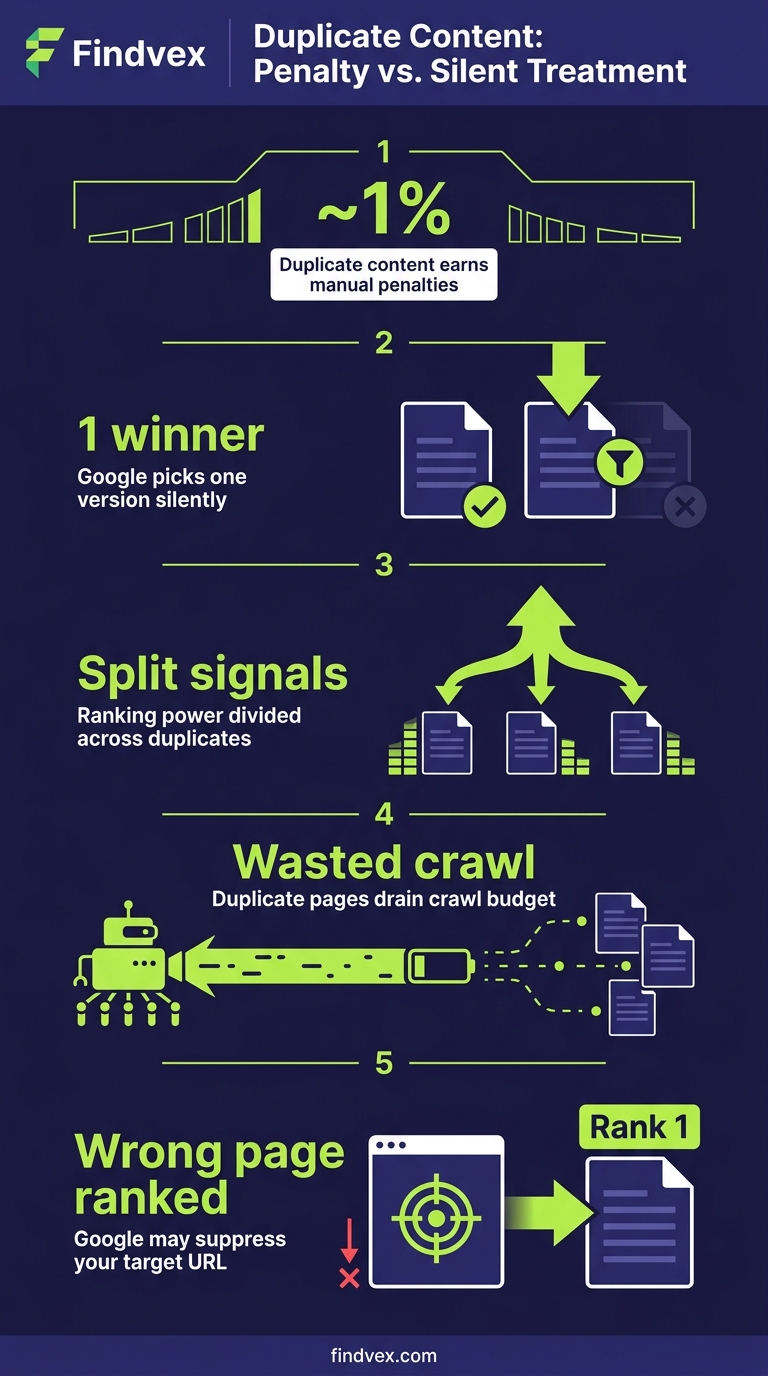
Duplicate content rarely triggers a manual penalty. Google usually picks one version and ignores the rest. But the wrong choice by Google can split your ranking signals, waste crawl budget, and suppress pages you actually want ranked. Here's how to diagnose the difference.
Quick answer
Duplicate content on small business sites rarely causes a manual penalty. Google automatically selects one version (the 'canonical') and consolidates ranking signals there. The real risk is Google picking the wrong version — deindexing your preferred page, splitting link equity, or wasting crawl budget on low-value URLs. Fix duplicate content when Google is choosing the wrong canonical or when the same content exists on multiple separately-indexed pages. Use canonical tags, 301 redirects, or parameter handling to signal your preferred version.
The Duplicate Content Threat Is Mostly Misunderstood
Business owners are often told duplicate content will 'penalize' their site. That framing is mostly wrong, and the misunderstanding causes two problems: people panic about harmless technical duplication, and they miss the situations where duplicate content actually does damage.
Google's documented position is that duplicate content does not result in a manual action unless the duplication appears to be deliberately deceptive — for example, scraped content scaled at volume to manipulate rankings. For the vast majority of small business websites, duplicate content is a consolidation problem, not a penalty problem. Google picks a canonical URL, assigns ranking signals to it, and suppresses the others. The question is whether Google is picking the URL you want.
This article separates the duplicates that need fixing from the ones Google handles competently on its own — and gives you a diagnostic workflow for each.
How Google Actually Handles Duplicate Content
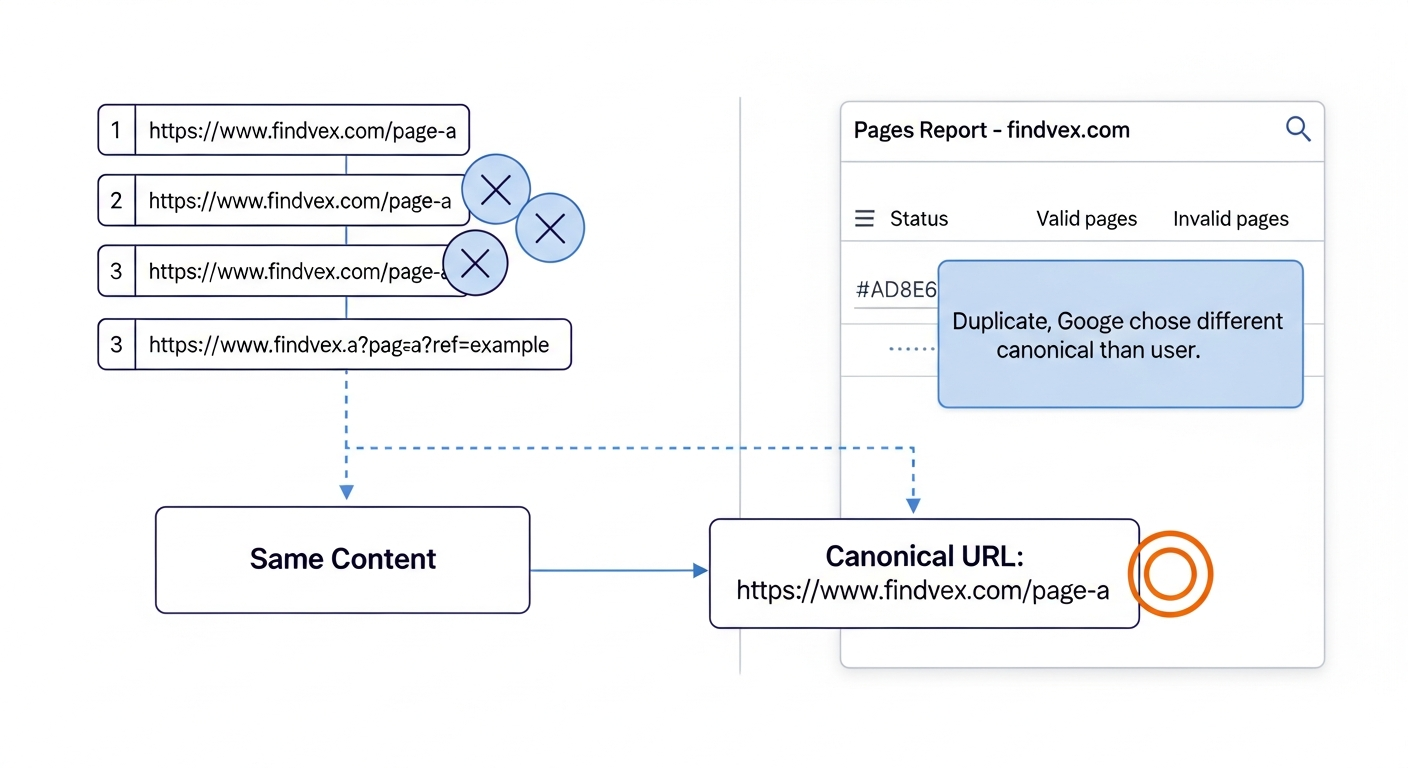
When Google discovers two or more URLs with substantially identical content, it runs a canonicalization process. It evaluates signals like canonical tags, internal linking patterns, redirect history, URL structure, sitemap inclusion, and PageRank to select one URL as the 'canonical' — the version it treats as authoritative. The other URLs are grouped under that canonical and typically not shown in search results.
The process is automatic and runs continuously. It doesn't require your input, and in many cases it produces the right result. The risk is when Google's choice conflicts with yours.
Three outcomes follow from poor canonicalization: (1) ranking signals like backlinks and internal link equity get split across duplicate URLs instead of consolidated on the one you want; (2) the wrong version appears in search results, potentially one with tracking parameters or a session ID in the URL; (3) Googlebot spends crawl budget on duplicate URLs that contribute nothing, which matters more for larger sites but can affect smaller sites with limited crawl allowance.
“AI agents do in hours what teams used to do in weeks. The advantage compounds.”
Duplicate Content Google Handles Without Your Help
Not every technical duplicate needs a fix. Understanding what Google handles competently saves you from over-engineering your site.
- HTTP vs. HTTPS versions of the same URL: If you have a valid SSL certificate and your HTTP URLs 301-redirect to HTTPS, Google handles this. If redirects aren't in place, fix the redirects — but this is a redirect problem, not strictly a duplicate content problem.
- Trailing slash variants (example.com/services vs. example.com/services/): Google typically canonicalizes these correctly when internal links are consistent. If your CMS serves different content on both variants, that needs a fix.
- Print-friendly page versions: Most modern sites don't generate these, but if yours does, a canonical pointing to the standard page is sufficient.
- Syndicated content with attribution: If you publish your content on other sites with a canonical tag pointing back to your original URL, Google generally respects that and credits the original. Without the canonical, it may rank the syndicated copy.
- Minor boilerplate repetition across pages: Shared navigation, footer text, and sidebars don't constitute duplicate content. Google evaluates content blocks in context.
- Product or service descriptions shared across related pages: Short, shared descriptions that accompany unique primary content on each page are not a material risk.
Duplicate Content That Needs Your Attention
The following are situations where Google's automatic handling is unreliable, inconsistent, or likely to produce the wrong result for your site.
- URL parameters creating duplicate pages: Filtering, sorting, and session parameters generate URLs like /services?sort=price or /products?sessionid=abc123. If these are crawlable and indexable, Google can create hundreds of duplicate variants. Fix: use the URL Parameters tool in Google Search Console (if available), add rel=canonical to the parameter URLs pointing to the clean URL, or configure your server to avoid serving unique content on parameterized URLs.
- WWW vs. non-WWW serving the same content: If both www.example.com and example.com load your site without a redirect, Google sees two separate sites. Fix: choose one version, implement a 301 redirect from the other, and verify your preferred domain is set in Google Search Console.
- Shopify and ecommerce platform duplicates: Shopify generates /products/[product-name] and /collections/[collection]/products/[product-name] for the same product. Both URLs are crawlable by default. Shopify adds canonical tags pointing to the /products/ version, but this relies on Googlebot respecting the canonical — it's worth verifying in GSC that the correct URL is being indexed. (See our guide on technical SEO for Shopify stores for a complete breakdown.)
- Location pages that are nearly identical: Service businesses often create city-specific landing pages with only the city name swapped. If the pages are substantively identical, Google may canonicalize them to a single version and suppress the rest. Fix: differentiate the pages with location-specific content — local landmarks, specific service details, genuine customer references for that area.
- Paginated content without proper signals: Blog archives, product listings, and article pagination (/page/2, /page/3) can appear as duplicate or near-duplicate to Google. Modern best practice is to make paginated pages individually indexable with unique content rather than using rel=prev/next (which Google no longer uses as a signal). Ensure each page in a paginated series has unique title tags and distinct content above the fold.
- Content accessible under multiple URL paths: A page appearing under /about-us/, /company/about/, and /who-we-are/ is a structural problem. Consolidate to one URL and redirect the others with 301s.
- Staging or development environments accessible to Googlebot: If your staging site is publicly accessible and not blocked in robots.txt, it can be crawled and indexed alongside your production site. Block staging environments in robots.txt or with HTTP authentication.
Diagnosis Checklist: Is Duplicate Content Hurting You?
Work through these checks in order. If you hit a confirmed issue, fix it before moving to the next one.
- ☐ Run a site: operator check: Search site:yourdomain.com in Google. Are there more indexed pages than you expect? Unexpected parameter URLs in the results indicate a crawl-and-index problem.
- ☐ Check Google's chosen canonical in GSC: In Google Search Console, go to Indexing > Pages. Filter by 'Duplicate without user-selected canonical' and 'Duplicate, Google chose different canonical than user.' Both statuses indicate Google isn't following your canonicalization signals.
- ☐ Verify canonical tags are self-referencing on your key pages: Open the source of your most important pages (Ctrl+U in Chrome) and search for rel="canonical". The href should match the exact URL of the page you're on. If it points to a different URL, you have a mismatch.
- ☐ Check for WWW/non-WWW duplication: Type both http://www.yourdomain.com and http://yourdomain.com in a browser. If both load content instead of one redirecting, fix this immediately.
- ☐ Look for parameter inflation in your crawl data: If you use Screaming Frog or a similar tool, filter crawled URLs for query strings. A high ratio of parameter URLs to clean URLs signals parameter duplication.
- ☐ Review your location pages for content differentiation: Open two of your city pages side by side. If you could swap the city names and nothing would change, the pages are functionally duplicate.
- ☐ Confirm staging is blocked: Visit yourstagingdomain.com/robots.txt. It should contain Disallow: / for all bots, or access should require authentication.
What to Check in Google Search Console
Google Search Console surfaces duplicate content signals directly if you know where to look.
- Indexing > Pages > 'Duplicate without user-selected canonical': These are pages Google identified as duplicates but where you haven't specified a canonical. Review each URL cluster. If the correct version is being indexed, add explicit canonical tags to confirm the signal. If the wrong version is indexed, add a canonical on the duplicate pointing to your preferred URL.
- Indexing > Pages > 'Duplicate, Google chose different canonical than user': This is the most actionable status. Google found your canonical tag but disagreed with it and chose a different URL. Common causes: your preferred URL returns a redirect, your preferred URL has fewer internal links pointing to it than the duplicate, or your preferred URL was recently changed. Investigate and resolve the discrepancy.
- URL Inspection tool: Inspect a specific page to see which canonical Google has selected ('Google-selected canonical' vs. 'User-declared canonical'). If they don't match, the page shows you exactly where Google's choice diverges from yours.
- Coverage > Excluded: Review all excluded URLs. A large number of excluded URLs categorized as duplicates or alternatives signals a canonicalization problem that may be suppressing pages you want indexed.
- Crawl Stats (Settings > Crawl Stats): A high volume of crawled-but-not-indexed URLs relative to indexed pages can indicate Googlebot is spending crawl budget on duplicates. This is more relevant for sites with hundreds of pages.
The Three-Tool Fix: Canonicals, Redirects, and Robots.txt
Most duplicate content issues on small business sites can be resolved with three tools. The choice between them depends on whether you want the duplicate URL to exist at all.
- Canonical tags (rel=canonical): Use when the duplicate URL needs to remain accessible — for example, a print page or a filtered product listing — but you want ranking signals consolidated on the primary URL. Add <link rel="canonical" href="https://yourdomain.com/preferred-url/" /> in the <head> of the duplicate. Risk level: Low. Canonicals are hints, not directives. Google may override them if signals are inconsistent.
- 301 redirects: Use when the duplicate URL serves no independent purpose. Permanently redirect it to the preferred URL. This passes link equity, eliminates the duplicate from the index, and is the strongest signal of the three. Risk level: Low when implemented correctly. Incorrect redirects (redirect chains, loops) can cause crawl issues — audit them after implementation. Our article on indexing issues and how to fix them covers redirect chain diagnosis.
- Robots.txt disallow: Use to prevent crawling of entire URL patterns that generate duplicates at scale — for example, /search?q= or /cart/. This is appropriate when the duplicate URLs have no ranking value and you want to conserve crawl budget. Risk level: Medium. Blocking URLs in robots.txt doesn't remove them from the index if they're already indexed or if other sites link to them. For already-indexed duplicates, combine robots.txt blocking with a noindex meta tag or use a 404/410 response.
Developer Handoff Notes
If you're handing these fixes to a developer or CMS administrator, here's what to communicate clearly to avoid implementation errors.
- Canonical tag placement: The canonical tag must be in the <head> element, not the <body>. It should appear once per page. If your CMS or theme outputs a canonical automatically, confirm there are no duplicate canonical tags — two canonical tags on one page tell Google nothing.
- Canonical URL format: The href in the canonical tag must be the exact, final URL — including the correct protocol (https://), the correct subdomain (www or non-www), and a consistent trailing slash policy. If your preferred URL is https://www.example.com/services/ (with trailing slash), the canonical must match exactly.
- 301 vs. 302 redirects: A 302 is temporary and does not reliably transfer ranking signals. Duplicate content fixes must use 301 (permanent) redirects. Verify the response code in your browser's developer tools or with a redirect checker after deployment.
- Redirect chain limit: If fixing multiple redirects, ensure the chain from any old URL to the final destination is no longer than one hop. /old-url-1 → /old-url-2 → /final-url is a chain that dilutes signals and slows crawling. Consolidate to /old-url-1 → /final-url.
- CMS template-level canonicals: For platforms like WordPress, implement canonical tags at the template level, not page by page. Plugins like Yoast SEO or Rank Math handle this. Confirm the plugin is outputting the correct URL format — check source on a few pages after enabling.
- Testing after deployment: Use the URL Inspection tool in GSC to fetch and render any page where you've added or changed a canonical. Verify the 'User-declared canonical' field shows the correct URL. Allow a few days for Google to re-crawl and re-process before checking whether GSC status changes.
The Local Pages Problem: When Near-Duplicate Is the Whole Strategy
For service-area businesses — plumbers, HVAC contractors, landscapers, law firms — local landing pages often become the site's primary duplicate content source. The page for 'Austin' and the page for 'Round Rock' use the same template, the same service descriptions, and only the city name changes.
Google's documentation is clear that pages created primarily for search engines — where the main differentiator is a swapped geographic term — are not valuable content. Google may index one version and suppress the rest, or it may treat all of them as low-quality.
The fix isn't to eliminate location pages. It's to make them substantively different. Each page needs content that only makes sense for that location: specific neighborhoods served, local licensing or permit context, service details relevant to regional conditions, references to local landmarks or infrastructure. A plumber's Austin page might address the city's hard water conditions and their effect on pipe scale. A Round Rock page might reference the 2021 freeze and the types of pipe repairs that followed.
This is both a duplicate content fix and a quality signal improvement. Pages that are genuinely location-specific don't just avoid canonicalization issues — they rank because they're more relevant to local searches than a generic template with a swapped city name. Our guide on local landing pages that rank without sounding generic covers this workflow in full.
Duplicate Content and AI Search Visibility
Duplicate content creates a specific problem for AI search systems like ChatGPT Search, Perplexity, and Google's AI Overviews. These systems retrieve content through RAG (retrieval-augmented generation) pipelines that fetch pages at query time. If multiple versions of the same content exist, the retrieval system may pull from a parameterized or non-canonical URL that lacks proper context or schema markup.
More practically: if your content is duplicated across multiple URLs, AI retrieval systems may attribute a lower confidence score to it because the same information appears across many places with no clear authoritative source. Consolidating your content on canonical URLs and marking them explicitly with structured data helps AI systems identify the definitive version of your content.
This connects to why canonicalization isn't purely a traditional SEO concern. Clean, deduplicated site architecture is increasingly important for visibility in AI-generated answers. Our article on why AI search skips your content covers the technical signals that affect retrieval selection in more depth.
Risk Summary: Duplicate Content Fixes by Priority
Not all duplicate content fixes are equally urgent. Here's a prioritized view based on actual impact potential.
- Priority 1 — Fix immediately: WWW/non-WWW serving the same site without a redirect. Staging environment indexed alongside production. GSC showing 'Google chose different canonical than user' on your most important pages.
- Priority 2 — Fix within 30 days: URL parameters generating large numbers of crawlable duplicate URLs. Shopify or WooCommerce product pages with unconfirmed canonicalization. Location pages with no substantive content differentiation.
- Priority 3 — Fix when resources allow: Paginated archive pages without distinct metadata. Minor parameter variants (like tracking UTMs in internal links) that aren't causing indexation problems.
- Low priority / monitor only: Print-friendly page variants. Minor boilerplate repetition across pages. Syndicated content where a canonical back to your site has been implemented.
FAQs
Does duplicate content cause a Google penalty?
Almost never, for typical small business websites. Google's documented position is that duplicate content results in a manual action only when it's deliberately deceptive at scale — such as scraped content produced to manipulate rankings. For naturally occurring duplicate content (CMS-generated parameter URLs, WWW/non-WWW variants, similar location pages), Google automatically selects a canonical and suppresses the rest. The real risk is Google selecting the wrong canonical, not a penalty.
How do I check if Google has indexed duplicate pages on my site?
Go to Google Search Console > Indexing > Pages. Filter by 'Duplicate without user-selected canonical' and 'Duplicate, Google chose different canonical than user.' Also use the URL Inspection tool to check individual pages — it shows both the URL you declared as canonical and which URL Google actually selected. A mismatch requires investigation.
Should I use a canonical tag or a 301 redirect to fix duplicate content?
Use a 301 redirect when the duplicate URL serves no independent purpose and you want it to permanently resolve to your preferred URL. Use a canonical tag when the duplicate URL needs to remain accessible (for functional reasons like filtering or sorting) but you want ranking signals consolidated on the primary URL. Redirects are a stronger, more definitive signal. Canonical tags are hints that Google may override.
Are location pages duplicate content if they use the same template?
They can be, if the only difference is the city name. Google may canonicalize them to a single version or treat them as low-quality. The fix is adding genuinely location-specific content to each page — local service details, regional context, specific neighborhood coverage — so each page offers something distinct to a searcher in that location.
Does Shopify have a duplicate content problem?
Shopify generates two accessible URLs for the same product: /products/[product-name] and /collections/[collection]/products/[product-name]. Shopify automatically adds canonical tags pointing to the /products/ URL, which is the correct behavior. The risk is that Google doesn't always follow canonical tags, so it's worth verifying in GSC's URL Inspection tool that the /products/ version is what Google has selected as canonical — not the collection URL.
Can duplicate content hurt crawl budget on small business websites?
For most small business sites with under a few hundred pages, crawl budget is unlikely to be a binding constraint. Where it matters is when parameter duplication creates hundreds or thousands of crawlable URLs — for example, an ecommerce site with many filter combinations. In those cases, blocking duplicate parameter URLs in robots.txt or adding canonical tags can help Google spend its crawl allowance on your valuable pages instead of duplicates.
What's the fastest way to find duplicate content issues on my site?
Three quick checks: (1) Search site:yourdomain.com in Google and look for unexpected parameter URLs in the results. (2) Open Google Search Console > Indexing > Pages and count how many URLs are excluded under duplicate-related statuses. (3) Use the URL Inspection tool on your most important pages and compare the 'User-declared canonical' against the 'Google-selected canonical.' Any mismatch is a starting point for investigation.
Research notes
Background claims used while researching this article. Verify with the cited authorities before quoting.
- Google's documented position that duplicate content does not result in a manual action unless deliberately deceptive — verify via Google Search Central documentation on duplicate content — verify current URL and confirm the framing matches current documentation before publication
- Google no longer uses rel=prev/next as a ranking signal for paginated content — verify via Google's announcement deprecating rel=prev/next — confirm this is still current policy and has not been reversed
Marcus Chen
Head of Technical SEO · Findvex
Marcus Chen heads technical SEO at Findvex. He writes about Core Web Vitals, indexing, schema, and JavaScript SEO — translating Google’s documentation into checklists small business owners can actually act on.
Expertise: Core Web Vitals · Indexing & crawlability · Schema / structured data · JavaScript SEO
Related reads
Google TurboQuant and Entity-Driven SEO: What the Compression Breakthrough Actually Means for Your Site
TurboQuant is a vector quantization algorithm from Google Research that dramatically compresses the mathematical representations AI uses to understand meaning. If it reaches production search infrastructure, it could lower the cost of semantic retrieval at scale — making entity-based content signals more dominant and keyword-match signals relatively less important.
SEO NewsHow AI Is Changing Local Search Visibility: What the SOCi + Google Webinar Revealed
Google and SOCi's joint webinar on local search visibility highlighted a fundamental shift: AI-powered discovery across Google Search, Maps, and Gemini now requires a different optimization playbook than the one most small businesses are running. Here's what changed and what to prioritize.
SEO NewsFrom SEO Expert to AI Search Expert: How to Control What AI Says About Your Brand
Search engine optimization is no longer just about rankings — it's about controlling what AI says when someone asks about your industry, your competitors, or your brand. Here's the strategic shift every SEO and business owner needs to make now.