Schema Markup for Small Business Websites: The 5 Types That Actually Affect Your Rankings
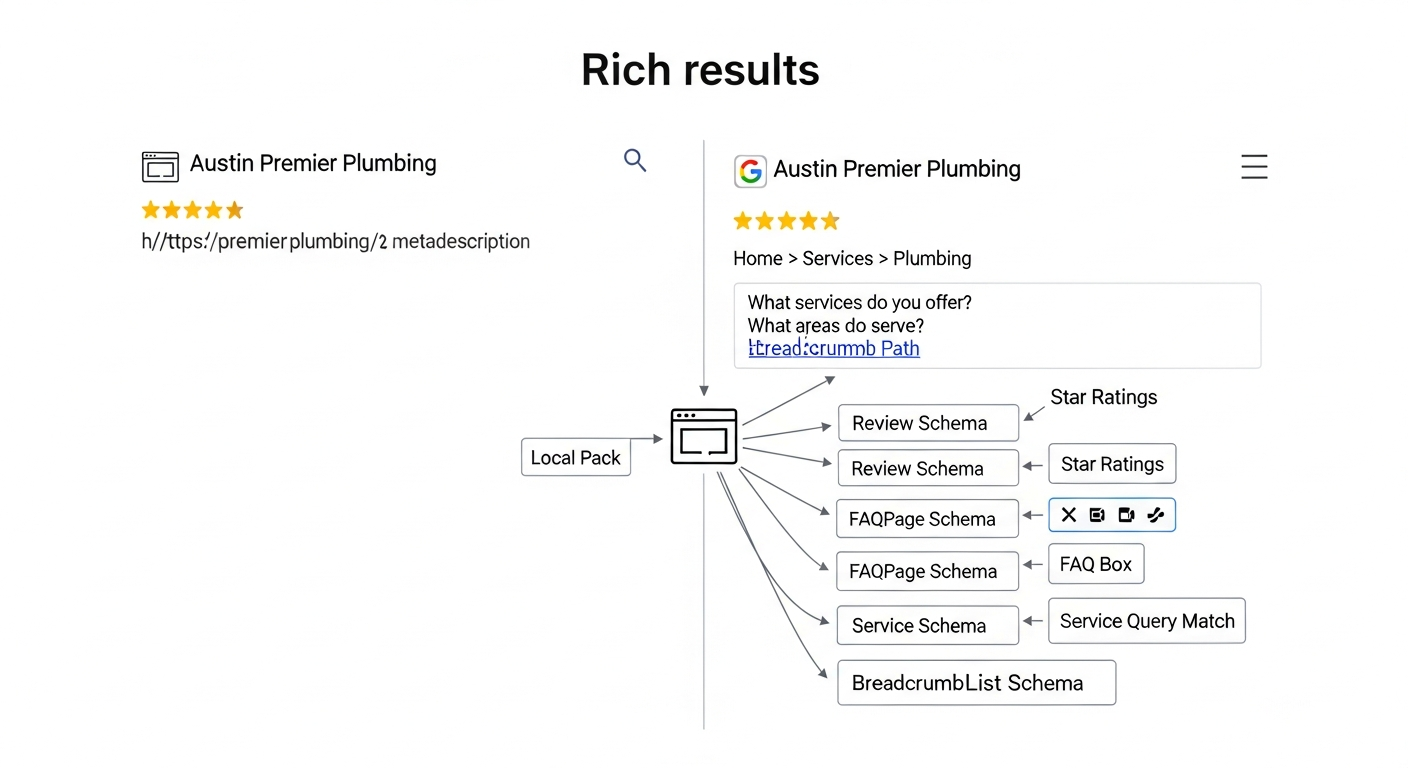
Not all schema markup is worth your time. These 5 types — LocalBusiness, FAQ, Review, Service, and BreadcrumbList — are the ones Google actually uses to trigger rich results and influence local rankings for small business websites.
Quick answer
The 5 schema markup types that most directly affect small business rankings and click-through rates are: LocalBusiness (or a subtype like Dentist, Restaurant, or Plumber), FAQ, Review/AggregateRating, Service, and BreadcrumbList. These are the types Google consistently uses to generate rich results, influence local pack visibility, and feed AI Overviews. Everything else is secondary until these are in place.
Section 1
If you've spent any time reading about technical SEO, you've probably seen schema markup described as something you 'should' add to your site. What most guides skip is which types actually matter for a small business — and which ones are just busywork.
There are over 800 schema types in the Schema.org vocabulary. A local plumber, dentist, or restaurant needs maybe five of them. Get those right, and you unlock star ratings in search results, FAQ dropdowns in Google, and stronger signals for the local pack. Get distracted by the other 795, and you've wasted hours your competitors used to rank for the keywords you're targeting.
Here's the focused version: the five schema types that move the needle, why each one matters, and exactly how to implement them.
What Schema Markup Actually Does for a Small Business
Schema markup (also called structured data) is code you add to your website that tells search engines what your content means — not just what it says. It's written in JSON-LD format and lives in the HTML of your page, invisible to visitors but readable by Google, Bing, and AI answer engines like ChatGPT and Perplexity.
For a small business, the payoff is twofold. First, schema markup can trigger rich results — the star ratings, FAQ dropdowns, and review counts you see under some search listings. These visually enhanced results get higher click-through rates than plain blue links, even when they rank lower on the page. Second, structured data helps Google understand your business entity: what you do, where you operate, and why you're relevant for specific searches.
Schema is also becoming more important for AI Overviews and answer engines. When AI summarizes 'best plumbers in Austin,' it pulls from structured, well-organized data sources. A business with clean LocalBusiness schema is easier for an AI model to cite accurately than one with information buried in paragraphs. For more on how AI models read and represent your business, see our piece on how AI models actually understand your brand.
“AI agents do in hours what teams used to do in weeks. The advantage compounds.”
Type 1: LocalBusiness Schema (and Its Subtypes)
This is the most important schema type for any business with a physical location or a service area. LocalBusiness schema tells Google your business name, address, phone number, hours, geographic coordinates, and the categories you belong to — all in a structured format that feeds directly into the Google Knowledge Panel and local pack ranking signals.
The key move here is to use the most specific subtype available, not the generic LocalBusiness type. Schema.org has subtypes for dozens of business categories: Dentist, LegalService, Plumber, Restaurant, RealEstateAgent, MedicalClinic, AutoRepair, and more. Using the right subtype signals relevance more precisely than a generic label.
The non-negotiable fields to include: name, address (using PostalAddress), telephone, openingHoursSpecification, geo (latitude and longitude), url, and priceRange. Optional but valuable: sameAs (links to your Google Business Profile, Yelp, and other directory listings), aggregateRating (if you have enough reviews), and areaServed for service-area businesses that don't have a storefront.
One practical note: your schema NAP (name, address, phone) must exactly match what's on your Google Business Profile and your website's contact page. Inconsistencies confuse Google's entity resolution and can dilute your local ranking signals.
- Use the most specific subtype: Dentist, Plumber, Restaurant, LegalService, etc.
- Include name, address, phone, hours, geo coordinates, and URL as minimum
- Add sameAs links to GBP, Yelp, Facebook, and industry directories
- Keep NAP identical across schema, GBP, and your contact page
- Add areaServed for service-area businesses without a public address
Type 2: FAQ Schema
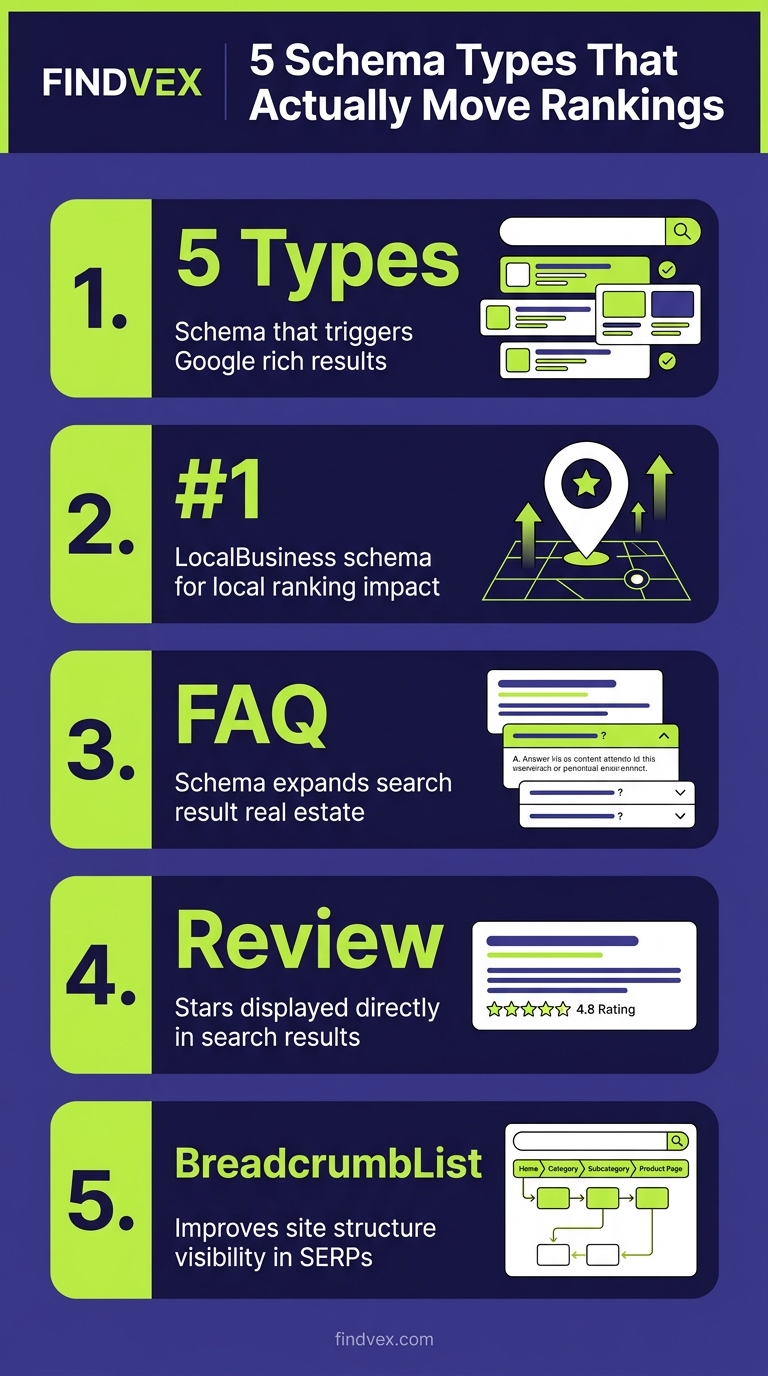
FAQ schema is one of the fastest ways to increase your search result real estate without improving your ranking position. When implemented correctly, Google can display two to four collapsible questions and answers directly beneath your search listing — doubling or tripling your visual footprint on the page.
More importantly for small businesses, FAQ schema feeds directly into Google's featured snippets and AI Overviews. When someone searches 'does a plumber fix water heaters' or 'how much does a dental implant cost,' Google pulls structured Q&A content from pages with FAQ schema to generate those direct-answer boxes at the top of results.
The content rules matter here. FAQ questions need to be genuine questions customers actually ask — not keyword-stuffed phrases. Answers should be concise (40–60 words is the sweet spot for snippet extraction) and written in plain language. Avoid FAQs that redirect entirely to another page; the answer needs to be self-contained within the markup.
Where to add it: service pages, location landing pages, and any page that answers a specific question your customers search for. A dental practice should have FAQ schema on its Invisalign page answering 'How long does Invisalign take?' A plumber should have it on their emergency services page answering 'Do you offer 24-hour plumbing service?'
- Triggers collapsible Q&A dropdowns directly in search results
- Feeds Google's featured snippets and AI Overviews
- Use real customer questions — check GBP Q&A, reviews, and support emails
- Keep answers between 40–60 words for snippet optimization
- Add to service pages and location pages, not just the homepage
Type 3: Review and AggregateRating Schema
Star ratings in search results are one of the highest-impact visual signals available in organic search. A listing showing 4.8 stars from 127 reviews grabs attention — and earns trust — before a user reads a single word of your copy.
AggregateRating schema lets you display your average rating and review count directly in the search listing. Google can pull this from your own on-site reviews (from customers who leave reviews on your website), and the structured data tells Google exactly how to display it. Important: Google does not accept AggregateRating schema that simply mirrors your Google Business Profile reviews — the ratings must come from reviews that are hosted on your own website.
This means you need a mechanism to collect and display native reviews on your site. Many small businesses use plugins like WP Customer Reviews (WordPress) or build a simple testimonials section with structured markup. The threshold for Google to show star ratings in results varies, but having at least ten reviews with a valid AggregateRating schema implementation is a reasonable minimum to target.
Review schema (for individual reviews, as opposed to aggregated ratings) is less commonly shown in Google results today but still valuable for service pages, product pages, and case study content. It helps reinforce credibility signals that AI models use when evaluating which businesses to cite.
- AggregateRating shows star ratings directly in the search listing
- Ratings must come from reviews hosted on your own site, not GBP
- Use a review plugin (e.g., WP Customer Reviews) or build a native reviews section
- Target at least 10 on-site reviews before expecting star display in results
- Review schema on individual service pages reinforces entity credibility for AI models
Type 4: Service Schema
Service schema is the most underused of the five types, but it's particularly powerful for local service businesses. It tells Google exactly what services you offer, how they're priced, and which areas they cover — as structured entities, not just prose.
Each service you offer should ideally have its own Service schema block: name, description, provider (linking back to your LocalBusiness entity), areaServed, and if applicable, offers (with price or priceRange). A plumbing company might have separate Service schema for emergency drain clearing, water heater installation, and pipe repair — each with its own page and its own schema block.
Why does this matter beyond rankings? Service schema helps Google (and AI models) match your specific services to specific queries. A user asking ChatGPT 'who does water heater installation in Denver' gets a more confident citation from a business whose site explicitly marks up 'Water Heater Installation' as a Service entity with areaServed: Denver than from one that mentions it in body copy only.
This integrates directly with your local landing page strategy. Each service-area page should combine LocalBusiness schema with Service schema specific to that location. For more on building location pages that convert, see our guide on local landing pages that rank without sounding generic.
- Create individual Service schema for each distinct service you offer
- Include: name, description, provider, areaServed, and offers/priceRange
- Link Service schema back to your LocalBusiness entity using provider
- Pair with individual service pages, not just the homepage
- Strengthens AI citation accuracy for service-specific queries
How to Add Schema Markup to Your Small Business Website
The fastest no-code path for most small businesses is a WordPress SEO plugin. Rank Math and Yoast SEO both generate LocalBusiness, BreadcrumbList, and basic Review schema from settings panels — no JSON editing required. For FAQ schema, both plugins let you add Q&A blocks directly in the page editor that automatically generate the correct markup.
For custom builds or platforms like Squarespace and Webflow, you'll need to paste JSON-LD code manually into the page's HTML head or body section. Use Google's Structured Data Markup Helper to generate the initial code, then customize the values. JSON-LD is the format Google recommends — it's cleaner than microdata and doesn't require you to modify your visible HTML.
For Shopify, structured data support is theme-dependent. Many themes include Product and BreadcrumbList schema by default but lack LocalBusiness or Service schema. You can add JSON-LD blocks via a Shopify app or by editing your theme's liquid files. Our technical SEO guide for Shopify covers the specifics of structured data gaps common to Shopify themes.
After implementation, validate every page with two tools: Google's Rich Results Test (tests whether your schema qualifies for rich results) and Schema.org Validator (checks for syntax errors). Then monitor Google Search Console's Enhancements section — it flags schema errors and shows which rich result types Google has detected across your site.
- WordPress: Use Rank Math or Yoast — both generate LocalBusiness, FAQ, and Breadcrumb schema from settings panels
- Custom builds: Use Google's Structured Data Markup Helper to generate JSON-LD, then paste into page HTML
- Shopify: Check your theme's existing schema, then fill gaps via app or liquid file edits
- Validate with: Google Rich Results Test + Schema.org Validator
- Monitor: Google Search Console > Enhancements tab for errors and detected rich results
Schema Types Small Businesses Can Safely Skip (For Now)
There's no shortage of schema types that sound relevant but deliver minimal return for a typical small business site. Understanding what to defer keeps your implementation clean and your time focused.
Event schema is valuable if you run regular in-person events, but irrelevant for most service businesses. Product schema matters for e-commerce — not for a dental practice or a law firm. HowTo schema can trigger step-by-step rich results, but Google's display of HowTo rich results has become inconsistent, and the implementation effort rarely pays off unless you have a dedicated tutorial-heavy content strategy.
JobPosting schema is worth adding if you're actively hiring and want your listings to appear in Google for Jobs — but it's a one-off addition, not part of your core schema strategy. VideoObject schema is useful if video is central to your content, but it doesn't affect the five core ranking signals this article focuses on.
The rule of thumb: implement schema for the types that have a confirmed rich result in Google's Rich Results documentation and that match content you already have on your site. Don't create content just to support a schema type.
- Event schema: only if you regularly host public events
- Product schema: e-commerce only
- HowTo schema: inconsistent Google display, low ROI for most service businesses
- JobPosting: add when hiring, but it's not a core ranking signal
- VideoObject: add if video is core to your content strategy
Do This This Week: Schema Implementation Action Plan
Schema markup has a high return-to-effort ratio when you prioritize correctly. Here's a five-step sequence you can complete in a focused afternoon.
- Step 1 — Audit what you have: Run your homepage and top 3 service pages through Google's Rich Results Test. Note which schema types are already present and which are missing.
- Step 2 — Add LocalBusiness schema to your homepage: Use your SEO plugin or generate JSON-LD manually. Include name, address, phone, hours, geo, URL, sameAs links, and the most specific subtype that matches your business.
- Step 3 — Add FAQ schema to your two highest-traffic service pages: Pull 3–5 real questions from your GBP Q&A section, customer emails, or review content. Write concise 40–60 word answers for each.
- Step 4 — Enable BreadcrumbList in your SEO plugin settings: If using Rank Math or Yoast, this is a one-toggle change. Verify with Rich Results Test.
- Step 5 — Check Search Console in 2 weeks: Go to Enhancements > FAQ and Enhancements > Breadcrumbs to confirm Google has detected your new markup and flag any errors to fix.
How Schema Markup Affects Leads, Not Just Rankings
Rankings are a means to an end. What schema markup actually does for your business is increase the number of qualified clicks you get from your existing rankings — and build the entity trust that turns searchers into callers.
Star ratings from AggregateRating schema make your listing stand out in competitive local searches, especially on mobile where users scan quickly. FAQ dropdowns answer objections before a user even visits your site — reducing bounce rate and increasing the likelihood that the click turns into a call. LocalBusiness schema with complete information reduces friction for Google to surface your business in 'near me' queries and the local 3-pack.
The compound effect matters too. Businesses with clean, complete structured data are easier for AI models to represent accurately in AI Overviews and answer engine results. As more search queries get answered without a traditional click, being the cited source becomes as valuable as ranking position. Schema is one of the clearest signals you can send to both Google and AI models that your business information is authoritative and trustworthy.
If you're thinking about how all of this fits into a broader local SEO strategy, our guide on how local SEO turns website traffic into booked calls covers the conversion layer in detail — including how to connect technical signals like schema to actual phone calls and form fills.
FAQs
Does schema markup directly improve my Google ranking position?
Schema markup doesn't directly cause a ranking jump in the traditional sense, but it improves visibility in ways that matter: it triggers rich results (star ratings, FAQ dropdowns, breadcrumbs) that increase click-through rate, and it strengthens entity signals that influence local pack rankings. LocalBusiness and Service schema are most directly tied to local ranking influence.
Do I need to know how to code to add schema markup?
No. If you're on WordPress, SEO plugins like Rank Math or Yoast handle LocalBusiness, FAQ, and BreadcrumbList schema through settings panels. For other platforms, you can use Google's free Structured Data Markup Helper to generate JSON-LD code, then paste it into your page HTML. Always validate with Google's Rich Results Test after adding.
Can I use schema markup on every page, or just certain pages?
LocalBusiness schema goes on your homepage (and optionally your contact page). FAQ schema goes on service pages and location pages where you have genuine Q&A content. BreadcrumbList should be on every page. Service schema goes on individual service pages. Don't add schema types to pages where the content doesn't match — Google may ignore or penalize mismatched markup.
Why aren't my star ratings showing up in search results after adding AggregateRating schema?
The most common reason is that Google requires ratings to come from reviews actually hosted on your website, not from your Google Business Profile. You need a native on-site review mechanism (a plugin or custom section). Additionally, Google's display threshold varies — having at least 10 on-site reviews with a valid average rating improves your chances significantly.
How is schema markup different from Google Business Profile?
Google Business Profile (GBP) is a separate Google-managed listing that appears in Maps and the local pack. Schema markup is code on your own website. Both send local relevance signals to Google, and they work together — your website's LocalBusiness schema reinforces the information in your GBP. Having consistent data in both places strengthens your overall local entity signals.
Does schema markup help with AI Overviews and ChatGPT visibility?
Yes. Structured data makes your business information easier for AI models to parse and cite accurately. LocalBusiness and Service schema are particularly valuable for AI Overviews, which surface business information in response to service and location queries. Clean, complete schema reduces the chance that AI models misrepresent your services or location.
How long does it take for schema markup changes to appear in Google Search Console?
Google typically detects new or updated schema within 1–2 weeks of implementation, though it can take up to 4 weeks for rich results to appear in search results. Check Search Console's Enhancements section 2 weeks after implementation to confirm detection and resolve any flagged errors.
Related reading
- landscaping seo — Landscaping SEO: How to Fill Your Schedule Without Paying for Every Lead
- google business profile audit — Google Business Profile Audit Checklist: 23 Things That Actually Affect Your Local Ranking
- near me seo strategy — Near Me SEO Strategy: A Local Discovery Playbook for Service Businesses
- real estate seo — Real Estate SEO: How Local Agents Win Search in 2026
- structured data testing — Structured Data Testing: How to Validate Schema Markup Before and After You Deploy It
- what is a technical seo audit — What Is a Technical SEO Audit? The 7 Areas That Actually Determine Whether Google Can Rank Your Site
- roofing seo — Roofing SEO: How to Rank in the Local Pack Before Storm Season Hits
- seo services for small business — SEO Services for Small Business: What You're Actually Buying (and What Moves the Needle)
- restaurant seo services — Restaurant SEO Services: What Actually Drives More Covers, Reservations, and Takeout Orders
- GEO playbook local search — The 90-Day GEO Playbook for Local Search: How To Show Up When AI Does The Searching
Research notes
Background claims used while researching this article. Verify with the cited authorities before quoting.
- AggregateRating schema — Google's specific requirements and threshold for displaying star ratings in search results
- JSON-LD is Google's recommended format for structured data
- Over 800 schema types in the Schema.org vocabulary
Sofia Patel
Head of Content & Growth · Findvex
Sofia Patel leads content and growth at Findvex. She writes about local SEO, conversion-focused content, and AEO/GEO strategy — the work that turns search visibility into booked calls and qualified leads for service businesses.
Expertise: Local SEO · Conversion content · AEO / GEO strategy · Content-led link building
Related reads
Answer Engine Optimization (AEO): The 2026 Guide for Small Businesses
Learn answer engine optimization (AEO) in 2026. This practical guide helps small businesses get found in AI search, voice assistants, and answer engines.
SEOGenerative Engine Optimization (GEO): The 2026 Guide for Small Businesses
Learn how generative engine optimization helps small businesses get found in AI search. Our 2026 GEO guide covers strategies, tactics, and tips to boost visibility.
SEOSEO Agency in USA: AI-Powered SEO for Small Businesses | Findvex
Findvex is a leading SEO agency in USA delivering AI-powered SEO strategies that help small businesses rank higher, drive traffic, and grow revenue. Get started today.