Internal Linking Strategy: How to Route Authority to the Pages That Drive Revenue
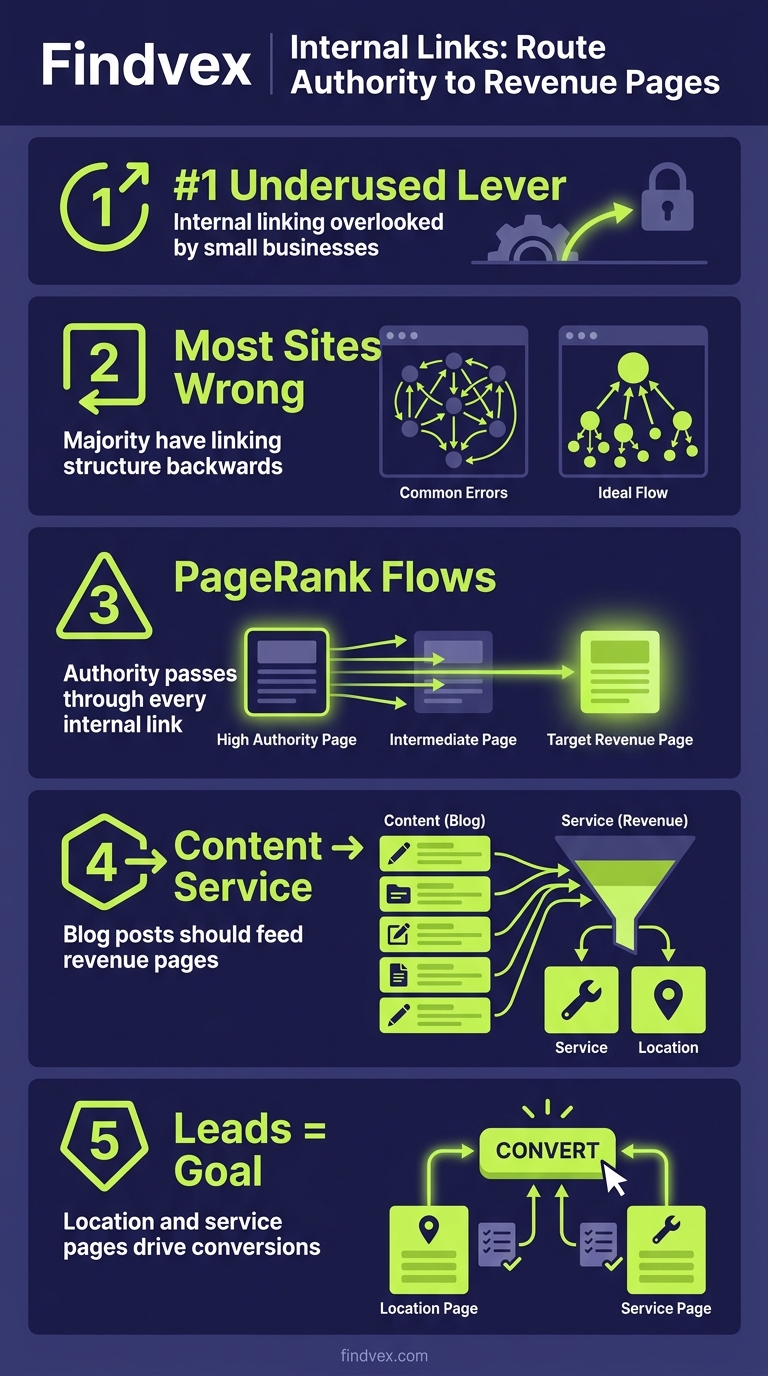
Internal linking is the most underused lever in small business SEO. A deliberate linking system routes PageRank from content pages to the service and location pages that actually generate leads — and most sites have it entirely backwards.
Quick answer
An effective internal linking strategy maps authority from high-traffic informational pages toward your highest-value commercial pages — service pages, location pages, and booking/contact pages. Start by identifying your 3–5 most important pages, then audit every existing post and page to add contextual links that point toward them using descriptive anchor text. Do this systematically, not randomly.
Most Small Business Sites Are Routing Authority in the Wrong Direction
The typical small business website sends traffic to a blog post that links to another blog post that links to the homepage. The service pages — the pages that actually book appointments, generate quote requests, and close leads — get almost nothing pointed at them.
That's a structural problem. Internal links are one of the clearest signals you can send Google about which pages matter most on your site. They distribute PageRank (the mathematical representation of link authority) from pages that have accumulated it — often informational content that earns backlinks — toward pages you want to rank. If those signals aren't pointing at your money pages, you're doing the SEO equivalent of advertising your business address and never mentioning what you sell.
The fix isn't complicated, but it requires being intentional. This article gives you the exact system to audit what you have, identify where authority is leaking, and build a linking structure that actually serves your business goals.
Quick Answer: What Is an Internal Linking Strategy?
An internal linking strategy is a deliberate system for connecting your website's pages so that authority, context, and navigational value flow from lower-priority pages toward higher-priority ones. It involves identifying your most commercially important pages, then ensuring that your content — blog posts, FAQs, resource pages — consistently links to those pages with relevant, descriptive anchor text.
Unlike backlink building (which depends on third parties), internal linking is 100% within your control. Done correctly, it amplifies the value of every external link your site earns.
“AI agents do in hours what teams used to do in weeks. The advantage compounds.”
The 3-Tier Site Architecture That Makes Linking Systematic
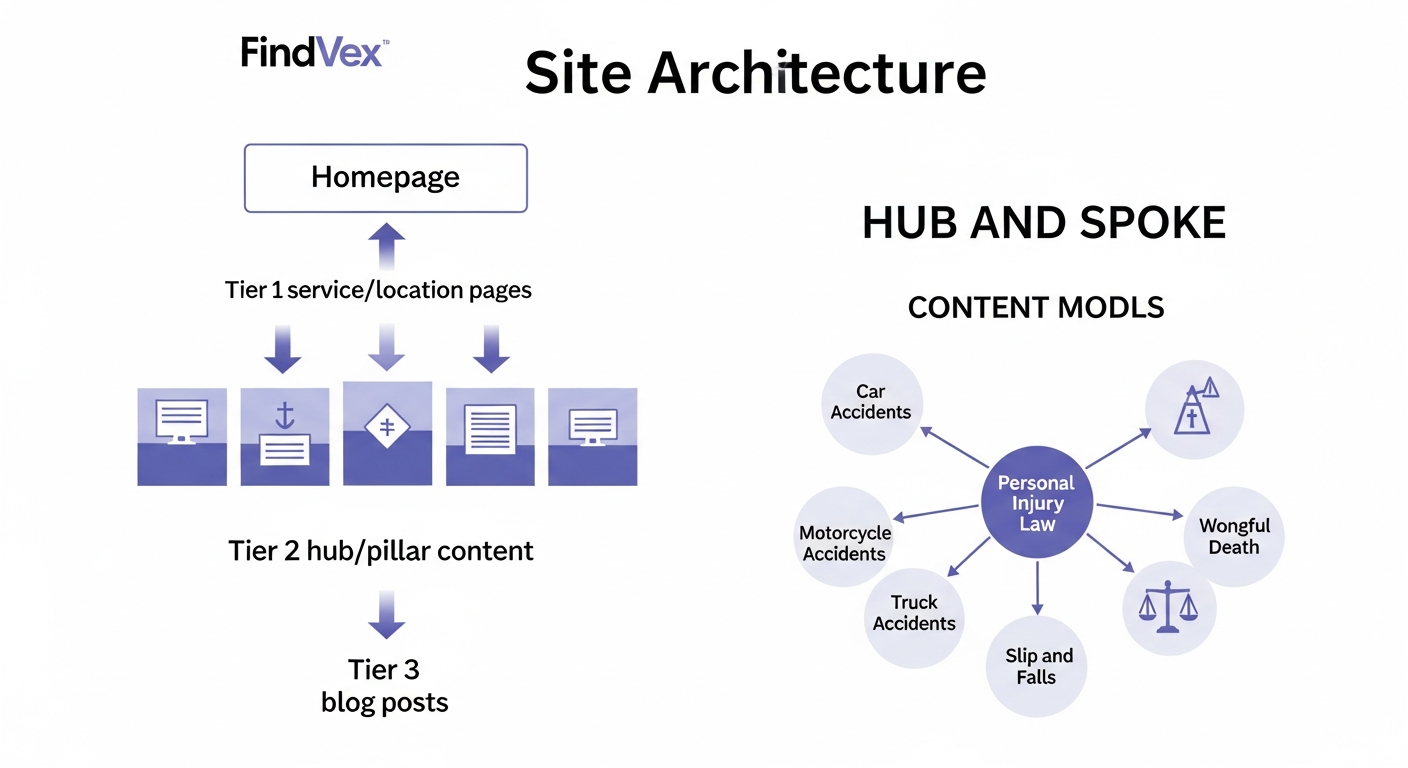
Before you can build an effective linking system, you need to understand your site's hierarchy. Most small business sites — whether they know it or not — operate across three tiers. Getting clear on this structure determines where every link should point.
This architecture also aligns directly with how Google's crawlers discover and evaluate your site. Pages that receive more internal links are crawled more frequently and treated as more authoritative within your domain.
- Tier 1 — Core commercial pages: Service pages, location pages, booking/contact pages. These are the pages that generate revenue. Examples: /plumbing-services/, /chicago-family-law-attorney/, /book-a-consultation/. Every site should have 3–8 of these depending on service breadth.
- Tier 2 — Supporting content: Category pages, pillar articles, comparison guides, and FAQ hubs. These explain your services, answer customer questions, and often earn backlinks from other sites. Examples: /what-is-an-hvac-tune-up/, /emergency-vs-scheduled-plumbing-repairs/.
- Tier 3 — Peripheral content: Individual blog posts, news updates, case studies, and supporting detail pages. These rarely rank for high-intent terms on their own, but they can pass authority up the chain.
Step 1: Identify Your 5 Most Important Pages Before Touching a Single Link
The single biggest mistake in internal linking is trying to link everything to everything. That dilutes the signal. You need a short, prioritized list of destination pages — the pages you want Google to see as the most authoritative on your site.
Run this exercise before you do anything else. Open Google Search Console and sort by clicks over the last 90 days. Then open your CRM or analytics and identify which landing pages produce actual leads or sales. The intersection of those two lists — pages that both Google already partially trusts and that convert — are your Tier 1 targets.
If you're starting fresh or Google Search Console is thin, pick your Tier 1 pages based on business logic: your primary service pages and your most important location pages. A plumber in Dallas should prioritize /dallas-plumber/ and /emergency-plumbing-dallas/ above anything else on the site.
- Use Google Search Console → Performance → Pages to see which URLs already receive impressions and clicks.
- Cross-reference with your CRM or contact form data to confirm which pages actually produce leads.
- Limit your primary target list to 3–7 pages. More than that and the signal gets diluted.
- Document these pages in a spreadsheet with their current URL, target keyword, and monthly search volume.
Step 2: Audit Your Existing Internal Links in 30 Minutes
Once you know your target pages, you need to see how many internal links currently point to each one. This audit will almost certainly reveal that your highest-value commercial pages are the most under-linked pages on your site.
The fastest free method: use Screaming Frog's free tier (up to 500 URLs) or Google Search Console's 'Links' report under the left sidebar. GSC shows you which internal pages link to which destination pages. Sort by your Tier 1 pages and count the inbound internal links for each.
What you're looking for: a pattern where blog posts and informational pages have accumulated many internal inbound links while service pages have very few. This is the authority leak. The content pages are absorbing crawl priority and PageRank that should be flowing downstream to pages that convert.
- In Google Search Console: go to Links → Internal links → sort to find your Tier 1 pages and see how many pages point to each.
- In Screaming Frog: crawl your site, export inlinks report, filter to your Tier 1 URLs, count the sources.
- Flag any Tier 1 page with fewer than 5 internal links as a priority fix.
- Flag any blog post or informational page with zero outbound links to Tier 1 pages as an opportunity.
Step 3: Choose Anchor Text That Signals Topical Relevance Without Over-Optimization
Anchor text — the clickable words in a link — tells Google what the destination page is about. For internal links, you have complete control over this, which makes it significantly more powerful than managing external anchor text.
The goal is descriptive and relevant, not keyword-stuffed. If you're linking to your Dallas emergency plumbing service page, good anchor text looks like 'our emergency plumbing service in Dallas' or 'Dallas emergency plumbers.' Bad anchor text is 'click here,' 'learn more,' or jamming the exact-match keyword into every single link on the site.
Google has been clear for years that it understands context around links — not just the anchor text itself. That means the paragraph surrounding your link also signals relevance. A link to your HVAC tune-up page in the middle of a paragraph about seasonal AC maintenance carries more weight than the same link placed randomly at the end of an unrelated post.
Vary your anchor text across different pages that link to the same destination. If 20 blog posts all use the exact same anchor text pointing to the same page, that looks unnatural — even for internal links.
- Use descriptive, specific anchor text: 'emergency plumbing in Dallas' not 'click here'.
- Vary anchor text across different source pages linking to the same destination.
- Ensure the surrounding paragraph is topically relevant to the destination page.
- Avoid over-stuffing the same exact-match keyword phrase in every link on the site.
The Hub-and-Spoke Model: How to Structure Links for Maximum Authority Flow
The most effective internal linking architecture for small business sites is the hub-and-spoke model. A hub page is a comprehensive, authoritative piece of content on a broad topic. Spoke pages are more specific articles or resources that support the hub. Spokes link up to the hub; the hub links down to spokes and across to Tier 1 commercial pages.
Here's a concrete example for a personal injury law firm. The hub page is a pillar article: 'Personal Injury Claims in Texas: What You Need to Know.' The spokes are specific articles like 'What to Do After a Car Accident in Houston,' 'How Long Do Personal Injury Cases Take in Texas,' and 'What Is Comparative Negligence?' Each spoke links back to the hub. The hub links to the firm's actual service page: /houston-personal-injury-attorney/.
This architecture does three things simultaneously: it establishes topical authority across a subject area, it concentrates internal link equity toward the hub, and the hub then passes that equity to the commercial page that drives consultations. It's a deliberate funnel — not random linking.
Our guide on technical SEO for small business covers how site architecture decisions like this interact with crawl efficiency and Google's ability to discover pages in the first place.
- Hub page: broad, comprehensive, answers the category-level question.
- Spoke pages: specific, detailed, each addresses a subtopic within the hub's theme.
- Each spoke links to the hub using relevant anchor text.
- The hub links to the relevant Tier 1 commercial page.
- Result: authority accumulates at the hub, then flows to the page that converts.
Crawl Depth: Why Pages Buried 4 Clicks Deep Almost Never Rank
Crawl depth — the number of clicks required to reach a page from your homepage — directly affects how much authority that page receives and how frequently Google crawls it. Pages reachable in 1–2 clicks from the homepage receive the most PageRank. Pages buried 4+ clicks deep receive very little and may be crawled infrequently or not at all.
For small business sites, the most common crawl depth problem isn't homepage structure — it's blog posts. A typical WordPress site will have blog posts accessible via the homepage → Blog → Category → Post. That's already 3 clicks. If the post also isn't linked from anywhere else on the site, it's effectively orphaned from an authority perspective.
The fix: create category or pillar pages that serve as hubs (reducing depth), and add contextual cross-links between blog posts and from blog posts to service pages. This shortens the crawl path to your most valuable content.
If crawl depth and indexation are ongoing issues on your site, the deeper diagnosis is covered in our crawl budget guide.
- Aim for all Tier 1 pages to be reachable within 2 clicks from the homepage.
- Aim for Tier 2 pages to be reachable within 3 clicks.
- Audit with Screaming Frog: filter by 'Crawl Depth' column, flag anything over 4.
- Create pillar/hub pages to reduce depth for important informational content.
- Add links from high-traffic or frequently-crawled pages to pages that need more crawl attention.
Orphan Pages: The Hidden Authority Sinkholes on Most Small Business Sites
An orphan page has no internal links pointing to it. It may exist in your sitemap, but if nothing on your site links to it, Google has no navigational path to discover it through crawling — and the page receives zero internal PageRank.
Orphan pages are more common than most site owners realize. They accumulate through blog migrations, site redesigns, deleted categories, or simply content that was published and forgotten. Service area pages are particularly prone to this — a business adds a new city page but never links to it from the main services page or from any relevant blog content.
The identification method: export your sitemap URLs into a spreadsheet. Run Screaming Frog or a similar crawler. Any URL in your sitemap that Screaming Frog finds zero inlinks for is an orphan. Prioritize fixing orphan pages that are Tier 1 targets first — those are active revenue leaks.
For more on how orphan pages interact with indexation problems, see our guide on diagnosing indexing issues.
- Export sitemap → compare against Screaming Frog inlinks report to find orphans.
- Prioritize: orphaned Tier 1 pages first, then orphaned Tier 2 content.
- Fix: add links from 2–3 relevant existing pages using descriptive anchor text.
- Ongoing prevention: add a step in your content publishing workflow that requires adding 2 internal links to every new page before it goes live.
The 5-Step Internal Linking Workflow You Can Run Every Quarter
Internal linking isn't a one-time project — it's a quarterly maintenance task that compounds in value over time. As you publish new content, new linking opportunities emerge. As your site grows, the authority hierarchy needs to be maintained deliberately.
The following workflow can be completed in 2–4 hours per quarter for a site with under 200 pages. For larger sites, focus each quarter on a specific section or service line rather than trying to audit everything at once.
- Step 1 — Refresh your Tier 1 page list: confirm your 3–7 highest-priority commercial pages are still the same. Business priorities shift; your link structure should reflect that.
- Step 2 — Run the orphan audit: compare your sitemap against your crawler's inlinks report. Fix any orphaned Tier 1 or Tier 2 pages before anything else.
- Step 3 — Scan new content for linking opportunities: for every piece of content published in the last quarter, check whether it links to at least one Tier 1 page with appropriate anchor text.
- Step 4 — Add retroactive links from existing content: search your site (using site:yourdomain.com 'keyword phrase' in Google, or your CMS search) for pages that mention topics related to your Tier 1 pages but don't currently link to them. Add contextual links.
- Step 5 — Review crawl depth: run a crawl depth report and flag any important pages that have drifted beyond 3 clicks. Add links from shallower pages to pull them back up.
Internal Linking in the AI Search Era: The Signal That Extends Beyond Google
The SEO value of internal linking extends beyond traditional Google rankings into AI-powered search. When AI models like ChatGPT, Perplexity, and Google's AI Overviews evaluate your site's content, they use semantic relationships between pages to understand what your site is authoritative about. A well-structured internal linking architecture reinforces those relationships.
Specifically: if your Tier 2 content consistently links to your service pages and uses contextually relevant language in those links, AI systems get clearer signals about the scope and depth of your expertise in a given area. It supports entity association — the process by which AI models connect your brand to a specific service category, location, or specialization.
This matters because AI Overviews and LLM citations tend to pull from sources that demonstrate clear topical authority, not just pages that happen to rank for a term. A coherent internal linking structure is one of the signals that supports that authority.
For a broader look at how your site architecture and content structure affect AI visibility, our guide on why AI search skips your content covers the technical diagnosis framework in detail.
5 Internal Linking Mistakes That Quietly Suppress Your Rankings
Most internal linking problems aren't dramatic — they're quiet. They don't cause error messages. They just bleed authority away from pages that should be ranking and leave your most important content under-supported.
- Mistake 1 — Linking only to the homepage: Using your brand name as anchor text in the navigation and footer to link to the homepage is fine — but if those are the only consistent internal links on your site, all authority flows to one page. Spread it to Tier 1 service pages too.
- Mistake 2 — Generic anchor text everywhere: 'Click here,' 'read more,' 'learn more' provide no topical signal. Every link is a missed opportunity to tell Google what the destination page is about.
- Mistake 3 — Reciprocal linking without purpose: Page A links to Page B, Page B links back to Page A, and neither links to a commercial page. Reciprocal links aren't inherently bad, but they create closed loops that don't route authority toward your most important pages.
- Mistake 4 — Over-linking a single page: A page with 50 outbound internal links dilutes the value of each link. If you're linking to 30 different pages from a single blog post, none of those links carries much weight. Be selective.
- Mistake 5 — Using tracking parameters in internal links: UTM parameters on internal links create duplicate URL versions that split authority and can confuse Google's canonical detection. This is a surprisingly common mistake — and one we've covered in full in our guide on tracking parameters in internal links.
Strategic Takeaway: Internal Linking Is a Revenue Architecture Decision
The way you structure internal links is fundamentally a decision about which pages your business is betting on. Every link is a vote. If your blog posts are voting for each other and your service pages have three links pointing at them, you've built an architecture that optimizes for content discovery and not for lead generation.
The businesses that get this right treat internal linking as part of their site's commercial architecture — not an SEO afterthought. They define their highest-value pages first, then build every other piece of content with the question: does this link contribute to my authority hierarchy, or am I just linking because linking exists?
For small business sites specifically, the return on fixing internal linking is high relative to the effort. You're not waiting for third-party backlinks. You're not dependent on an algorithm update. You're reorganizing signals you already control — and routing them toward pages that generate revenue.
If you want to see where your site's current technical SEO stands before diving into link architecture, running a proper technical SEO audit first will give you a complete picture of crawlability, indexation, and site structure issues that affect how well your internal links actually function.
Tools for Auditing and Managing Internal Links
You don't need an enterprise tool budget to run a solid internal linking audit. The following covers free and low-cost options appropriate for small business sites.
- Google Search Console (free): Links report → Internal links shows inbound internal link counts per page. Best for a quick check on whether your Tier 1 pages are being linked to.
- Screaming Frog SEO Spider (free up to 500 URLs, ~$260/year for unlimited): The most comprehensive option. Shows inlinks per page, crawl depth, orphan pages, and anchor text distribution. Worth the investment for sites with 100+ pages.
- Ahrefs Site Audit or Semrush Site Audit (paid): Both identify orphan pages, internal link distribution, and redirect chains automatically. Better for ongoing monitoring at larger sites.
- Sitebulb (paid, ~$180/year): Excellent crawl depth visualization. Particularly useful for understanding how authority flows through your site structure.
- Manual site search (free): Use Google's site: operator with a keyword to find existing pages that mention a topic but don't yet link to your target page. Fast for targeted retroactive linking.
FAQs
How many internal links should a page have?
There's no hard limit, but quality and relevance matter more than quantity. For most small business blog posts (800–2,000 words), 3–6 contextual internal links is a reasonable range. Avoid adding links just to hit a number. Every link should be relevant to the surrounding content and point to a page that genuinely helps the reader.
Do internal links pass PageRank the same way backlinks do?
Yes, but at a lower magnitude. Internal links distribute PageRank across your own site, helping Google understand which pages are most important and passing ranking authority from pages that have accumulated it externally to pages that need it. They don't create new authority — they redistribute what already exists.
Should I link to external sites from my internal content?
Linking to authoritative external sources (official data, government sites, industry standards) can add credibility to your content and may be factored into quality signals. The concern isn't external links themselves — it's linking to competitors unnecessarily or adding so many external links that you're routing users (and crawl signals) away from your own site prematurely. Keep external links purposeful and ensure they open in a new tab.
What is a silo structure and do I need one?
A silo structure is an internal linking approach where pages are grouped into isolated topic clusters, with links only connecting pages within the same silo. It was popular in the 2010s as a way to concentrate topical authority. In practice, strict siloing often creates navigation problems and limits the natural flow of authority. A hub-and-spoke model with cross-linking between related clusters is more practical for most small business sites and aligns better with how Google currently evaluates topical depth.
How often should I update my internal links?
A quarterly review is sufficient for most small business sites. Run the 5-step workflow outlined in this article each quarter: refresh your priority page list, fix orphans, check new content for outbound links to Tier 1 pages, add retroactive links from existing content, and verify crawl depth. Treat it as a standing calendar task, not a one-off project.
Can internal linking fix a page that isn't ranking despite good content?
Sometimes. If a page has strong content but few internal links pointing to it, increasing internal link equity can meaningfully improve its rankings — especially on competitive but not extreme-difficulty keywords. It's one of the first things to check when a page is underperforming. That said, internal linking is one of several factors; thin content, weak backlink profile, and technical issues can all limit a page's ceiling even with excellent internal linking.
Does the position of a link on the page matter?
Yes. Links placed higher in the main body content are generally treated as more significant than links in sidebars, footers, or navigation menus. Google's documentation has historically confirmed that link position within the page content affects how link signals are weighted. Contextual links embedded naturally in relevant paragraphs carry more signal than the same link placed in a boilerplate footer section.
Research notes
Background claims used while researching this article. Verify with the cited authorities before quoting.
- Google's documentation or statements confirming that link position within page content affects how link signals are weighted
- Specific PageRank distribution mechanics for internal links
Alex Rivera
CEO & Editorial Strategist · Findvex
Alex Rivera leads editorial strategy at Findvex. He sets the weekly content plan, picks topical pillars, and decides what to publish — and what to skip — based on search intent, competitive data, and what genuinely helps US small businesses rank.
Expertise: Editorial strategy · Topical authority · Content prioritisation · Pillar planning
Related reads
Technical SEO for Small Business: The 7 Foundations That Determine Whether Google Can Rank Your Site
Technical SEO is the infrastructure layer of your search presence. If Google can't crawl, render, and index your pages correctly, no amount of content or link building will move the needle. This guide covers the seven foundations that matter most for small business websites—and the order in which to fix them.
Strategic Technical SEOHreflang Is Not for You: Why US-Only Small Businesses Don't Need It (And What to Do Instead)
If your small business only serves US customers in English, hreflang tags are not on your to-do list. This article explains what hreflang actually does, which businesses genuinely need it, and what technical SEO work actually moves the needle for a US-only site.
Strategic Technical SEOStructured Data Testing: How to Validate Schema Markup Before and After You Deploy It
Deploying schema markup without testing it first is one of the most common technical SEO mistakes on small business sites. This guide walks through the exact validation workflow — pre-deployment, post-deployment, and ongoing monitoring — so errors never quietly kill your rich result eligibility.