Tracking Parameters in Internal Links Are Hurting Your SEO — Here's How to Fix Them
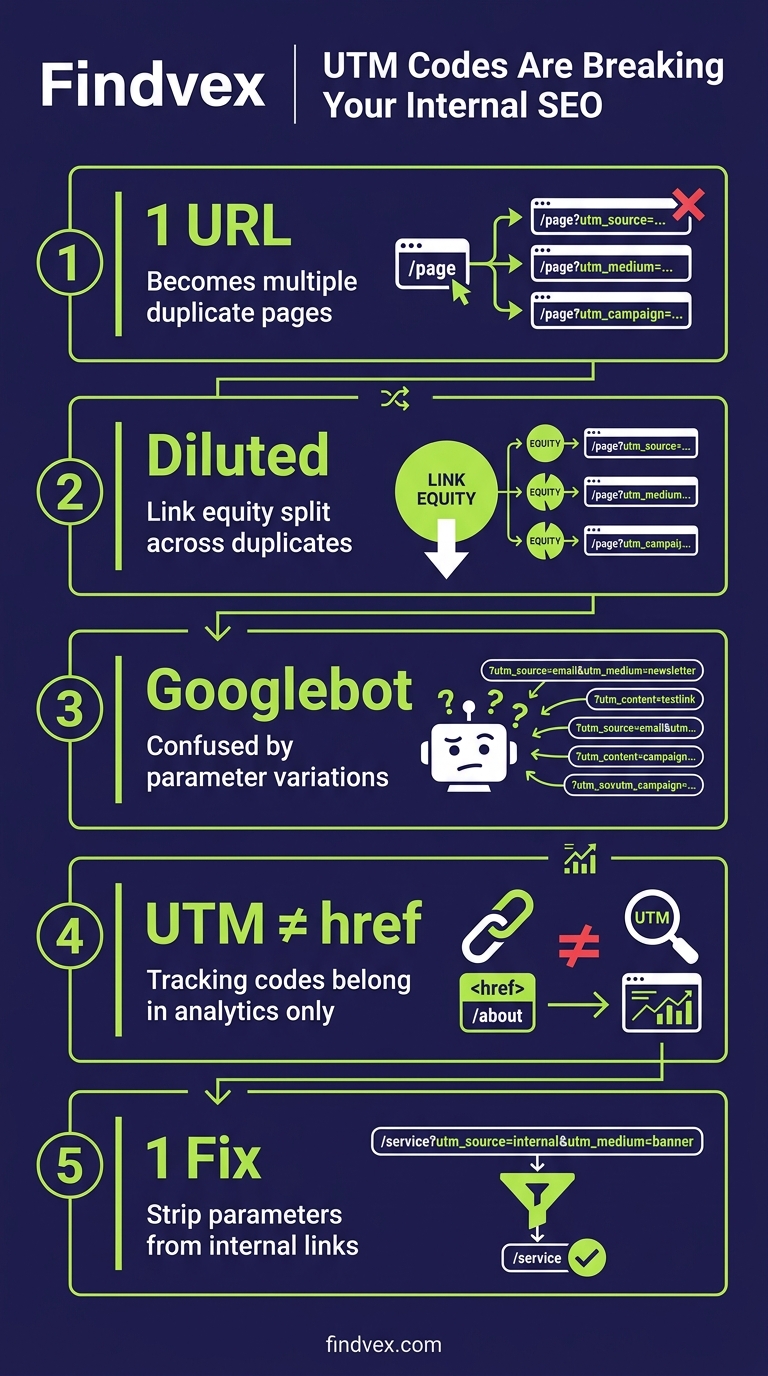
Tracking parameters like UTM codes belong in your analytics tool, not in your internal links. When they end up in internal hrefs, they create duplicate page versions, confuse Googlebot, and dilute the link equity passing through your site. Here's the technical breakdown and a practical fix.
Quick answer
Tracking parameters (like ?utm_source=email) on internal links force Google to crawl multiple versions of the same page, splitting link equity and wasting crawl budget. The fix: strip parameters from all internal href attributes and let your analytics platform capture them server-side or via JavaScript events instead. Check Google Search Console's 'Pages' report for parameter-generated duplicates.
The Short Version: Parameters Belong in Analytics, Not in Your HTML
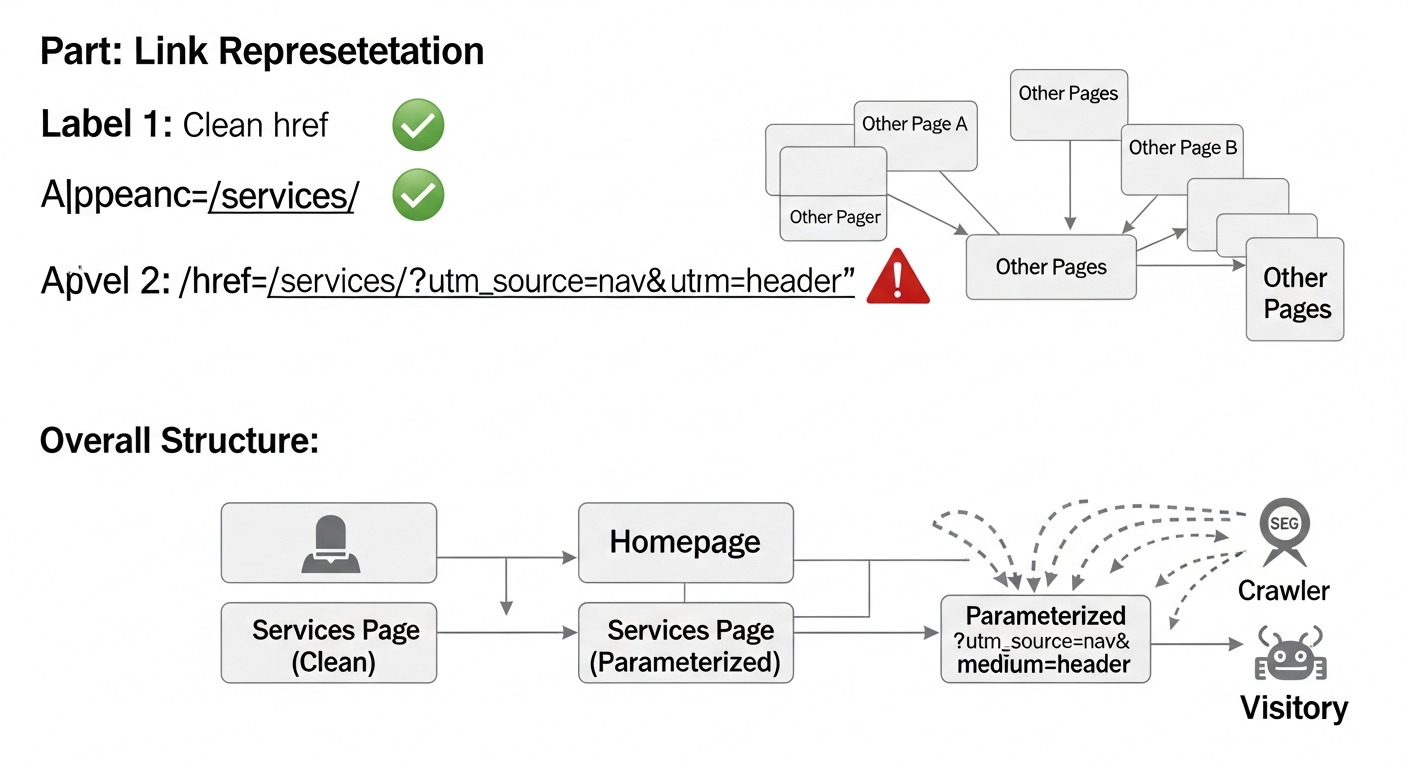
When a developer or marketer adds a UTM tag to an internal link — say, changing <a href="/services/"> to <a href="/services/?utm_source=homepage&utm_medium=cta"> — that parameterized URL becomes a distinct address in Google's eyes. Googlebot can crawl it, index it, and treat it as a separate page from /services/. In practice, this means your site may be generating dozens or hundreds of near-duplicate URLs that compete with the clean canonical versions you actually want to rank.
This isn't a theoretical risk. It's a practical crawl and indexing problem that shows up consistently in audits for sites of all sizes — and it's especially damaging for smaller sites where crawl budget and link equity are already limited resources.
The source of this issue was highlighted by Search Engine Land (April 2026): parameterized internal links bloat crawl paths, fragment attribution data, and dilute the PageRank flow through your site's internal link graph. The fix is cleanly architectural, not a workaround.
Symptoms: How This Shows Up in Real Sites
This problem is easy to miss because everything looks functional on the surface. Pages load, analytics fires, conversions record. But underneath, Google is doing extra work — and your pages are paying for it.
- Google Search Console shows more 'indexed' or 'crawled but not indexed' URLs than you expect, many with query strings you recognize as tracking parameters
- The Pages report in GSC lists parameterized variants of your core pages (e.g., /contact/?utm_campaign=nav) as separate discovered URLs
- Site crawlers (Screaming Frog, Sitebulb) reveal hundreds of parameterized internal links pointing to what should be the same destination
- Analytics shows clean URLs and parameterized URLs both receiving traffic, making attribution messy
- Canonical tags are either absent on parameterized versions or self-referencing the wrong URL
“AI agents do in hours what teams used to do in weeks. The advantage compounds.”
Root Causes: Where Tracking Parameters End Up in Internal Links
There are three common entry points. Understanding which one applies to your site determines the fix.
- Email or campaign templates copied into site navigation: A marketer builds a tracked link for an email (/pricing/?utm_source=email), then pastes the same URL into a site-wide nav element or footer CTA — now every page on the site links to a parameterized version
- CMS or page builder automations: Some CMS platforms and A/B testing tools automatically append session identifiers or test variant parameters to internal links during rendering
- Tag manager misfires: A GTM trigger or auto-link decorator meant for outbound links is applied too broadly and starts rewriting internal hrefs on the fly
- Developer shortcuts during migrations: Parameters added during a site rebuild to track traffic sources are left in the HTML long after the campaign ends
Why Google Treats Parameterized URLs as Separate Pages
Google's crawler does not automatically know that /services/?utm_source=homepage is the same page as /services/. It sees a different URL. It may or may not follow the canonical tag. It will consume crawl budget fetching that variant. And if multiple internal links point to the parameterized version rather than the clean version, the internal PageRank signal flows to the parameter URL, not the canonical.
Canonicalization is your safety net here — but only a partial one. If Googlebot consistently sees more internal links pointing to the parameterized variant than to the clean URL, it may decide the parameterized version is the 'preferred' URL and override your canonical. This is the Google-selected canonical vs. user-selected canonical mismatch that shows up in GSC's Indexing report.
For sites with hundreds of pages and active marketing campaigns, this can mean Googlebot is spending a significant portion of its crawl allocation on URLs that will never rank — and the pages that should rank are receiving diluted internal authority.
Diagnosis Checklist: Do You Have This Problem?
Work through these steps before touching any code. Understand the scope first.
- ☐ Run a full site crawl in Screaming Frog or Sitebulb — filter internal links by URLs containing '?' and export the list
- ☐ Sort by parameter type: separate UTM parameters (marketing tracking) from functional parameters (session IDs, pagination, filters) — the fix differs
- ☐ In Google Search Console → Pages report → filter by 'Crawled - currently not indexed' and 'Duplicate without user-selected canonical' — look for parameter variants in these lists
- ☐ In GSC → Settings → Crawl Stats — if crawled URLs are disproportionately high vs. your actual page count, parameterization is often the cause
- ☐ Use the URL Inspection tool on a clean URL (e.g., /services/) — check whether GSC reports it as the Google-selected canonical or whether a parameterized version has been chosen instead
- ☐ Review your GTM container for any 'Click URL' variables or link decoration triggers that may be modifying internal hrefs
- ☐ Check your CMS template files and footer/nav partials for any hardcoded parameterized links
What to Check in Google Search Console
GSC gives you direct visibility into how Google is interpreting your URL space. These are the specific reports to review:
- Pages report (Indexing → Pages): Look at the 'Not indexed' reasons. 'Duplicate without user-selected canonical' and 'Alternate page with proper canonical tag' both suggest parameterized variants are being discovered and processed
- URL Inspection tool: Enter your most-linked internal pages (homepage, services, contact) and check the 'Google-selected canonical' field — it should match the clean URL exactly
- Crawl Stats (Settings → Crawl stats): A high crawled-page count relative to your actual page count is a signal worth investigating; download the crawl stats and look at the breakdown of crawled URLs
- Sitemap coverage: If your XML sitemap is clean (no parameters) but GSC is discovering parameterized URLs anyway, that's confirmation they're coming from internal links, not the sitemap
- Performance report: Filter by page and look for parameterized URL versions appearing as distinct entries — any impressions or clicks going to parameter URLs instead of canonical URLs is link equity and traffic fragmentation in action
How to Fix Tracking Parameters in Internal Links
There's a clean hierarchy of fixes. Start with the most impactful and work down. Not all of these require developer involvement — but some do, and those should be handed off properly.
- Fix 1 — Remove parameters from internal href attributes (HIGH IMPACT, LOW RISK): The source-of-truth fix. Any internal link in your HTML, CMS, or template should point to the clean canonical URL. /services/ not /services/?utm_source=nav. A developer or CMS admin can audit and clean these systematically using the crawl export from the diagnosis step. Risk: negligible — you're removing unnecessary parameters, not changing destinations.
- Fix 2 — Switch to server-side or GA4 event-based tracking for internal attribution (HIGH IMPACT, MEDIUM EFFORT): Instead of appending UTM parameters to internal links, use GA4's automatic enhanced measurement or configure custom events on click. This tracks the user journey without polluting URLs. If you need campaign attribution for internal promotions, configure it as a custom dimension in GA4 rather than a URL parameter. Risk: low, but requires coordination between your analytics and development teams.
- Fix 3 — Audit and tighten GTM triggers (MEDIUM IMPACT, LOW RISK): If a Google Tag Manager trigger is auto-appending parameters to links, narrow its scope to external URLs only. In GTM, link decoration or click triggers can be filtered by checking whether the destination domain matches your own — if it does, exclude it. Risk: low, but test in GTM preview mode before publishing.
- Fix 4 — Add canonical tags to parameterized versions as a backstop (LOW-MEDIUM IMPACT, LOW RISK): If you cannot immediately remove parameters from all internal links, ensure every parameterized URL variant returns a canonical pointing to the clean URL. This is a mitigation, not a solution — Google may still crawl the variant and consume budget. But it prevents indexing and canonical mismatch. Risk: very low, but do not treat this as permanent.
- Fix 5 — Use robots.txt to block parameter patterns only if crawl budget is severely impacted (LOW RISK IF SCOPED CORRECTLY): You can disallow specific parameter patterns (e.g., Disallow: /*?utm_*) in robots.txt to prevent Googlebot from crawling parameter variants. Caution: this prevents crawling, not indexing — if parameterized URLs are already indexed, blocking them in robots.txt alone will not remove them from the index. Pair with canonical tags or a redirect strategy. Risk: medium if applied incorrectly — test thoroughly before deploying.
Developer Handoff Notes
If you're a business owner passing this to your developer or web agency, here's exactly what to ask for:
- Crawl export task: Run Screaming Frog against the site, export all internal links where the destination URL contains a query string ('?'). Return a CSV with source page, destination URL, and link text.
- Template audit: Review all CMS templates, navigation partials, footer files, and widget configurations for hardcoded parameterized URLs. Replace with clean paths.
- GTM audit: Open the GTM container and identify any triggers using 'Click URL' variables or auto-link decorators. Confirm they exclude same-domain destinations.
- GA4 event migration: For any tracking currently achieved via UTM parameters on internal links, propose equivalent GA4 event tracking (custom events or enhanced measurement) that does not modify the destination URL.
- Canonical audit: Using the URL Inspection API or a crawl tool, confirm that Google's selected canonical for key pages matches the intended canonical — flag any mismatches.
- Estimated effort: For a site under 500 pages with a single CMS, template cleanup and GTM adjustment is typically 2–4 hours of developer time. Canonical auditing and GA4 event reconfiguration adds another 2–4 hours depending on complexity.
Which Sites Are Most at Risk
This is not exclusively a large-site problem. In fact, small business sites are often more vulnerable because they have less crawl budget to absorb waste, and marketing teams operate independently from developers, creating gaps where parameterized links slip through unnoticed.
Sites particularly at risk include those running active email marketing (where tracked URLs get repurposed), those that have recently migrated platforms (where old parameter patterns persist), and any site using A/B testing tools or personalization platforms that rewrite URLs client-side.
Shopify stores, in particular, are prone to this — campaign links built for email get pasted into navigation blocks without stripping parameters. If you're running a Shopify store, this is one item worth checking specifically in the context of your broader technical SEO setup.
The Broader Principle: Clean URL Architecture Protects Link Equity
Tracking parameters in internal links are a specific instance of a broader architectural discipline: every internal link should point to the canonical version of the destination page. No exceptions. This is the same logic that governs how you handle trailing slashes, www vs. non-www, and HTTP vs. HTTPS — consistency in internal linking preserves the PageRank signal flowing through your site.
When you run a proper technical SEO audit, internal link hygiene — including parameter cleanup — is one of the first things to verify before moving on to content or authority work. There's no value in building links to pages whose internal equity is being scattered across parameterized variants.
A complete technical audit covers this alongside crawlability, indexing, Core Web Vitals, and schema — if you haven't run one recently, the systematic approach is worth doing end-to-end.
FAQs
Do UTM parameters on internal links actually affect Google rankings?
Not directly in a simple cause-and-effect way, but they create conditions that do affect rankings: they fragment internal link equity between clean and parameterized versions of the same URL, they consume crawl budget on non-ranking variants, and they can trigger canonical mismatches where Google chooses the parameterized version as the 'preferred' URL. The cumulative effect is that your target pages receive less internal authority than they should.
Can't I just add canonical tags to the parameterized URLs and call it done?
Canonical tags are a mitigation, not a fix. Google treats them as hints, not directives. If your internal links consistently point to the parameterized version, Google may decide that version is the 'real' page and override your canonical. The correct fix is to remove parameters from internal link href attributes so they never appear in the URL in the first place.
How do I track internal campaigns in GA4 without UTM parameters?
GA4's enhanced measurement captures page views and navigation events automatically. For more specific internal campaign tracking, configure custom click events via Google Tag Manager that fire on specific element clicks and pass campaign metadata as event parameters or custom dimensions — without modifying the destination URL. This approach keeps your URL space clean while preserving attribution data.
Will Google remove already-indexed parameterized URLs if I fix the internal links?
Removing internal links to parameterized URLs reduces Googlebot's ability to discover and re-crawl them. Combined with canonical tags pointing to the clean URL, parameterized versions will typically drop out of the index over time as Google re-evaluates them. The timeline varies but is generally weeks to a few months for smaller sites. You can also request removal via the URL Removal tool in GSC for urgent cases, but this is rarely necessary.
How do I find all parameterized internal links on my site quickly?
Run a crawl with Screaming Frog (free up to 500 URLs) or Sitebulb, then export the internal links report. Filter the 'Destination' column for URLs containing '?' — this gives you every internal link pointing to a parameterized URL. Sort by parameter type to separate tracking parameters (utm_*, gclid, fbclid) from functional ones (pagination, filters) since the fix differs.
Is this different from URL parameters used for filtering or pagination?
Yes, and the distinction matters. Pagination parameters (?page=2) and filter parameters (?color=red) serve functional navigation purposes and require different handling — often rel=canonical back to the base page or a deliberate indexing decision. Tracking parameters (UTM, fbclid, gclid) serve zero functional purpose in internal links and should simply be removed from internal hrefs entirely.
Sources & Citations
- https://searchengineland.com/tracking-parameters-internal-links-seo-475815 — Primary source for this news item — article should link to this as the attributed origin of the reported issue
Marcus Chen
Writing about AI, search, and what actually moves the needle for US small businesses.
Related reads
OpenAI Crawl Activity Tripled Since GPT-5: What It Means for Your Website
OpenAI's crawl activity roughly tripled following the GPT-5 launch, with OAI-SearchBot overtaking GPTBot in log-file events. If you haven't audited your robots.txt or server logs for AI crawler behavior recently, now is the time.
seo-newsThe AI Crawler Protection Paradox: Why Brands Block Bots Then Pay to Be Seen
Businesses are simultaneously blocking AI crawlers from scraping their content and paying to appear in AI-generated answers. That contradiction has a name: the protection paradox. Here's what it means technically, and what small businesses should actually do about it.
industry-seo-playbooksReal Estate SEO: A Practical Guide for Small Businesses
Real estate SEO helps agents, brokerages, and property managers rank in local Google searches so buyers and sellers find them first. This guide covers everything from Google Business Profile to IDX optimization and neighborhood content—practical steps you can start this week.