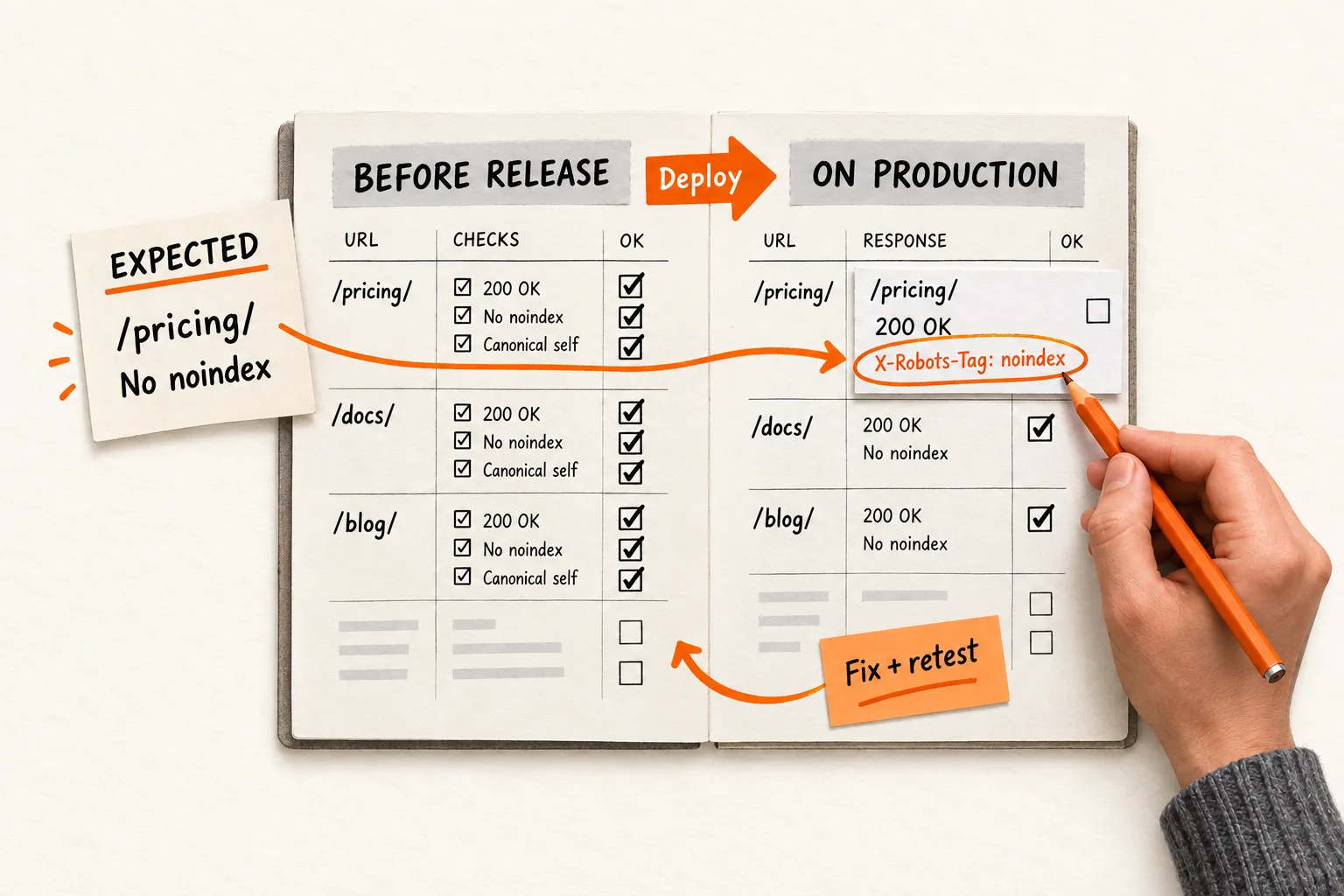
Your pricing page can look correct in a browser while its response header tells Google not to index it. A routing change can leave an old product URL without its intended redirect. A visual review alone can miss both problems.
SEO regression testing checks whether a release preserves the search-related behavior your site needs. Start with representative URLs, write down what each should return, and assign someone to investigate failures. Run the checks before deployment and again on the public production site.
The aim is to catch unintended changes while the release is easy to investigate. Passing these checks does not guarantee indexing, rankings, or traffic.
Choose URLs that cover the changed templates and routes
Start with a manageable sample, perhaps eight to twelve URLs. Treat that number as a starting suggestion, not a coverage standard. Include pages with different templates and routing rules:
- Your homepage and pricing page.
- A product or use-case page that matters to acquisition.
- A blog article and a public documentation page.
- An older URL with an intentional redirect.
- A duplicate or parameterized URL with a defined canonical destination.
- A nonexistent URL that should return an error.
- A page intentionally excluded from search, if your site has one.
Include a representative from every template touched by the release. If you are changing documentation routing, a homepage check tells you little about the affected section.
Record what each URL should do before collecting results. Comparing releases can reveal a change, but it can also carry an existing mistake forward. Review the expected behavior separately from the previous response.
If you are still deciding which public pages to build, start with your first 30 days of SEO for an AI SaaS. Use this checklist for the pages you have chosen to maintain.
Define five checks with explicit expected results
1. Check crawl access through robots.txt
Fetch the production robots.txt file and check whether the rules applicable to Googlebot allow each intended public page. Review changed directory rules and access to resources the page needs.
Test access for each sampled URL. A robots.txt file can contain deliberate exclusions and still allow all the public pages in your sample.
Robots.txt controls crawling. Google says a blocked URL can still appear in search results if it is discovered through links, so a crawl restriction does not establish that a page is excluded from search. Google’s robots.txt introduction.
2. Inspect indexing directives in headers and HTML
For pages intended for search, inspect both HTTP response headers and HTML robots directives. Flag an unexpected noindex, including one aimed specifically at Googlebot. For deliberately excluded pages, verify that the intended exclusion remains in place.
Google supports noindex through a robots meta tag or an X-Robots-Tag response header. It must be able to crawl the page to discover the instruction. Blocking the page in robots.txt prevents Google from reading that rule. Google’s noindex documentation.
A hosting rule can add an indexing restriction without changing anything visible on the page. Save the relevant header or tag in the failure report so the release owner can locate the problem.
3. Verify status codes and content together
Request each page with GET and capture its status, headers, and body. Inspect the original response before following redirects, then check the final response separately.
Set the expected status by URL: 200 for an ordinary public landing page, 404 or 410 for an intentionally missing page, or the specified redirect status for a moved page.
Also verify that the expected content exists. A branded error screen or empty page can return 200. Google documents that error-like content with a successful status can produce a soft 404, and that a successful response does not guarantee indexing. Google’s HTTP status guidance.
Choose a stable content check, such as a product heading or documentation section. Comparing every byte of HTML creates noise when harmless timestamps or generated asset names change.
4. Compare canonicals with the intended destination
Record the expected canonical URL for each sampled page where your site specifies one. Check the exact scheme, hostname, and path. Look for preview hostnames, unrelated destinations, and conflicting declarations.
For a parameterized copy, a canonical pointing to the clean URL may be intentional. Write that destination into the expectation instead of requiring every URL to reference itself.
Google treats canonical annotations as a strong preference signal and recommends absolute URLs and consistent signals. Your test verifies what your site declares; Google may select a different canonical. Google’s canonicalization guidance.
5. Follow old URLs to their final destinations
For each sampled redirect, specify the expected first status and destination. Follow the chain and confirm that it reaches the intended page without a loop or an unexpected extra hop.
A redirect to the homepage should fail if the approved destination is a replacement product page, even when the homepage loads successfully.
Choose the redirect type that matches the move. Google recommends permanent server-side redirects where possible for permanent URL changes; 301 and 308 indicate permanent moves. Google’s redirect documentation.
Run checks before release and again on production
Before deployment, test the release candidate using expectations appropriate to that environment. A preview site may intentionally require authentication or carry noindex. Keep those protections in place and record how its expected behavior differs from production.
Separate the hostname you test from the canonical hostname you expect. A preview page can legitimately declare a production canonical. Review the production robots configuration intended for release without assuming that the preview host should use the same rules.
After deployment, rerun the checks against the public hostname without an existing login session. This can reveal differences introduced by production configuration, redirects, or delivery infrastructure that the preview tests did not exercise.
Use HTTP checks for statuses and headers, plus a browser check where rendering affects the content you need to inspect. Save the release identifier, check time, requested URL, redirect chain, relevant headers, and observed result. Each failure should show the expected and actual behavior.
Decide how to handle failures before release. An unexpected noindex on pricing, a broken public template, or a redirect loop should stop further rollout while the owner investigates. Record planned changes to expectations so they do not become false alarms. Treat a timeout as unresolved: allow a bounded retry, then assign a persistent failure to someone.
Worked example: catch a header error after a documentation move
Suppose a two-person AI SaaS team moves its public help pages from /help/ to /docs/ and changes a shared hosting configuration. This is a hypothetical example. The team’s illustrative production hostname is https://example.com.
The team records these production expectations:
| URL path | Expected behavior |
|---|---|
/pricing/ |
200; Googlebot allowed by robots.txt; no noindex in applicable headers or meta tags |
/help/connect-calendar/ |
301 directly to https://example.com/docs/connect-calendar/ |
/docs/connect-calendar/ |
200; heading contains “Connect your calendar”; canonical is https://example.com/docs/connect-calendar/ |
/docs/not-a-real-page/ |
404 |
The preview checks confirm the new documentation content and redirect mapping. Immediately after deployment, the production check finds that pricing returns 200 with X-Robots-Tag: noindex.
The page looks normal, and a test of the status alone would pass. The indexing check fails. Investigation reveals that a header rule intended for preview was applied to production.
The release owner corrects the rule using the team’s recovery procedure, then reruns the entire sample to check for other effects of the configuration change. The owner saves the failed and corrected responses and adds a test for the rule’s environment scope.
The example shows how to detect and verify a configuration error. Whether Google encountered the bad response, or whether search traffic changed, would require separate evidence.
Separate release verification from Google’s later view
Your checks show what the site returned at the time of the test. Search Console provides additional evidence, but its indexed information and live test answer different questions.
The live URL Inspection test can assess whether Google can access a page for indexing. It cannot predict Google’s selected canonical or guarantee search appearance. Use the indexed information to examine the Google-selected canonical and compare it with your current declaration. Search Console’s URL Inspection guide.
A small URL sample leaves gaps. Broaden testing when changing shared templates, routing, or sitewide configuration. Run a wider crawl periodically and after major structural changes. Add a regression case whenever an incident exposes a failure your sample missed.
Copy this checklist into your next release ticket
Use one release record and repeat the URL block for each page in your sample. Write “not applicable” where a check does not apply, with a brief reason.
Release identifier:
Release owner:
Changed templates, routes, and configuration:
Approved changes to previous expectations:

URL record
Requested URL and environment:
Expected Googlebot access under robots.txt:
Expected indexing directives in headers and HTML:
Expected initial status:
Expected redirect destination, chain, and final status:
Expected content:
Expected canonical URL, if specified:
Preview check time, actual results, and evidence:
Production check time, actual results, and evidence:
Result: pass / fail / unresolved
Failure owner and next action:

Release decision
Unresolved failures:
Recovery action, if needed:
Results after rerunning the sample:
Intentional exceptions, reasons, and owners:
Follow-up inspection or broader crawl needed:
Before closing the ticket, compare the recorded results with the expectations for crawl access, indexing directives, statuses, content, canonicals, and redirects. Resolve failures or document the release owner’s decision about each exception.
For your next release, choose the URLs and fill in the expected outcomes before deployment. Run the checklist manually once. Automate the repeatable checks after confirming that they detect the failures you care about.


