Suppose a new user wants to turn a document into a usable summary. Before they can upload it, your onboarding asks them to name a workspace, upload a logo, invite colleagues, connect an integration, and choose notification settings. Each request may have a purpose. Does it need to happen before the user can try the product?
A SaaS onboarding friction audit starts with one audience and one useful outcome. Walk through the path, classify each requirement as required now, deferrable, or removable, then test whether the revised sequence helps more users reach that outcome. Keep a reason for every requirement that remains.
Define the result before counting the steps
Describe what the user should accomplish in their first successful session. Make the outcome specific enough that someone watching could tell whether it happened.
For a hypothetical AI document tool, the outcome could be a saved summary of the user’s own document, reviewed against its supporting passages. Account creation and a generated preview are earlier milestones; neither establishes that the summary is usable.
Choose an outcome connected to why this audience came to the product. A solo founder evaluating a reporting tool may need one credible report. An operations administrator may need to confirm the team’s permissions before importing anything.
Check your definition with a few recent users. Ask what they came to do, what would have made the session worthwhile, and where they needed help. Keep their words separate from your interpretation. A report of difficulty finding the import button supports investigating navigation. It does not establish how common the problem is.
Treat the event you choose as a working indicator of value. Later, check whether people who reach it return to perform meaningful work. An easy event can still be a poor definition of activation.
Walk through the path with an empty account
Use a fresh account without saved settings, existing data, or administrator shortcuts. Follow the route a new user sees, including email verification, loading states, errors, and transitions between devices.
Record what each step asks the user to do and what they need beforehand. A field that takes five seconds to fill out can cause a much longer delay if the answer requires a colleague’s approval.
Separate interaction time, such as reading and correcting errors, from system time spent uploading or processing. Record external waiting separately: finding data, obtaining access, or waiting for another person. A clearer label may reduce hesitation, but a missing permission or slow import needs a different remedy.
Watch someone from the intended audience attempt the same task without coaching. Record behavior and explanation separately. A pause at integration setup is observable; attributing it to distrust of the permission request requires evidence from the user.
Give every requirement a dependency test
For each step, ask: What specifically fails if the user skips this before the first useful result?
A segmentation field may serve a business preference without being necessary for the user’s task. The GOV.UK Design System recommends knowing why each question is being asked, requesting only needed information, and labeling optional fields. Use that principle to examine setup questions. GOV.UK question-page guidance
| Classification | Decision rule | Action |
|---|---|---|
| Required now | Skipping it prevents a valid result or necessary protection | Keep it and explain why |
| Deferrable | It matters for a later task | Request it when that task begins |
| Removable | It serves no demonstrated purpose | Remove it from the flow |
Required steps deserve scrutiny too. Keep necessary authorization before accessing private data and a review before sending information outside the workspace. Then examine whether those steps are clear and easy to complete.
Give every deferred request a trigger. Ask for a teammate’s email when the user chooses to share, or a recurring schedule when they decide to repeat a report. Record where the request moves and how users will find it.
Progressive disclosure makes important options available first and exposes specialized options on request. Nielsen Norman Group emphasizes that the route to secondary options must remain clear. Apply that principle when moving settings out of onboarding. NN/G on progressive disclosure
A default can also replace a decision. Inspect its consequences: a report name is easy to change, while a setting that shares documents publicly affects who can access the user’s work.
Worked example: simplify an AI summary tool’s setup
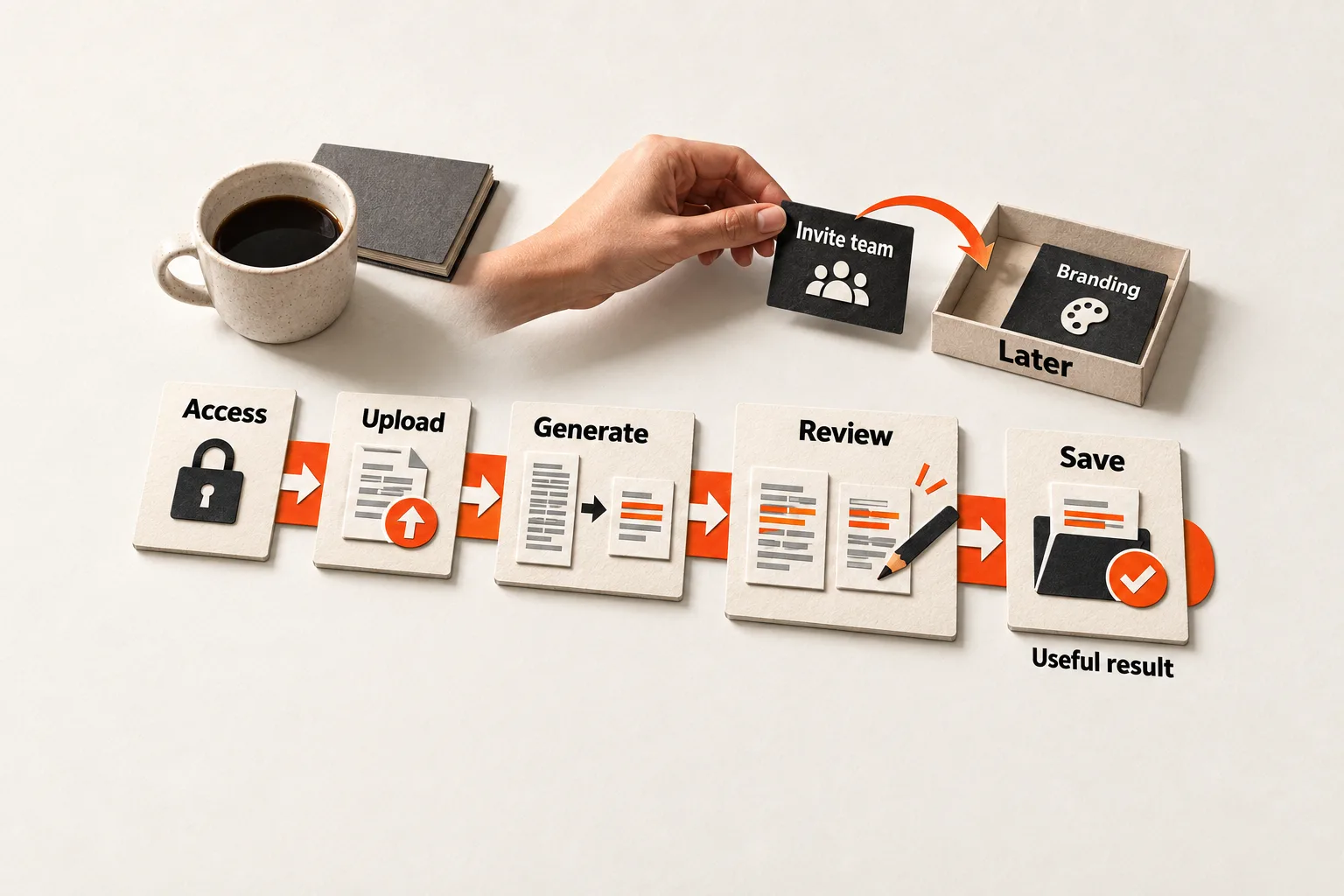
Consider the hypothetical document tool from the opening. It supports direct upload as well as a cloud-storage connection. Its first useful result is a saved summary of the user’s own document after they review its supporting passages.
| Current requirement | Decision | Reason or later location |
|---|---|---|
| Account access | Keep | This example stores documents and summaries in a private account |
| Workspace branding | Defer | Make it available in appearance settings |
| Team invitations | Defer | Ask when the user first chooses to share |
| Cloud-storage connection | Make optional | Offer direct upload alongside it |
| Notification preferences | Defer | Ask when the user enables a recurring task |
| Upload, generation, source review, and saving | Keep | These steps produce the defined outcome |
The proposed path is account access → direct upload → generate → review → save. Test direct upload with the intended users and document sizes. If their documents are available only through a controlled storage integration, that connection may remain required.
A sample document could help someone explore before locating a real file. Label it clearly and track that experience separately from work with the user’s own material.
The hypothesis is that moving optional setup will help more eligible users reach a reviewed, saved summary without reducing its usefulness. This example provides a proposed flow, not measured conversion results.
Measure completion and elapsed time together
Choose a start event that stays consistent across versions, such as the beginning of signup. Decide whether you are measuring users or workspaces, then record the first qualifying outcome for each. For collaborative software, count invited members separately only if individual activation is the question you are studying.
Define who qualifies for the comparison before collecting results, and use the same eligibility rules for both versions. Keep starters who abandon setup in the denominator.
Set an observation window long enough for the intended task, including unavoidable external waiting. Compare groups only after each starter has had the full window to finish.
Report two measures together:
- Outcome reach: eligible starters who achieve the defined outcome within the window, divided by all eligible starters.
- Elapsed time among completers: time from the fixed start event to the first qualifying outcome. Report the median with the number of completers.
A shorter median can hide a worse experience if slower users stop completing. Show reach alongside timing, including the count that did not reach the outcome within the window.
Check your analytics tool’s definitions. Amplitude’s Time to Convert percentages use converted users as their denominator, and its conversion window limits which completions count. Match those settings to your planned comparison. Amplitude funnel interpretation documentation
Record the onboarding version, audience segment, and whether the result used sample or customer data. Track result quality too, such as failed outputs or summaries rejected during review. A save event alone cannot establish that a summary was useful; check the quality condition through observation or user feedback. Keep later repeat use and paid conversion separate from first-session success.
Test one change you can explain
Start with a step that has a weak dependency on the first outcome and evidence of delay or abandonment. Move it, then verify the revised path yourself before exposing it to users. Check that deferred settings are still accessible and that the start and completion events record correctly.
If traffic supports a useful randomized comparison, keep each user or workspace assigned to a consistent version. With a small user base, combine observed sessions with a cautious before-and-after comparison. Record differences in acquisition source, user needs, and other product changes that could explain the result. A few successful sessions can reveal usability improvements without establishing a reliable conversion lift.
If a necessary step still causes trouble, use targeted help. The guide to sending a short help video when a SaaS user gets stuck explains how to support a specific unfinished task. Keep an owner responsible for fixing the underlying problem even when assistance helps users proceed.
Copy the worksheet and choose one step to change
Complete this worksheet for one audience and one first outcome. Duplicate the step fields for each requirement you examine.
Audience and task:
First useful result:
Quality condition and how it will be checked:

Measurement unit (user or workspace):
Eligible starters and exclusions:
Start event:
Completion event:
Observation window:

Step under review:
What the user sees, does, and needs beforehand:
Observed behavior or event evidence:
User explanation, kept separate from interpretation:
Interaction time / system time / external waiting:
What fails if this step is skipped now:
Decision (keep, defer, or remove):
Later location and trigger, if deferred:

Change to test:
Owner:
Version assignment:
Check that events record correctly:
Review date:

Results by version:
Eligible starters:
Completers within the window:
Starters who did not complete within the window:
Outcome reach:
Median elapsed time among completers:
Result-quality findings:
Other changes or unresolved explanations:
Choose one requirement that appears optional and complete its dependency test. Before changing the interface, specify where the requirement will move, who will make the change, and how you will check whether more users reach a useful result.


