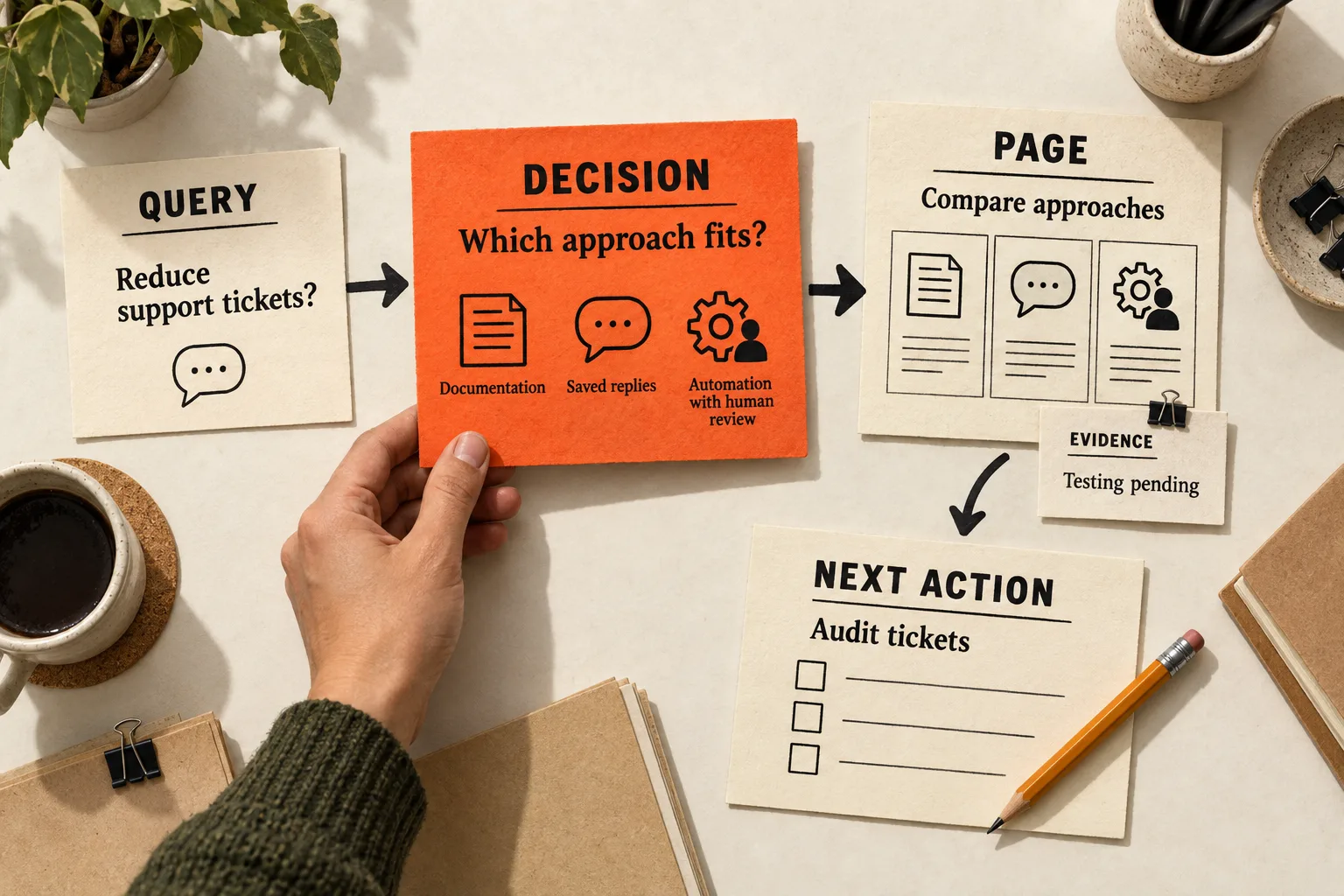
For each query in your SaaS keyword list, finish this sentence: After reading this page, the reader should be able to decide _____. Then assign a page, the evidence it needs, and a useful next action.
That is the starting point for buyer journey keyword mapping. A query about reducing support tickets calls for help choosing an approach. A pricing query calls for billing details. Sending both readers to the same introductory article leaves different questions unanswered.
Use the map to decide which existing pages need work and which questions deserve a new page.
Describe the decision before assigning a stage
Start with one audience and one problem your product can address. A support lead trying to reduce repetitive tickets has different constraints from a developer researching how to build a chatbot, even when their searches share words.
Gather a small batch of candidate queries from customer conversations, public discussions, your existing search data, and keyword research. Keep original customer language separate from the search phrases you infer from it. A complaint establishes that someone expressed a problem; it does not establish search volume or how common the problem is.
Write the unresolved decision in everyday language, then choose a working stage:
| Working stage | Decision the page helps answer |
|---|---|
| Learning | Is this problem worth solving, and what approaches exist? |
| Evaluating | Which approach or product fits my constraints? |
| Committing | Can I justify the cost and complete the purchase or setup? |
These are planning labels. A query alone does not identify a person’s position in a buying process. Someone searching for pricing may be checking a renewal, preparing a shortlist, or researching a competitor.
Add the constraint that changes the answer: team size, integration, budget, data handling, or implementation effort. For example, turn “compare support automation” into “decide whether automation fits a two-person support team that needs human approval before replies go out.”
Check what the search results answer
Before assigning a URL, inspect current Google results for the query in your target market. For a US audience, record the country, language, device, and date.
Open several organic results and note their formats, intended audiences, and central tasks. Record whether guides, comparisons, product pages, or documentation dominate, or whether the results are mixed. Look for recurring constraints in the pages themselves. Are they helping someone buy software, operate it, or understand a concept? Keep uncertain interpretations in the map.
A results page is a sample. Google says results vary with time, place, device, and recent search history, so keep your interpretation revisable. Google’s Search Console documentation
Check expansion terms for changes in meaning. Someone searching for “customer journey mapping tools” may want software for creating journey maps. That is a different task from assigning SaaS keywords to content. Shared words alone are a weak reason to include a term.
Mark missing keyword volume as unknown. Keep a provider’s reported zero as a separate value. Neither observation, by itself, settles whether a customer question deserves an answer.
Assign a page that can finish the task
Review existing pages before proposing a new URL. A missing section on a useful page may answer the question with less maintenance than another article.
A learning query may need a diagnostic worksheet or an explanation with examples. An evaluation query may need a comparison with explicit selection criteria. A purchase question may belong on pricing, integration, security, or implementation documentation.
Group queries when the same page can satisfy their central decision and evidence needs. Split them when the answer, reader, or required proof differs materially. Similar wording does not establish a shared task, and different wording does not automatically justify separate pages.
Use this as an editorial planning rule; it cannot guarantee which URL Google will show. Google’s helpful-content guidance asks whether readers leave having learned enough to achieve their goal. That is a useful completeness check for the proposed page. Google’s guidance on helpful content
Put an evidence requirement beside every page assignment. A comparison needs verified differences and reasons an alternative might fit. An integration page needs accurate compatibility and setup details. A claim about time saved needs a documented measurement method and results you actually have.
When evidence is missing, name what must be checked and who will check it before drafting the claim.
Worked example: map an AI support assistant’s queries
Imagine a fictional product called RelayDesk that drafts support replies for human approval. Its intended customer is a small SaaS support team. These queries are illustrative research candidates; their demand and search results have not been checked.
| Candidate query | Reader’s decision | Proposed page | Useful next action |
|---|---|---|---|
| how to reduce repetitive support tickets | Should we improve documentation, use saved replies, or test automation? | A guide to auditing tickets and comparing approaches | Complete a ticket audit |
| AI support assistant vs help desk macros | Which approach fits our ticket patterns and review requirements? | A comparison covering predictable questions, context needs, maintenance, and human review | Use a scorecard on permitted test material |
| RelayDesk pricing | Does a plan fit our expected usage and budget? | The pricing page | Estimate a bill from a typical month of usage |
| RelayDesk human approval settings | Can we configure the review controls we need? | Documentation explaining the controls and their limits | Check the setup instructions |
The learning guide should help readers recognize when a simpler process change may be sufficient. It needs a usable audit method and enough detail to compare the proposed approaches.
The comparison needs a test plan before it can make performance claims. Test both approaches on a clearly described set of example tickets and explain what the results support. In the map, record “comparison testing pending” until that work is complete.
The pricing page needs real billing units, included usage, relevant limits, and cancellation terms. The approval-settings page needs verified controls and setup steps. A prospect and an existing customer could both use that documentation, so keep its intent labeled as mixed and link to a relevant product overview where useful.
This example produces four page assignments with different evidence requirements. It does not establish a publishing order. The team still needs to check the queries, review existing pages, and determine which missing answer it can support.
Make the next step match what the reader knows
After a diagnostic guide, a reader might complete a worksheet. A comparison might prepare them to run a bounded test. Implementation requirements might give them enough information to confirm compatibility with a teammate.
Choose that action while planning the page. It should help someone who is not ready to buy, too. Explain the basic information the page promises without requiring a sales conversation to obtain it.
Write links that name the destination, such as “review integration requirements” or “use the evaluation worksheet.” Google recommends descriptive, concise link text and contextual links to related resources. Google’s link best practices
Once a row has a clear decision, page assignment, and evidence plan, use the SaaS content brief template to turn it into a writing assignment.
Copy this decision-mapping worksheet
Create one record per distinct reader decision. Several closely related queries can share it. Copy these fields into a document or use them as spreadsheet columns:
Audience and situation:
Candidate query and relevant variants:
Customer's original wording, source, and date:
Decision the reader should be able to make:
Constraint or objection that changes the answer:
Working stage and alternative interpretation:
Search check: country, language, device, and date:
Observed result types and unresolved intent questions:
Keyword metric, status, provider, and update date:
Existing or proposed URL:
Page action: keep, revise, create, or research first:
Evidence available and evidence still needed:
Useful next action and destination:
Outcome to observe:
Owner and next task:
Review date:
Keep evidence gaps explicit. For the fictional comparison above, “founder assumption; customer evidence not collected” would be an honest customer-evidence entry. “Search results not checked” and “volume unknown” would remain separate entries. The next task would be to investigate those gaps before treating the query as a content opportunity.
For an initial batch, choose a decision with a clear audience fit, a consequential unanswered question, and evidence you can obtain. Estimated volume can inform that choice, but it cannot supply missing product relevance.
Review discovery and usefulness separately
After publication, use Search Console to examine the queries and pages receiving impressions and clicks. Its Performance report supports those dimensions and metrics. Google’s Performance report overview
Also observe the next action you chose: worksheet use, visits to relevant documentation, a completed evaluation, or a qualified inquiry. A click on a link shows interest in its destination; it does not prove the visitor made a purchase decision.
Record the change date and allow a review window suited to your traffic and buying cycle. With little activity, retain uncertainty instead of declaring success or failure from a handful of visits. Before-and-after results also cannot isolate the effect of the map from other changes.
Start with five queries and one page
Choose five candidate queries for the same audience. Write the decision behind each, inspect the search results, and look for existing pages that could answer them. Record missing evidence before proposing new content.
Finish with one page assignment: the decision it will help someone make, the missing answer you can substantiate, the person responsible, and the next task. Use that row to prepare a brief or revise the existing page.


