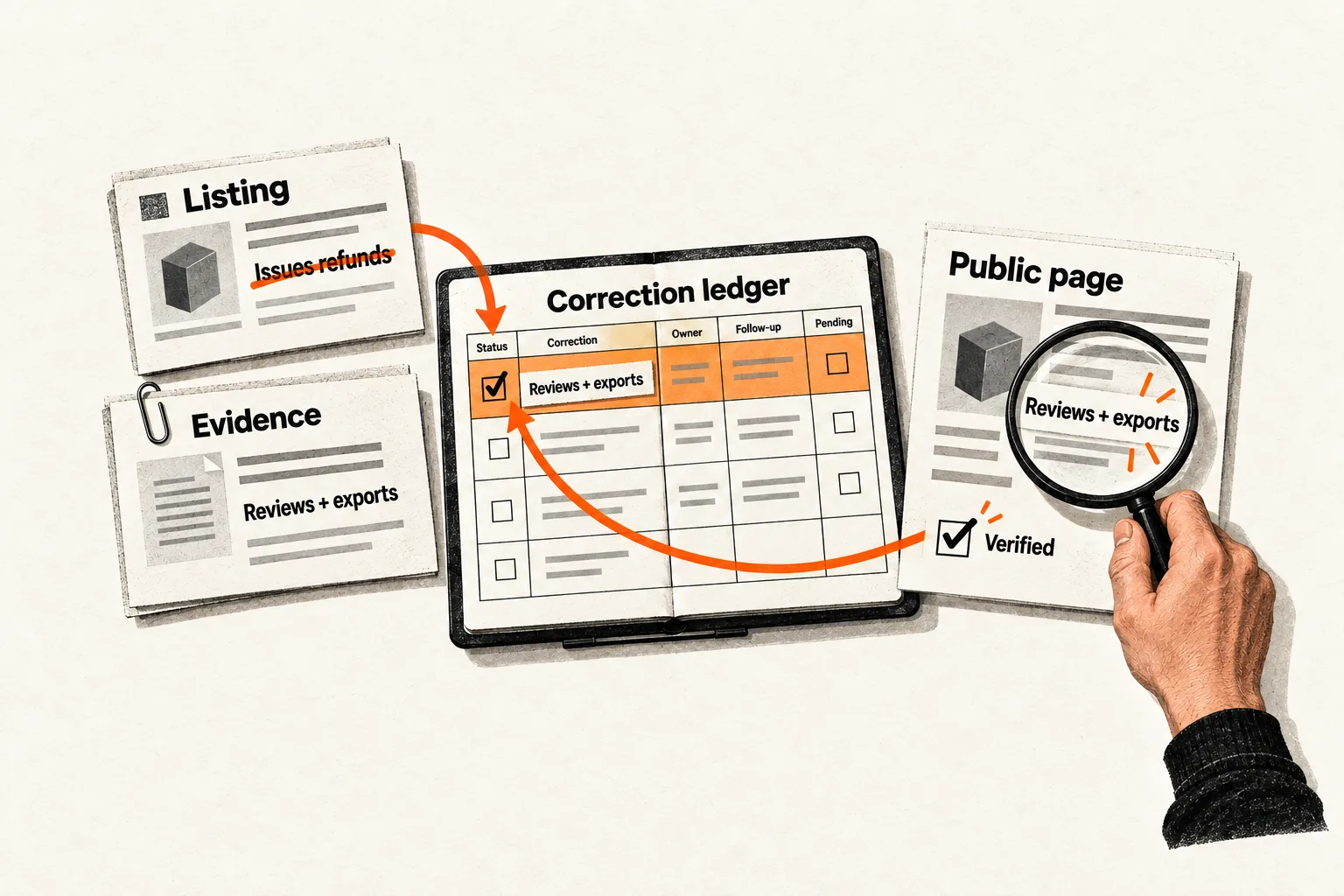
An old directory listing can promise an integration you retired or describe your software company as a consulting agency. To correct it, you need a current fact, evidence a publisher can inspect, and a way to track the request through to a public change.
A SaaS brand entity consistency audit puts that work in one ledger. Compare public descriptions against documented facts, record who can change each page, and verify the corrections. Start with ten relevant pages, including your own comparison pages. The immediate result is a correction queue; any effect on AI answers needs separate measurement.
Establish which facts should agree
Create a reference sheet with each fact’s current value, supporting evidence, effective date, and the teammate responsible for confirming it. Cover the details that help a buyer identify the business and understand the product:
- Company and product names, including the relationship between them.
- Current website, former names, and former domains.
- What the product does and whom it serves.
- Availability, supported integrations, and material limitations.
- Public company details, such as founding date, when relevant and documented.
Resolve what each field means before deciding it is wrong. A legal company name can differ from its product name. Incorporation, founding, and product launch can have different dates. A mailing address may differ from a headquarters address.
Allow reasonable differences in wording. “Workflow software” and “approval management software” may both describe the same product accurately. “Includes Salesforce integration” is a testable claim that needs current product evidence.
A dated launch announcement may accurately describe an earlier version. Classify it as historical unless it presents those details as current. If your team cannot settle a fact, mark it unresolved and name the evidence needed to resolve it.
Find the pages a buyer could encounter
Search your company and product names, former names, and combinations such as “[product] integrations” or “[company] software.” Open the pages behind the results. Record the queries, search date, and actual market and language settings; use US English settings for a US buyer audit.
For the first ten pages, include your homepage and About page as comparison points. Fill the remaining places with existing software directory entries, company profiles, partner listings, marketplace pages, or relevant articles. If fewer relevant pages exist, use that smaller set. Record a Google knowledge panel separately if one appears.
Prioritize pages with an observable connection to buyers. A listing that sends referrals or appears in a product-name search has a clearer reason for review than an obscure directory found in a bulk export.
If an AI answer misdescribes the product, save the exact question, answer, date, product or mode used, and displayed source links. Inspect those sources individually. A linked page is a lead to investigate; the link alone does not establish where every sentence came from. FindVex’s guide to verifying AI search retrieval claims explains how to separate observations from assumptions.
Keep a simple page list with the URL, page type, date checked, and access status. Mark a page you cannot open as unchecked. A search snippet does not establish whether the underlying page is accurate.
Build a ledger with one claim per entry
A page can contain several correct facts and one consequential error. Keep the page list as your coverage record, then create a ledger entry for each disputed claim. This gives every correction a clear completion condition without filling the queue with accurate statements.
Copy this template into a spreadsheet or document:
Page URL and publisher:
Page type and date checked:
Exact wording observed:
Fact being checked:
Expected value and effective date:
Supporting public URL:
Assessment: inaccurate / historical / unresolved / accurate after review
Why the difference matters to a buyer:
Correction route: direct edit / publisher request / platform feedback
Responsible teammate:
Requested replacement:
Status and request or edit date:
Follow-up date:
Verified public wording and verification date:
Closure reason, if no change is needed or possible:
Keep observed wording separate from your interpretation. “Offers automated refunds” is what the page says; “could attract buyers who need payment execution” is your assessment of the consequence.
Use statuses such as awaiting evidence, ready to act, awaiting public verification, verified correction, and closed without change. After an edit or request, keep the entry open until you inspect the public result. If an editor declines a request, record the reason and decide whether to seek better evidence or close it without change. Neither outcome counts as a verified correction.
Choose corrections by consequence and control
Start with errors that could materially change a buying decision: the wrong website, a mistaken company identity, an unavailable feature, or a false statement about product availability. Then address stale descriptions and less consequential details.
For each item, note how buyers encounter it, what misunderstanding it creates, and the effort required to correct it. Use those judgments to order the queue. They do not predict traffic or AI visibility.
Fix contradictions on your own pages before using those pages as evidence in an external request. Review public copy and any existing organization structured data together. Google says organization markup can help it understand administrative details and distinguish organizations. Its documented fields include name, legalName, url, and description; use accurate values that apply to your business. See Google’s organization structured data guidance.
For external profiles, check the editing permissions before assigning a direct edit. Crunchbase requires a registered account and social authentication through LinkedIn or Google. Locked fields require verified employment, and some changes need staff assistance. Record the route available for the specific field you need to correct. See Crunchbase’s editing requirements.
For an independently edited article, request a narrow factual correction. An unfavorable opinion or a different choice of wording does not automatically qualify as an error.
Make correction requests easy to assess
Identify the passage, explain the factual problem, and provide public evidence. Adapt this template to the publisher’s correction process:
I work with [company]. On [page URL], the [section or field] says “[exact wording].” This is inaccurate because [specific factual reason]. The current fact is [fact and effective date, if relevant], documented at [public URL]. Would you replace the passage with “[minimal replacement]”?
Use the effective date when a fact has changed. If the original claim was always wrong, explain that directly. When your evidence is only internal, decide what you can substantiate publicly before making the request. A planned feature should remain labeled as planned.
Google knowledge panels have a separate correction process. Google says their information is generated from public web sources. For an incorrect description, it directs people to contact the underlying source. If that effort fails, you can submit panel feedback explaining the attempt and providing strong evidence. Google says it cannot create a custom description on request. See Google’s knowledge panel correction guidance.
Record the source-page request separately from knowledge panel feedback. You can then verify each result even if the underlying page changes before the search display does.
Worked example: correct an outdated integration claim
Consider a fictional SaaS company, ExampleFlow, whose product helps operations teams review refund requests. It discontinued a native payment integration and now exports approved requests for processing elsewhere.
The founder checks ten pages and records four items:
| Page | Observation | Decision |
|---|---|---|
| Company About page | Promises the retired integration | Correct directly |
| Software directory | Says the product issues refunds | Request a factual correction |
| Partner profile | Links to an obsolete product URL | Ask the partner to update it |
| Dated launch article | Accurately describes the original integration | Retain as historical |
The founder updates the About page and publishes a support note explaining the export workflow and the integration’s retirement date. After checking those public pages, the founder uses the support note as evidence for the directory request.
The directory entry in the ledger reads:
Exact wording observed: “ExampleFlow issues refunds automatically.”
Expected value: The product reviews requests and exports approved requests.
Evidence: Public support note documenting the retirement and current workflow.
Assessment: Inaccurate.
Buyer consequence: A buyer may expect the product to execute payments.
Correction route: Publisher request.
Responsible teammate: Founder.
Requested replacement: “ExampleFlow helps operations teams review refund
requests and export approved requests for processing.”
Status: Awaiting public verification after request submission.
Follow-up: Two weeks after submission, unless the publisher gives a timeline.
In a real entry, include the actual page and evidence URLs, effective date, and calendar dates. The example proposes a single replacement sentence that the editor can assess against the support note.
The partner request identifies the obsolete link and supplies its replacement. Suppose the partner updates the link while the directory has not responded. After opening the partner page and testing the new link, the founder records one verified external correction and one pending request. The historical article stays unchanged.
These are hypothetical workflow outcomes. They provide no evidence of a ranking or citation improvement.
Recheck public changes and track AI answers separately
Choose a follow-up interval your team can maintain, such as two weeks, while respecting any timeline the publisher provides. Reopen each changed page and record its visible wording. An acknowledgment confirms receipt of a request; completion requires a public check.
Review the ledger after a rebrand, domain change, major product retirement, or another event that could make existing descriptions stale. Keep the initial page set stable when comparing checks, and label new pages so the totals remain understandable.
Track unresolved consequential errors, verified corrections, and requests awaiting action. If you also monitor AI answers, keep a separate observation log. An answer changing after an edit does not establish that the edit caused it.
Google says AI Overviews and AI Mode require no special optimization beyond its established guidance, and meeting eligibility requirements does not guarantee inclusion. A consistency audit cannot promise citations. See Google’s AI features guidance.
Complete one correction before expanding the audit
Create your factual reference sheet and select the first ten pages, or the smaller relevant set available. Record disputed claims, separating factual errors from historical statements and reasonable wording differences.
Choose the discrepancy most likely to give a buyer the wrong expectation. Confirm the evidence, correct any related contradiction on your own site, and prepare the smallest accurate replacement. Assign a teammate and a follow-up date. Close the entry as corrected only after checking the public result.


