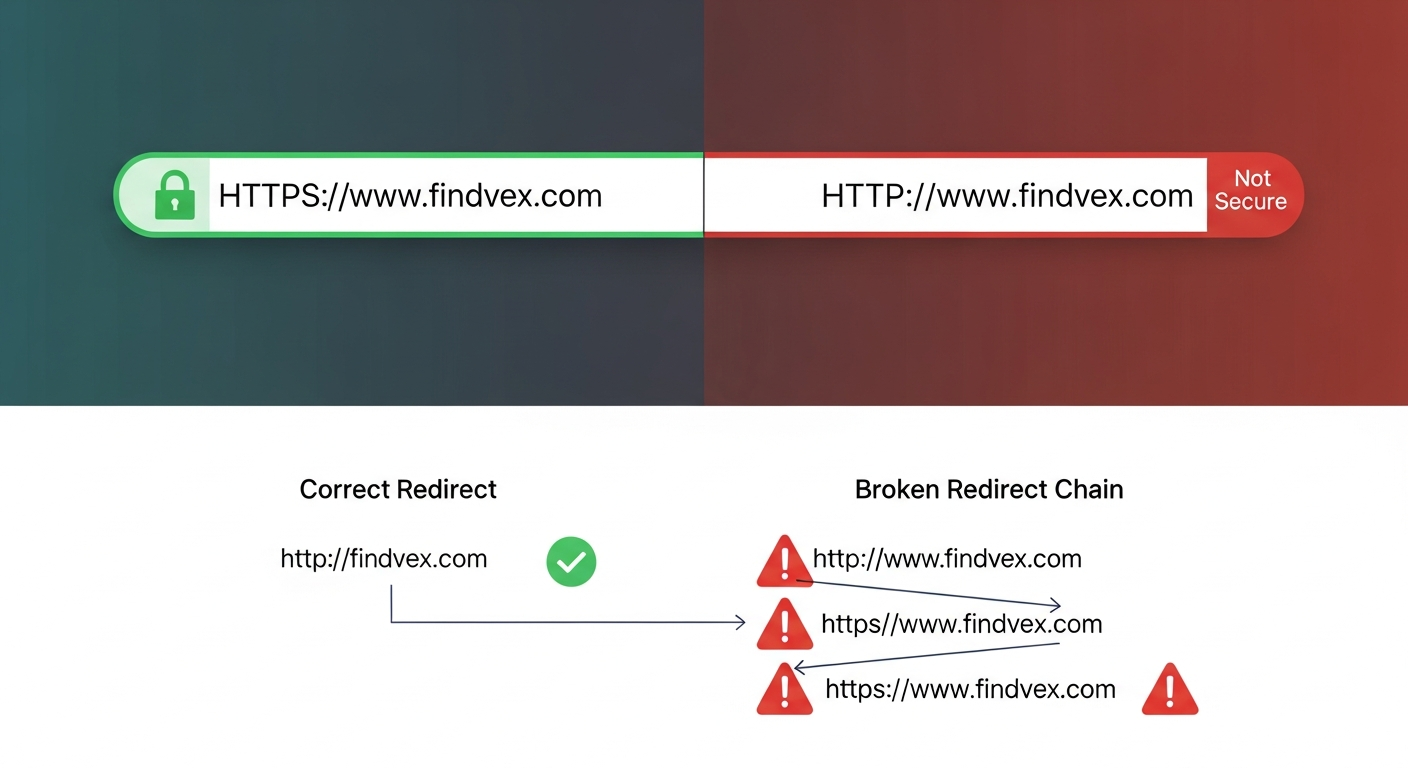
HTTPS and SSL for Small Business SEO: What Google Actually Checks (and 6 Mistakes That Quietly Kill Rankings)
HTTPS is a confirmed Google ranking signal, but the certificate itself is only part of the story. Mixed content, incorrect redirects, and canonical mismatches are the real killers. Here's what to audit and fix.
Quick answer
HTTPS is a lightweight Google ranking signal — confirmed, but not dominant. The SSL certificate itself rarely causes ranking drops. What does cause problems is a botched HTTP-to-HTTPS migration: broken 301 redirect chains, mixed content errors, duplicate HTTP/HTTPS versions indexed simultaneously, canonical tags still pointing to HTTP, and sitemaps listing the wrong protocol. Fix those five issues and the security layer becomes an asset instead of a liability.
What Google Actually Checks With HTTPS
Google confirmed HTTPS as a ranking signal in 2014. The practical effect is modest — it functions as a tiebreaker at best, not a lever that moves you from page 3 to page 1. Treating a valid SSL certificate as an SEO win by itself is a mistake. What Google actually evaluates goes several layers deeper.
Googlebot checks three things during a crawl of your HTTPS site: (1) whether the secure URL responds with a 200 status code without falling through an unnecessary redirect chain, (2) whether the page's resources — images, scripts, stylesheets — also load over HTTPS rather than HTTP, and (3) whether the canonical tag on the page confirms the HTTPS version as the authoritative URL. Fail any of these and the certificate is essentially decorative from a crawl standpoint.
The deeper issue is that most small business HTTPS problems are not SSL problems. They are migration problems that were left half-finished: the certificate was installed, but the site still serves HTTP URLs in internal links, the sitemap, or canonical tags. That inconsistency is what Googlebot flags — and what costs rankings.
HTTPS SEO Diagnosis Checklist
Run through this checklist in order. Each item builds on the one before it. If you find a failure at step 3, fix it before assuming step 5 is causing your problem.
- ☐ Certificate is valid and not expired — check browser padlock or use an SSL checker tool.
- ☐ HTTP version of every page redirects to HTTPS with a 301 (permanent), not a 302 (temporary).
- ☐ www and non-www versions resolve consistently — pick one and 301-redirect the other.
- ☐ No redirect chains longer than one hop: http://example.com → https://example.com (not http → http://www → https://www).
- ☐ Canonical tags on all pages reference the HTTPS URL, not HTTP.
- ☐ XML sitemap lists only HTTPS URLs — no http:// entries.
- ☐ Internal links throughout the site use HTTPS hrefs, not HTTP.
- ☐ No mixed content warnings — all page resources load over HTTPS.
- ☐ Google Search Console property set up for the HTTPS version (separate property from HTTP).
- ☐ robots.txt file is accessible at https://yourdomain.com/robots.txt and references sitemap with HTTPS URL.
“AI agents do in hours what teams used to do in weeks. The advantage compounds.”
6 HTTPS Mistakes That Quietly Kill Small Business Rankings
These are the specific failure patterns I see most often on small business sites — not theoretical concerns, but real configurations that cause ranking drops, indexing confusion, and crawl waste.
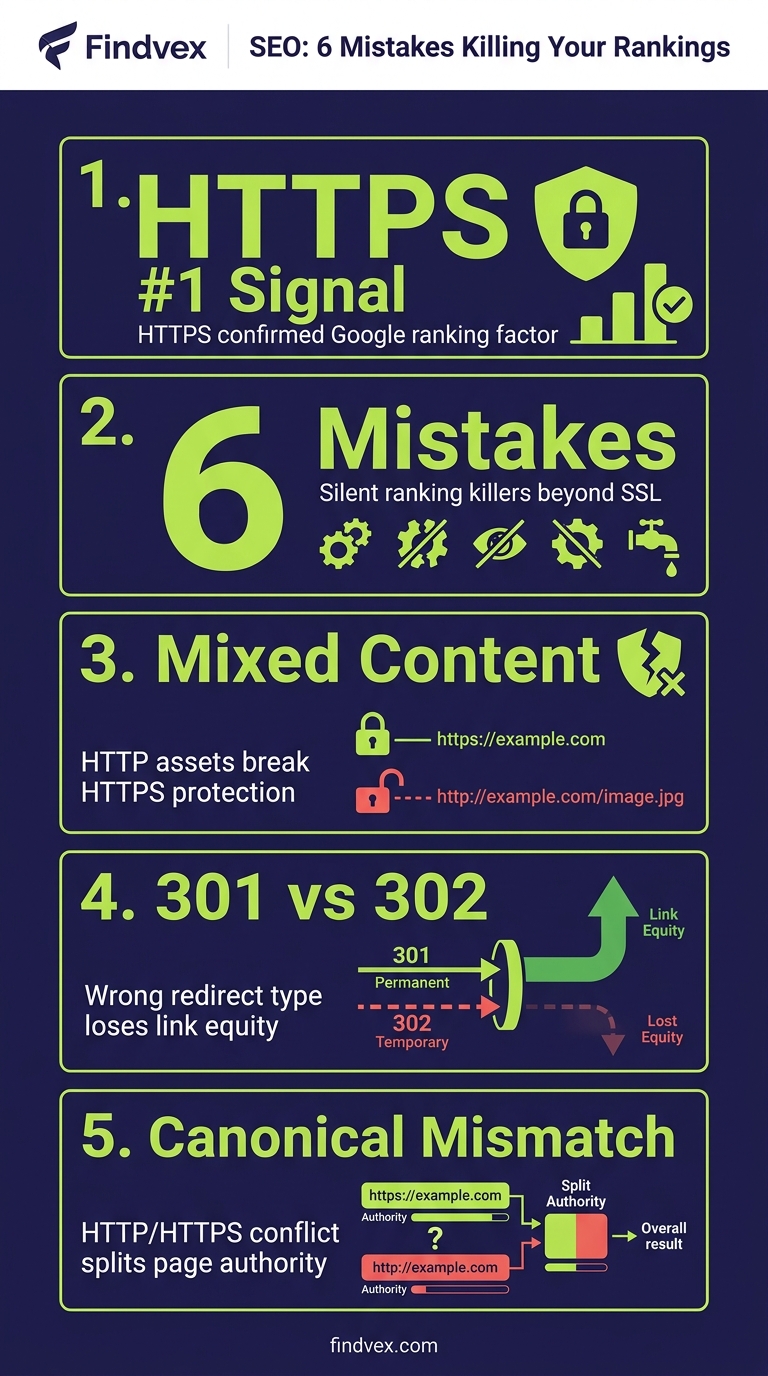
Mistake 1: Redirect Chains Instead of Direct 301s
Symptom: PageSpeed Insights shows redirect warnings; Googlebot spends crawl budget on intermediate URLs.
Cause: The HTTP-to-HTTPS redirect was added on top of an existing www-to-non-www (or vice versa) redirect, creating a chain: http://example.com → http://www.example.com → https://www.example.com.
Fix: Collapse the chain to a single 301. Every HTTP variant should redirect directly to the final canonical HTTPS URL in one hop. Risk level: Low to implement, high risk to leave unfixed for crawl efficiency.
Developer handoff note: Update the redirect rules in the server config (Apache .htaccess or Nginx server block) or CDN/hosting panel. Test with a header checker tool before deploying to production. Confirm the final destination is the intended canonical URL.
Mistake 2: Mixed Content Errors on Key Pages
Symptom: Browser shows a padlock with a warning triangle; Chrome DevTools console logs 'Mixed Content' errors.
Cause: The page itself loads over HTTPS, but embedded resources — images, iframes, scripts, stylesheets — still reference http:// URLs. This is especially common after migrating a site that had years of content with hard-coded HTTP image paths.
Fix: Two categories to address. Active mixed content (scripts, iframes) is blocked by modern browsers and breaks functionality. Passive mixed content (images, audio) triggers a warning but doesn't break the page. Fix active content immediately. Passive content should be fixed but is lower urgency. Risk level: Active mixed content — high. Passive mixed content — medium.
Developer handoff note: Run a crawl with Screaming Frog or a browser extension like 'HTTPS Checker'. Export all HTTP resource URLs. For WordPress sites, the 'Better Search Replace' plugin can bulk-update http:// to https:// in the database. For custom CMS environments, the developer needs to update asset URLs at the template level or add a Content Security Policy upgrade-insecure-requests directive as a stopgap.
Mistake 3: Canonical Tags Still Pointing to HTTP
Symptom: Google Search Console shows the HTTPS page as 'indexed' but the Google-selected canonical is the HTTP version.
Cause: The CMS or SEO plugin was configured before the migration and still generates canonical tags with http:// in the href. The certificate is installed correctly, but every page is effectively telling Google 'the real version of this content is at the HTTP URL.'
Fix: Update the canonical tag base URL in your SEO plugin settings (Yoast, Rank Math, All in One SEO) or in the theme's head template. Verify by viewing page source and searching for rel='canonical'. Risk level: High — this is one of the most impactful single-item fixes available.
Developer handoff note: For WordPress, update the 'Site Address (URL)' and 'WordPress Address (URL)' in Settings → General to https://. This propagates the correct protocol to canonicals, sitemaps, and internal links automatically in most configurations.
Mistake 4: Sitemap Lists HTTP URLs
Symptom: Google Search Console Coverage report shows pages 'Submitted URL not selected as canonical' — Google is choosing HTTPS but your sitemap keeps nominating HTTP.
Cause: The sitemap was generated before migration and was never regenerated, or the sitemap plugin's base URL setting was not updated to HTTPS.
Fix: Regenerate the sitemap and confirm every <loc> entry uses https://. Resubmit via Google Search Console. Risk level: Medium — causes indexing inconsistency but rarely causes complete deindexing.
Mistake 5: Both HTTP and HTTPS Versions Are Indexed
Symptom: A site:yourdomain.com query shows duplicate pages — some http://, some https://. Google Search Console's HTTP property shows pages still receiving impressions.
Cause: The 301 redirects were not applied site-wide. Certain URL patterns — tagged URLs, paginated pages, or non-www variants — were missed during migration.
Fix: Crawl both protocols and compare. Any HTTP URL returning a 200 status (rather than 301-redirecting to its HTTPS equivalent) needs a redirect added. Check for crawl traps: parameter URLs, print-friendly URLs, and legacy sub-directories often get missed. Risk level: High — duplicate indexing dilutes link equity and confuses Google's canonical selection.
Developer handoff note: Server-level redirects are more reliable than application-level redirects for catch-all HTTP→HTTPS rules. A single rewrite rule in .htaccess or Nginx that forces HTTPS for all requests is more robust than individual page-level redirects.
Mistake 6: Google Search Console Is Only Set Up for HTTP
Symptom: You have no data on how Googlebot is crawling your HTTPS site; your coverage reports look sparse or incorrect.
Cause: Search Console treats http://example.com, https://example.com, http://www.example.com, and https://www.example.com as four separate properties. Many owners only verified the original HTTP property and never added the HTTPS version.
Fix: Add and verify the HTTPS version of your domain in Google Search Console. The simplest approach is to use a Domain Property (verified via DNS), which covers all protocol and subdomain variants under one property. Risk level: Low to fix, but without it you are flying blind on HTTPS crawl and indexing data.
What to Check in Google Search Console After HTTPS Migration
After implementing fixes, use Google Search Console as your ground truth — not a crawl tool, not a browser check. Here is the specific sequence.
- Coverage report → 'Excluded' tab: Look for 'Alternate page with proper canonical tag' — this indicates Google found a duplicate and picked one version. If the canonical it selected is the HTTP version, your canonical tags are still wrong.
- Coverage report → 'Valid' tab: Confirm the indexed URLs show https:// in the URL column.
- Sitemaps report: Verify your submitted sitemap URL uses https:// and that the 'Discovered URLs' count is plausible.
- URL Inspection Tool: Inspect your homepage and a sample of key pages. The 'Google-selected canonical' field should match the 'User-declared canonical' field — both should be HTTPS.
- Security Issues report: Any SSL certificate errors, malware, or deceptive content flags appear here. Should be empty.
- Core Web Vitals report: An HTTPS migration sometimes introduces redirect latency that degrades LCP. Check mobile and desktop scores post-migration.
Does HTTPS Actually Affect Rankings? The Honest Answer
HTTPS is a confirmed signal, but the ranking boost from installing an SSL certificate on an otherwise unchanged site is small — the kind of gain that might show up as a few positions for highly competitive queries, or not be distinguishable from normal fluctuation at all.
The more measurable impact comes from what HTTPS enables and what its absence prevents. Chrome marks HTTP sites as 'Not Secure' in the address bar. For service businesses — law firms, clinics, contractors, financial advisors — that warning is a conversion problem before it is an SEO problem. Users who see 'Not Secure' before filling out a contact form bounce at higher rates, and behavioral signals (time on page, bounce rate) do feed into Google's quality assessments indirectly.
The significant SEO impact of HTTPS problems is almost always downstream of a botched migration, not the absence of HTTPS itself. A site that has been cleanly on HTTPS for years with correct redirects, canonical tags, and no mixed content is in good shape. A site that installed a certificate six months ago but left 40% of its pages accessible at both protocols is dealing with a real crawl and indexing problem.
If you are doing a full technical audit, the HTTPS layer should be checked as part of a broader crawl and indexing review — not treated as a standalone project. For a systematic approach to that broader audit, see our guide on what a technical SEO audit actually covers.
HTTP-to-HTTPS Migration: A Step-by-Step Workflow
If you have not migrated yet, or if you are inheriting a site where the migration was done incorrectly, use this sequence. Do not skip steps to save time — each step prevents the next from creating a new problem.
- Step 1: Install and validate the SSL certificate. Confirm it covers all subdomains you use (including www). Set a calendar reminder 30 days before expiry.
- Step 2: Update WordPress Address and Site Address (or equivalent CMS setting) to https://.
- Step 3: Implement server-level 301 redirects from all HTTP variants to HTTPS. Cover: http://example.com, http://www.example.com → https://www.example.com (or whichever is your canonical preferred domain).
- Step 4: Update canonical tags site-wide. Verify by crawling with Screaming Frog and filtering the Canonicals tab for http:// entries.
- Step 5: Fix internal links. Crawl the site and update any internal href attributes pointing to http:// URLs.
- Step 6: Regenerate and resubmit your XML sitemap with HTTPS URLs.
- Step 7: Update robots.txt sitemap directive to reference the HTTPS sitemap URL.
- Step 8: Run a mixed content audit. Fix all active (script/iframe) mixed content immediately. Queue passive (image) mixed content fixes.
- Step 9: Update Google Search Console — add the HTTPS property, verify it, and set it as the preferred domain if using a non-Domain property setup.
- Step 10: Update any third-party tools that reference your domain: Google Analytics property URL, Bing Webmaster Tools, any hardcoded HTTP references in ad platform tracking URLs.
SSL Certificate Types: What Small Businesses Actually Need
There are three common certificate types. The choice has zero effect on your Google rankings — Google does not differentiate. It matters for user trust signals and compliance requirements.
Domain Validation (DV): Proves you control the domain. Issued in minutes. Free options include Let's Encrypt (available through most web hosts). Sufficient for nearly every small business website.
Organization Validation (OV): Verifies your organization's legal identity in addition to domain control. Appears in certificate details. Appropriate for businesses where users need extra assurance — some financial services, legal, or healthcare contexts.
Extended Validation (EV): The highest level of identity verification. Previously displayed a green bar in browsers; modern browsers no longer show this prominently, which has reduced its value as a visual trust signal. Generally not worth the cost for small business sites.
The only practical decision for most small businesses: use a free Let's Encrypt certificate via your hosting provider (most major hosts provide this in one click), or a paid certificate if your industry has compliance requirements that specify it. Do not pay for an EV certificate expecting an SEO benefit — there is none.
FAQs
Does having an SSL certificate improve my Google rankings?
HTTPS is a confirmed but lightweight ranking signal. Installing an SSL certificate on an otherwise unchanged site typically produces a minor ranking improvement, if any measurable effect at all. The larger SEO impact comes from ensuring your HTTP-to-HTTPS migration is technically clean — correct 301 redirects, no mixed content, HTTPS canonical tags, and an HTTPS XML sitemap. A botched migration causes more ranking damage than no certificate at all.
My site has an SSL certificate but Google Search Console shows HTTP pages being indexed. What's wrong?
This almost always means your 301 redirects are incomplete, your canonical tags still reference HTTP URLs, or both. Start by using the URL Inspection tool in Google Search Console to check a sample of pages. Look at the 'Google-selected canonical' field — if it shows an http:// URL, your canonical tags are the problem. If it shows https:// but HTTP pages are still in the index, your redirects are not covering all URL patterns. Run a crawl of your HTTP domain and look for any URLs returning a 200 status code instead of a 301.
What is mixed content and how does it affect SEO?
Mixed content occurs when a page served over HTTPS loads some resources (images, scripts, iframes, stylesheets) from HTTP URLs. Active mixed content (scripts, iframes) is blocked by modern browsers, which can break page functionality and harm user experience. Passive mixed content (images, audio, video) is loaded but triggers a browser security warning. Both types undermine the security signal your HTTPS certificate is meant to provide. For SEO, active mixed content that breaks page rendering can prevent Googlebot from seeing full page content. Mixed content is most common immediately after an HTTP-to-HTTPS migration.
Do I need to set up a new Google Search Console property after moving to HTTPS?
Yes. Google Search Console treats http:// and https:// as separate properties. After migrating, add and verify your HTTPS domain. The recommended approach is to use a Domain Property (verified via DNS TXT record), which covers all protocols and subdomains under a single property and eliminates this fragmentation entirely. If you only monitor the HTTP property, you will not see crawl errors, indexing status, or Core Web Vitals data for your HTTPS pages.
What's the difference between a 301 and 302 redirect for HTTPS migration?
A 301 is a permanent redirect — it passes link equity (PageRank) to the destination URL and tells Google to update its index to the new URL. A 302 is a temporary redirect — it does not reliably pass link equity and signals that the original URL should remain indexed. HTTPS migrations must use 301 redirects. Using 302s is a common mistake that results in both HTTP and HTTPS versions appearing in Google's index and link equity being split between them.
How do I check if my HTTPS migration is complete and correct?
Use four checks: (1) Google Search Console URL Inspection on 5–10 representative pages — confirm 'Google-selected canonical' matches 'User-declared canonical' and both are HTTPS. (2) Crawl your site with Screaming Frog and filter the Canonicals tab for any http:// entries. (3) Check the Coverage report's Excluded tab for 'Alternate page with proper canonical tag' — a large number indicates duplicate HTTP/HTTPS indexing. (4) Run a mixed content audit using Chrome DevTools (Network tab, filter by 'http:') on your key page types.
Can an expired SSL certificate cause my site to drop in Google rankings?
An expired certificate causes browsers to show a full-screen security warning that prevents most users from accessing your site. This will cause immediate traffic drops and signals to Google that the site is inaccessible. Googlebot will still attempt to crawl but may log SSL errors. Set an automated renewal — Let's Encrypt certificates auto-renew through most hosting panels, and paid certificates should have calendar reminders set 30 days before expiry. Ranking recovery after a certificate expiry depends on how long the site was inaccessible.
Related reading
Research notes
Background claims used while researching this article. Verify with the cited authorities before quoting.
- Google confirmed HTTPS as a ranking signal in 2014 — verify via Google Webmaster Central Blog post from August 2014 announcing HTTPS as a ranking signal. Public record — link to original Google post if available.
- Chrome marks HTTP sites as 'Not Secure' — verify via Google Chrome security blog or Chrome release notes confirming 'Not Secure' label for HTTP sites. Public record.
Marcus Chen
Head of Technical SEO · Findvex
Marcus Chen heads technical SEO at Findvex. He writes about Core Web Vitals, indexing, schema, and JavaScript SEO — translating Google’s documentation into checklists small business owners can actually act on.
Expertise: Core Web Vitals · Indexing & crawlability · Schema / structured data · JavaScript SEO
Related reads
Answer Engine Optimization (AEO): The 2026 Guide for Small Businesses
Learn answer engine optimization (AEO) in 2026. This practical guide helps small businesses get found in AI search, voice assistants, and answer engines.
SEOGenerative Engine Optimization (GEO): The 2026 Guide for Small Businesses
Learn how generative engine optimization helps small businesses get found in AI search. Our 2026 GEO guide covers strategies, tactics, and tips to boost visibility.
SEOSEO Agency in USA: AI-Powered SEO for Small Businesses | Findvex
Findvex is a leading SEO agency in USA delivering AI-powered SEO strategies that help small businesses rank higher, drive traffic, and grow revenue. Get started today.