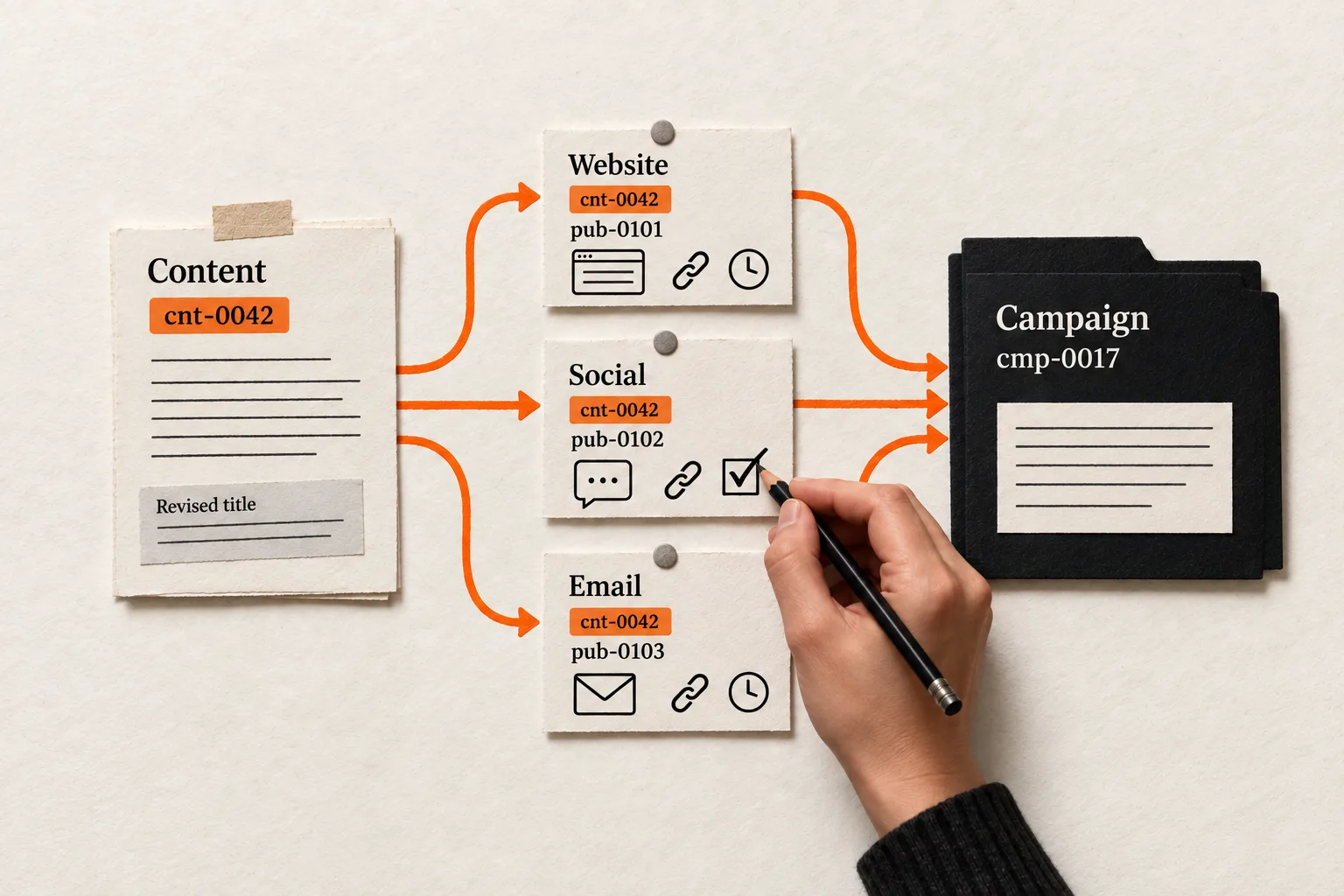
Give each content item a permanent ID, then create a separate publication record for every place it appears. Carry those IDs into your campaign records so a title change or delayed release doesn’t break the connection.
For a small AI or SaaS team, a spreadsheet can hold this together. Start with one piece whose draft, scheduled posts, and campaign record are scattered across tools. The worksheet below connects the original reader question to what went live and any recorded customer response.
Give the content a permanent identity
Assign an ID when an idea becomes an item the team intends to develop. A sequence such as cnt-0042 works if one person or system controls assignment. Never recycle an ID.
Keep the ID independent of the title, channel, publication date, and campaign name. All four can change. Store it in a dedicated field wherever possible. If a tool lacks suitable fields, put it in an internal description alongside a link to the main record.
Use three identifiers:
| Identifier | What it identifies | Example |
|---|---|---|
| Content ID | The underlying editorial item | cnt-0042 |
| Publication ID | One release or placement of that item | pub-0102 |
| Campaign ID | The marketing effort using it | cmp-0017 |
An article, its LinkedIn adaptation, and its newsletter placement can share a content ID while having different publication IDs. A later campaign can reuse the article without changing its identity.
Choose a boundary for adaptations. A shorter version answering the same question can remain under the original content ID. A piece with a different reader task or argument should receive a new ID, with a link to its parent item if useful. Treat corrections as revisions. When a change matters to later analysis, save the version used and give it a revision number.
Build a content register and publication log
Keep one row per editorial item in the content register and one row per placement in the publication log. That gives each release its own URL, timestamp, and status.
Use these fields as your starting template:
| Content register field | What to record |
|---|---|
| Content ID | Permanent value, such as cnt-0042 |
| Working title | Current descriptive name |
| Reader question | The specific task the piece helps with |
| Evidence reference | Source link, audience label, and original wording, kept separate from your interpretation |
| Owner | Person responsible for the next handoff |
| Editorial status | Idea, drafting, review, approved, or archived |
| Draft and revision link | Working copy and saved version used for publication |
A support question from an enterprise admin may suggest a useful article, but it does not establish what every trial user needs. The pain-point evidence sheet provides a method for preserving that audience context.
The publication log records what happened to each placement:
| Publication log field | What to record |
|---|---|
| Publication ID | Unique value for this release |
| Content ID and revision | Item and version used |
| Channel and native ID | Destination plus the identifier assigned by that platform |
| Publication status | Planned, scheduled, live, failed, or withdrawn |
| Planned time | Intended release time, including time zone |
| Published at | Actual release time, including time zone; leave blank until release |
| Live URL or send record | Public location or durable email send record |
| Campaign reference at release | Campaign ID and link to its record |
| Destination and tagged URL | Where the placement sends readers, if applicable |
| Handoff notes | Failure, correction, or unresolved issue and its owner |
A spreadsheet can connect these records through matching IDs. Airtable supports linked records for one-to-many and many-to-many relationships. Its documentation describes a junction table when a relationship needs its own information, such as a reuse date. Airtable’s relationship guide.
Begin with one campaign reference per publication. If a release belongs to several campaigns, add a separate list of publication-to-campaign pairs. Keep the release itself as one record so it isn’t counted twice.
Decide where each field gets updated
The content register can own the reader question, editorial status, and owner. The publishing tool supplies the native post ID, actual release time, and live URL. The CRM or campaign register owns the campaign’s objective and ID.
Write these assignments beside your field definitions. Other tools can hold references or copies, but anyone resolving a mismatch needs to know which record to check.
Use this handoff sequence:
- Before scheduling, confirm the content ID, approved revision, owner, and campaign reference.
- After release, capture the native ID, actual timestamp, and live URL or send record.
- Open the released asset and check its destination link before marking the handoff complete.
Keep editorial approval separate from publication status. An approved article can have a failed social release and a successful email release at the same time. Record a failed attempt in the handoff notes; update the placement’s status when you verify a successful release.
Manual updates are reasonable at low volume. Automate once the team can follow the field definitions and handoff rules consistently.
Preserve the campaign reference used at release
Store your campaign ID alongside the CRM’s native campaign identifier when they differ. If your current plan lacks a campaign feature, use a campaign sheet with an ID, objective, owner, and related CRM links.
Check the platform’s association rules before designing automatic updates. HubSpot’s available campaign assets depend on the subscription, and support for multiple campaigns varies by asset type. Changing the campaign of a published HubSpot social post does not transfer its link traffic to the new campaign. HubSpot’s campaign association documentation.
Preserve the campaign reference and tagged destination used at release. Record later associations separately, with the date and reason for the change. This lets you distinguish the campaign attached to the original link from a campaign added for later reuse.
Connect tracking values to recorded responses
For referral links to your site, use your campaign ID in utm_id and a publication identifier in utm_content. Include consistent source, medium, and campaign values. Google defines utm_id as a campaign identifier and utm_content as a way to distinguish creatives; parameter values are case sensitive. Google Analytics URL parameter guidance.
Using a publication ID in utm_content is a naming convention you choose. It does not create a CRM integration.
To connect a submitted form to those values, test the path from the tagged link through the form to the CRM record or interaction. Record the expected values, what arrived, and where they were stored. A tagged visit alone does not identify a contact, and a campaign association does not establish that the content caused a sale.
Keep the evidence types separate: a tagged visit, a form submission with captured values, a buyer’s self-report, or a manually linked sales activity. Use the social referral tracking test to check the link portion of that path.
Worked example: one question, three releases
Suppose a two-person AI meeting-notes company wants to answer whether users can correct a generated summary before sharing it. This is a hypothetical workflow.
The founder creates cnt-0042, records the question, and links the support note that prompted it. After approval, revision r1 has three publication records:
| Publication ID | Placement | Content reference | Campaign |
|---|---|---|---|
pub-0101 |
Website article | cnt-0042, r1 |
cmp-0017 |
pub-0102 |
LinkedIn adaptation linking to the article | cnt-0042, r1 |
cmp-0017 |
pub-0103 |
Newsletter placement linking to the article | cnt-0042, r1 |
cmp-0017 |
The campaign is named editable-summaries. The LinkedIn destination uses these values:
utm_source=linkedin
utm_medium=social
utm_campaign=editable-summaries
utm_id=cmp-0017
utm_content=pub-0102
The newsletter uses utm_source=newsletter, utm_medium=email, and utm_content=pub-0103, retaining the campaign values.
The article’s title changes before approval, so the founder updates the title without changing any IDs. The newsletter sends a day late; its planned and actual timestamps show the difference. The first LinkedIn attempt fails. The founder notes the failure, then records the successful release’s native ID, URL, and timestamp after retrying and checking it.
If a demo request later contains the captured value pub-0102, the team can trace that label to the LinkedIn placement’s record. That is evidence of the captured label, not proof that the post caused the request. If the value is missing, the publication connection stays unknown unless another identified source supplies evidence. Assigning the most recent post would hide the gap.
Copy a handoff check for your next release
Use the field tables to set up the two registers, then complete this record for one placement:
Content ID and saved revision:
Publication ID:
Reader question:
Owner:
Channel and native ID:
Campaign ID and campaign record link:
Planned release time and time zone:
Actual release time and time zone:
Live URL or send record:
Tagged destination used at release:
Live asset and destination checked by:
Expected tracking values:
Observed values and CRM record or interaction:
Evidence type, or unknown:
Failure or unresolved mismatch:
Next action, owner, and check date:
Leave fields blank until the relevant event occurs, then record what you observed. Use unknown when an expected connection cannot be established.
Before automating imports, test whether a repeated import updates the existing publication instead of creating another one. Match on publication ID or a verified native platform ID, and send unmatched or conflicting records to a review queue. Titles can change, so they are poor matching keys.
Complete one piece’s records before expanding
Choose one upcoming piece and record every planned placement. Follow it through release, verify each URL or send record, and run a test submission through the tracking path. Assign the first unresolved mismatch to an owner.
Review missing URLs, broken campaign references, and duplicate releases to judge whether the workflow is complete. Evaluate the content separately through qualified inquiries or another defined customer action, retaining the limits of the evidence.
Finish that piece’s records and repair the first broken handoff before extending the process to the rest of the calendar.


