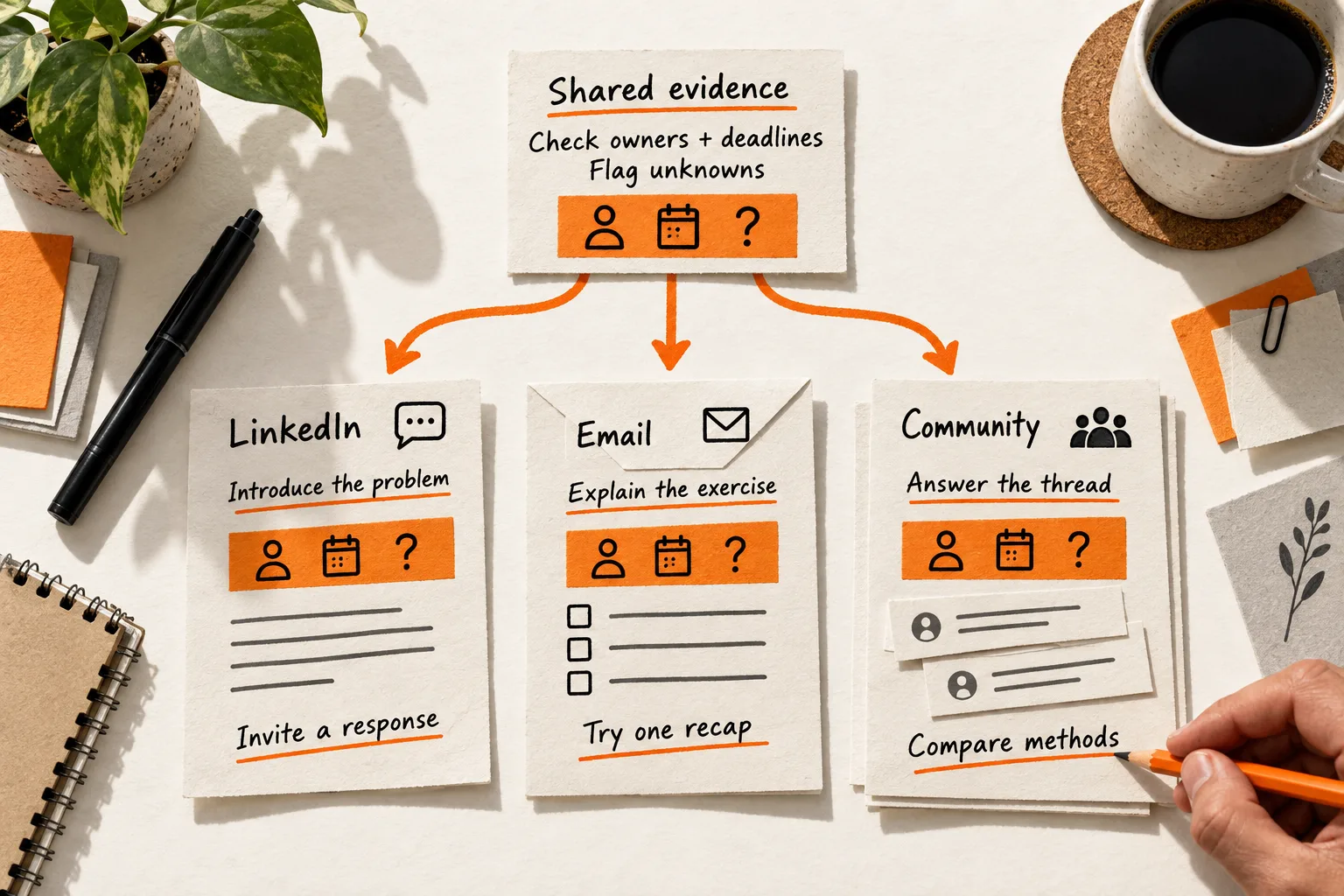
To adapt one insight for LinkedIn, email, and a product community, keep the evidence fixed and change the context and reader’s next step. A person encountering your post needs an introduction; a subscriber can try an exercise; someone in a workflow discussion needs an answer that fits the thread.
That is the practical work of cross-platform content adaptation. For a small SaaS team, start with one idea you can support, then draft each version around what its reader needs.
Decide what must stay true in every version
Write the insight in one sentence, followed by its evidence and limits. Use a customer question, a documented product behavior, or an observation you can substantiate. Keep the customer’s actual words separate from your interpretation: a question about confusing setup does not prove that setup causes cancellations.
If you need a place to collect those observations, use the pain-point evidence sheet before choosing the message.
For this worked example, imagine a fictional SaaS company building an AI meeting assistant. Its founder wants to teach this review step:
Before sharing an AI-generated meeting recap, check each action item’s owner and deadline against the meeting. Flag anything missing or unclear for confirmation.
This is an editorial recommendation. The three drafts below are hypothetical examples, with no measured customer results or claims about a model’s accuracy or time savings.
Every version must preserve the same boundary: record what the meeting supports and leave unresolved details visible. Wording can change; the evidence cannot.
Give each channel a specific job
Choose a reader situation before choosing a format. Use these assumptions as a starting point, then check them against your audience.
| Destination | Reader situation | Job of this version |
|---|---|---|
| Encounters the idea without prior context | Make the problem recognizable and invite a relevant response | |
| Subscriber email | Has opted in to practical workflow tips | Provide a review exercise they can finish from the message |
| Product community | Is already discussing the workflow | Answer the existing question and examine where the method falls short |
An email subscriber may still be new to the topic. An experienced community member may already have a better process. Adjust the explanation accordingly while keeping your usual voice.
LinkedIn: make the problem recognizable
Introduce the situation before the method so readers can understand the post without visiting another page. LinkedIn’s sharing guide recommends offering a point of view, asking questions, and responding to commenters. These are conversation practices, with no guaranteed reach attached. LinkedIn sharing guide
Hypothetical LinkedIn post:
Your AI meeting recap says: “Follow up on the integration.”
Before forwarding it, check two details against the meeting: who owns the task, and what was agreed about timing?
If either detail is missing, flag it for confirmation. Use a simple review line:
Action / Owner / Deadline / Needs confirmation
Keep the original task wording until you can verify what it means. “Follow up” may need clarification too.
Which detail does your team have to clarify most often after meetings: the task, the owner, or the deadline?
The sample gives readers a recognizable problem before asking about their experience. The question also gives you something specific to follow up on.
If a reply raises a different problem, investigate that separately. A comment about disputed decisions may suggest another article; it does not establish how often action items lack owners.
Email: give the subscriber a task they can finish
For subscribers who opted in to workflow tips, put the complete exercise in the message. They should be able to use it without clicking or replying.
Hypothetical subscriber email:
Subject: Check one meeting recap before sharing it
Preview text: A short review for owners, deadlines, and missing details.
Before you share your next AI-generated meeting recap, review its action items against your notes or an authorized transcript.
For each proposed task, fill in this line:
Action: ___ / Owner: ___ / Deadline: ___ / Needs confirmation: ___
Use only details supported by the meeting. If your source does not establish an owner or deadline, write “needs confirmation.” Use “not agreed” only when you can establish that no agreement was reached.
For example, suppose the only relevant detail in your notes is “Follow up on the integration.” Your review line would be:
Action: Follow up on the integration / Owner: Needs confirmation / Deadline: Needs confirmation / Needs confirmation: What follow-up means, who owns it, and timing
Keep the vague wording visible until someone clarifies it. Rewriting it as “confirm integration requirements” would add a task the notes do not establish.
Try this on one recap today. If you reply, describe which field needed clarification; leave out names and confidential meeting details.
The email explains where answers should come from and gives the subscriber a complete task. Its optional reply can help you find unclear instructions. The worksheet still depends on someone checking the source and resolving missing decisions; adding fields alone cannot establish accuracy.
Product community: answer the question already being discussed
Read the community’s rules and recent discussions. Check where workflow questions belong and whether a focused reply would help more than a new post.
For example, Discourse Meta asks members to browse existing discussions, improve the conversation, and avoid posting the same thing in multiple topics. It also asks people not to simply paste AI-generated content into replies. Those expectations apply to Meta; check your actual destination’s rules, including any restrictions on promotion or AI-assisted contributions. Discourse Meta guidelines
The following example assumes a community permits this contribution and a member has asked how to handle unclear action items. It is not a proposed post for Discourse Meta.
Hypothetical community reply:
For your question about unclear action items, you could try this review format:
Action / Owner / Deadline / Needs confirmation
I’m building an AI meeting assistant and am interested in how teams handle this review. You can use the format with your existing notes.
Take “Follow up on the integration.” Check it against the meeting before assigning an owner or date. If the source does not establish either, mark that field “needs confirmation.” Keep the task wording as written and flag its meaning too.
The format exposes unresolved details, but it doesn’t settle disagreements about what was said. That may require checking the discussion or asking the participants.
How does your team distinguish a missing detail from a decision that people remember differently?
Use the affiliation sentence only if it is true. Replace the opening with the actual question, remove anything the thread has already answered, and write the contribution in your own words within the community’s rules. Skip destinations where this contribution is unwelcome.
Here, the next step is to compare review methods. The reply’s narrower question gives community members room to explain a limitation or a better approach.
Measure whether each version did its job
Decide what you want to learn before sharing. For this example, useful signals could be a LinkedIn reply describing a review problem, an email response from someone who tried the exercise, or a community explanation of where the format fails.
Record the audience, date, intended action, relevant responses, and next revision for each version. Keep observations separate from conclusions. If two readers ask what counts as an agreed deadline, clarify that instruction. Their questions do not demonstrate improved productivity.
Email reports need care. Mailchimp explains that blocked images can prevent open tracking and that bot activity can inflate open and click metrics. Mailchimp’s explanation of open tracking
Use replies and observable task completion alongside those reports. A reply describing a completed review is evidence of that reader’s experience; silence leaves completion unknown.
Avoid ranking channels by raw response counts. Their audiences, exposure, and requested actions differ, so this exercise cannot isolate the effect of the channel. Use the responses to decide what to clarify or test next.
Use this worksheet for your next insight
Copy this template into a working document. Complete the shared fields once, then write a separate channel record for each destination.
Shared insight:
Evidence or source:
What the evidence does not establish:
Details that must stay unchanged:

Channel: LinkedIn / subscriber email / product community
Specific reader and situation:
What this reader already knows:
Context the opening must supply:
Useful example or procedure:
Reader's next action:
Relevant destination rules:
Draft:

After sharing
Date and audience:
Intended action:
Observed response:
What remains unknown:
Next revision and review date:
Before sharing, compare each version with the shared evidence. Remove invented proof and unsupported product claims. Check that unfamiliar context is explained and the reader gets useful help before being asked for anything. Keep only questions you are prepared to answer.
Three destinations also mean three places to follow up. If that exceeds your capacity, use the repurposing effort budget to choose fewer outputs.
Choose one supported insight and draft the three versions side by side. Underline each opening and next action. Check whether they fit the reader’s situation; the actions may overlap when that serves the reader. Then choose the first version you have time to share and follow up on.


