301 vs 302 Redirects: When to Use Each One and How to Audit Redirect Chains Before They Cost You Rankings
Use a 301 for any permanent URL change — it passes PageRank and tells Google to update its index. Use a 302 only when a redirect is genuinely temporary. Redirect chains (multiple hops to reach a final URL) dilute link equity and slow crawling. This guide shows you how to diagnose and fix both problems.
Quick answer
A 301 redirect is permanent and passes the majority of PageRank to the destination URL. A 302 is temporary and tells Google to keep the original URL in its index. Always use 301 for permanent changes (rebrands, URL restructures, HTTP→HTTPS migrations). Use 302 only for A/B tests or genuinely short-term redirects. Redirect chains — where URL A redirects to URL B which redirects to URL C — dilute link equity with each hop and waste crawl budget. Audit them in Google Search Console (Coverage report + URL Inspection) or with a crawl tool like Screaming Frog, then collapse chains to a single direct 301.
The Redirect Decision That Quietly Costs Rankings
Most small business websites have at least a handful of redirect problems — and the owner has no idea. A plugin update changes a URL slug. A developer sets up a temporary 302 and forgets to change it to a 301. An HTTPS migration creates a chain where HTTP redirects to www-HTTP which then redirects to www-HTTPS. Each hop in that chain costs something.
The stakes are real but not dramatic. You won't lose rankings overnight from one redirect chain. You will gradually leak PageRank on your most important pages, slow Googlebot's crawl of your site, and — in the case of misused 302s — confuse Google about which URL should actually rank.
This guide explains the mechanical difference between 301 and 302 redirects, when each is correct, and how to run a redirect audit on a small business site without needing a developer for every step.
301 vs 302 Redirects: What They Actually Tell Google
Both redirect types send a visitor (and a crawler) from one URL to another. The difference is in the HTTP status code returned and what it signals to the browser and search engine.
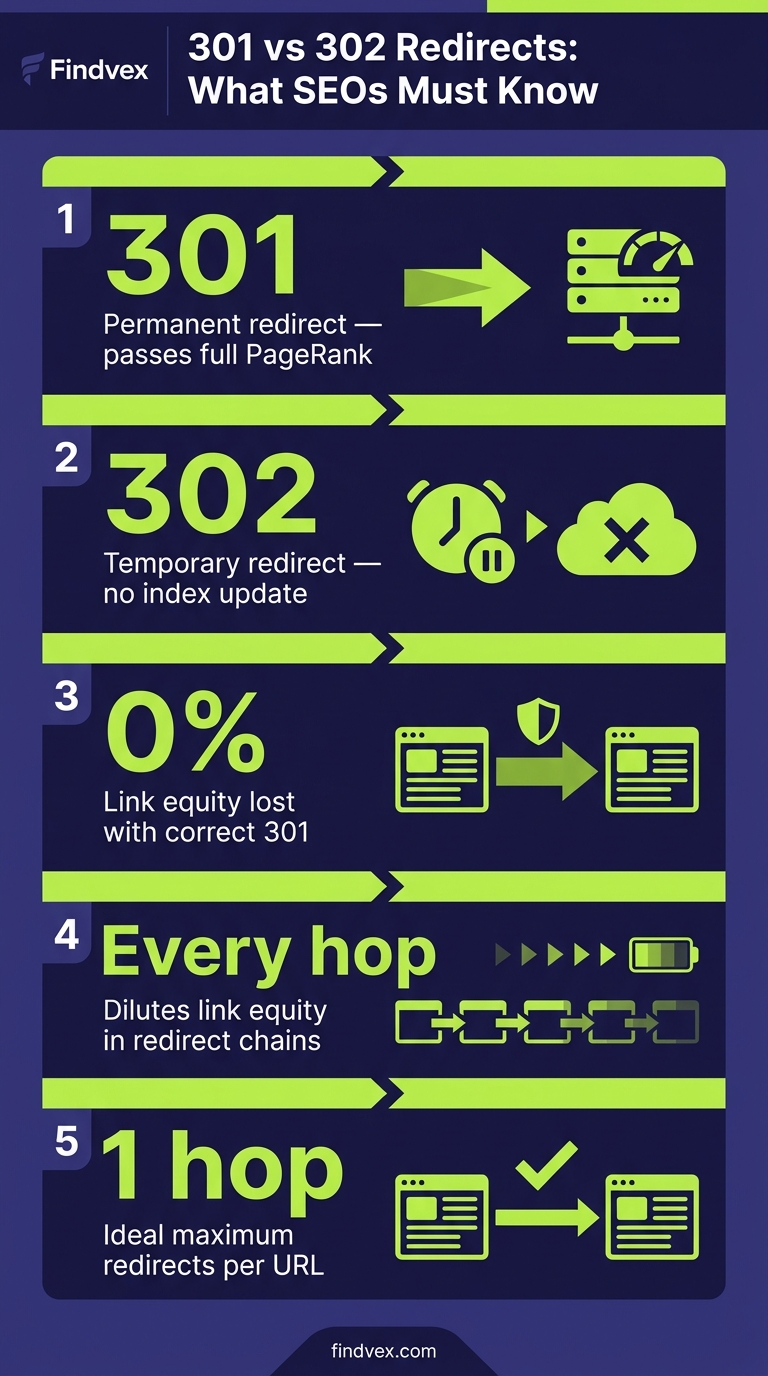
A 301 (Moved Permanently) tells Google: 'This page has moved for good. Update your index, consolidate any link signals here, and stop crawling the old URL.' Google treats the destination URL as the canonical version and transfers the majority of PageRank accumulated by the original URL.
A 302 (Found, sometimes called Moved Temporarily) tells Google: 'This page is temporarily somewhere else. Keep the original URL in your index because it will be back.' PageRank stays associated with the origin URL — which is exactly what you want for a legitimate temporary redirect, and exactly what you don't want when the move is permanent.
There is also a 307 (Temporary Redirect), which is the HTTP/1.1 equivalent of 302 and respects the original request method more strictly. For most small business website purposes, the practical SEO behavior of 302 and 307 is similar — both signal a temporary state.
- 301 = permanent move → Google consolidates PageRank to destination, updates index
- 302 = temporary move → Google retains PageRank at origin, keeps original in index
- 307 = temporary redirect (HTTP/1.1) → same SEO behavior as 302 in most cases
- 308 = permanent redirect (HTTP/1.1) → same SEO behavior as 301 in most cases
“AI agents do in hours what teams used to do in weeks. The advantage compounds.”
When to Use a 301 Redirect (Permanent)
Use a 301 any time a URL change is intended to last longer than a few weeks, or whenever you want Google to rank the new URL instead of the old one. The overwhelming majority of redirects on a small business site should be 301s.
The most common scenarios where a 301 is the correct choice:
- HTTP to HTTPS migration — every HTTP URL should 301 to its HTTPS equivalent
- Non-www to www consolidation (or vice versa) — choose one preferred version and 301 the other
- URL slug changes — if you rename a page from /services/plumbing-repair to /plumbing-repair, use a 301
- Domain migration or rebrand — old domain 301s to new domain for every page, not just the homepage
- Deleting a page that has backlinks — 301 to the most relevant live alternative rather than letting it 404
- Consolidating duplicate content — 301 the duplicate to the canonical version (or use a canonical tag; both have tradeoffs)
- CMS platform changes — e.g., WordPress to a new platform where URL patterns change
When to Use a 302 Redirect (Temporary)
Legitimate uses of 302 are narrow. The redirect should be used when you genuinely intend to restore the original URL, and the detour is short — days to a few weeks, not months.
In practice, many 302s on small business sites are accidents: a developer defaulted to 302, a plugin used 302, or someone set up a redirect without checking which type. If you find a 302 that has been in place for more than 30 days and the original URL is not coming back, change it to a 301.
- A/B testing a new page design — redirect to variant while test runs, then remove or make permanent
- Maintenance mode — redirect to a holding page while work is done (hours or a day, not weeks)
- Seasonal or event-based redirects — e.g., a holiday landing page that replaces a regular page only during a specific window
- Geo-based or device-based redirects — if you redirect users to a different URL based on location or device, use 302 so Google indexes the original URL rather than the redirected version
How PageRank Flows (or Leaks) Through Redirects
Google has confirmed that 301 redirects pass the 'vast majority' of PageRank. The exact figure is not published, and historical statements from Google engineers have varied over the years — so treating redirects as perfectly lossless is not accurate, but the loss per well-implemented single-hop 301 is small enough to be negligible in most cases.
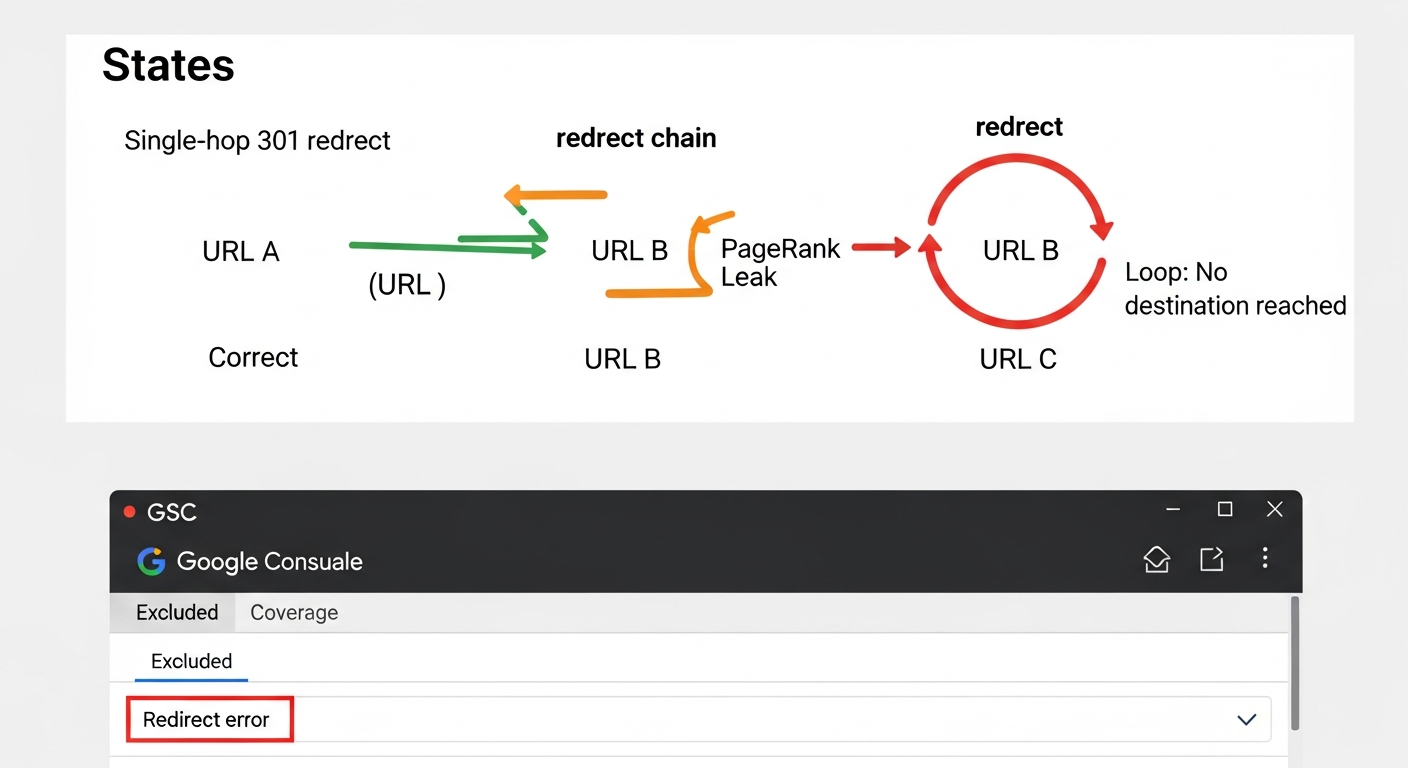
The problem is chains. If URL A → URL B → URL C, each hop introduces a potential loss and a crawl delay. Googlebot may follow the chain, but it may also stop after a certain number of hops or de-prioritize the crawl. More importantly, any backlinks pointing to URL A now have to traverse multiple hops before their equity reaches URL C — the page that actually needs it.
For a small business site with 50–200 pages, a redirect chain that adds two or three hops to a key service page is a real problem, not a theoretical one. It's measurable as lower crawl frequency and slower PageRank consolidation after a site migration.
Redirect loops are a separate failure mode: URL A redirects to URL B which redirects back to URL A. Browsers and crawlers detect these and return an error. No PageRank reaches any destination.
Redirect Audit Diagnosis Checklist
Work through this checklist before assuming your redirect setup is clean. These are the most common failure patterns on small business sites.
- [ ] Homepage HTTP → HTTPS check: does http://yourdomain.com redirect directly to https://yourdomain.com in one hop?
- [ ] www consolidation: does http://www.yourdomain.com and http://yourdomain.com both resolve to the same preferred version without creating a chain?
- [ ] Old blog post or page URLs: after any CMS migration or permalink change, do old URLs 301 to the correct new URLs?
- [ ] 302s masquerading as permanent: run a crawl (Screaming Frog free tier handles up to 500 URLs) and filter for 302 status codes — review each one
- [ ] Chain length: any URL requiring 3 or more hops to reach its final destination is a priority fix
- [ ] Redirect loops: check for circular chains in your crawl report (Screaming Frog flags these in the redirect tab)
- [ ] Canonical + redirect conflicts: a URL that has a canonical tag pointing to URL B but also redirects to URL C sends mixed signals — resolve to one consistent destination
- [ ] Internal links pointing to redirecting URLs: internal links should target final destination URLs, not URLs that then redirect
What to Check in Google Search Console
Google Search Console surfaces redirect problems in several places. Here's where to look and what each signal means.
- Coverage report → 'Excluded' tab: look for pages listed as 'Redirect error' — these are URLs GSC followed into a problematic redirect
- Coverage report → 'Valid' pages: if you recently migrated URLs and old URLs are still appearing as indexed, your 301s may not have been implemented or may be configured as 302s
- URL Inspection tool: paste any URL you suspect has a redirect issue. The tool shows the exact HTTP response code, whether Googlebot can reach it, and what canonical Google selected. Run this on both old and new versions of migrated URLs
- Core Web Vitals report: redirect chains add latency. If a key page shows poor performance metrics, check whether a multi-hop redirect is adding load time before the real page is even requested
- Sitemaps: your XML sitemap should only contain final destination URLs that return 200 status codes — not URLs that redirect. If redirecting URLs appear in your sitemap, GSC will flag them. See our guide on XML sitemap best practices for the full rules on what belongs in a sitemap
- Links report: check that high-value backlink landing URLs (the URLs receiving the most external links) are not themselves redirecting — if they are, confirm those 301s are clean single-hop redirects
How to Fix Redirect Chains: Step-by-Step
Fixing a redirect chain means collapsing it: instead of A → B → C, you implement A → C directly. You do not need to touch URL B unless B itself is linked to externally or internally.
Here is the operational sequence to work through it without breaking anything.
- Step 1 — Crawl the site: use Screaming Frog (free up to 500 URLs) or a similar tool. Export all redirects. Sort by 'Redirect Chain' to identify URLs with more than one hop.
- Step 2 — Map the chain: for each chain, identify the origin URL (A), every intermediate URL (B, B2, etc.), and the final destination URL (C). Your goal is A → C.
- Step 3 — Update the redirect rule at A: in your .htaccess file, nginx config, Cloudflare redirect rules, or WordPress plugin (e.g., Redirection plugin), change the rule for URL A to point directly to URL C.
- Step 4 — Verify intermediate URLs: if URL B has its own backlinks or internal links, add a direct B → C rule as well. If B has no external equity and no internal links, the B → C rule can stay as-is — it's now only one hop and not part of a chain.
- Step 5 — Fix internal links: search your CMS for any internal links still pointing to URL A or URL B. Update them to point to URL C. Internal links should never pass through redirects — they waste crawl budget and add unnecessary latency.
- Step 6 — Re-crawl and verify: run Screaming Frog again after changes. Confirm the chain is gone. Then use GSC URL Inspection on URL A to verify the redirect resolves in a single hop.
- Step 7 — Submit updated sitemap: if your sitemap contained any redirecting URLs, regenerate it and resubmit in GSC.
Risk Level for Each Fix Type
Not all redirect fixes carry the same risk. Here's how to prioritize and what to watch out for.
- Changing a 302 to a 301 (no URL change) — LOW RISK. You're only updating the HTTP response code. The origin and destination URLs stay the same. Safe to do in any redirect manager or .htaccess.
- Collapsing a redirect chain — LOW-MEDIUM RISK. Low risk if you've mapped the chain correctly and update the rule carefully. Medium risk if you accidentally break a step in the chain by updating the wrong rule or misidentifying the final destination URL. Test with a redirect checker tool before publishing.
- Updating internal links from old to new URLs — LOW RISK. No server configuration involved. The only risk is missing some instances, which is why a crawl tool check is useful post-implementation.
- Domain-level redirect changes (e.g., updating rules during or after a migration) — HIGH RISK. An error here can take large portions of your site offline or create site-wide loops. Test in a staging environment first and make changes outside peak traffic hours. Have a rollback plan.
- Removing redirects entirely (pointing old URLs to 404) — MEDIUM-HIGH RISK if those URLs have any backlinks. A 404 does not pass PageRank. If backlinks are pointing to an old URL, keep the 301 in place rather than removing the redirect.
Developer Handoff Notes
If you're a business owner handing this work off to a developer or web agency, here's what to communicate clearly to avoid misconfiguration.
- Specify the HTTP status code explicitly: never say 'set up a redirect' without stating 301 or 302. Default behavior varies by platform and developer assumption.
- Provide a redirect map spreadsheet: three columns — Source URL, Destination URL, Status Code. Every row is one redirect rule. This removes ambiguity and makes it auditable.
- Request a pre-deployment test: the developer should verify each rule in a staging or testing environment using a redirect checker (e.g., httpstatus.io or Screaming Frog) before pushing to production.
- Confirm .htaccess or server config changes are backed up before edits: a misconfigured redirect rule in Apache .htaccess can take down a site. The original file should be committed to version control or manually backed up.
- Ask for a post-deployment crawl report: within 48 hours of changes going live, request a Screaming Frog export confirming zero chains and correct status codes. This is a reasonable deliverable to include in any migration or technical SEO contract.
- WordPress note: if the site uses WordPress, the Redirection plugin (by John Godley) is a reliable redirect manager that logs hits and provides a visual audit trail — preferable to editing .htaccess directly for non-developers.
4 Redirect Mistakes That Show Up in Almost Every Small Business Audit
These patterns come up repeatedly during technical SEO audits. If you haven't checked your site for them yet, assume at least two apply.
- 1. The forgotten 302: a developer set up a redirect 'temporarily' six months ago and never changed it. Google is still treating the original URL as the canonical version and not consolidating PageRank to the destination. Fix: change to 301.
- 2. The HTTPS migration chain: HTTP → HTTPS is implemented, but non-www HTTP → www HTTP → www HTTPS creates three hops instead of one. Fix: implement a single rule that redirects all non-HTTPS non-www URLs directly to the https://www version.
- 3. The sitemap with redirecting URLs: the XML sitemap lists old URLs from before a permalink change. GSC flags these as errors, and Googlebot wastes crawl budget recrawling pages that just bounce to somewhere else. Fix: regenerate the sitemap from the CMS to include only live 200-status URLs.
- 4. Internal links pointing to old redirecting URLs: after a URL change, the internal links on the site still point to the old address. Googlebot follows these links, hits a 301, then follows through to the final destination — every internal link adds an unnecessary round-trip. Fix: use a crawl tool to find internal links returning non-200 codes and update each one to the final URL.
How Redirect Issues Interact With the Rest of Your Technical SEO
Redirect problems rarely exist in isolation. They compound with other technical issues in specific ways worth understanding.
Crawl budget: every redirect adds a request before Googlebot reaches actual content. On a small site with limited crawl allocation, a site-wide chain pattern (e.g., every HTTP URL in the sitemap redirecting through two hops) measurably reduces how many pages get crawled per day. If you're working through crawl budget issues, fixing redirect chains is typically one of the first line items.
Duplicate content: a site that resolves on both www and non-www without proper 301 consolidation creates two versions of every page. If canonical tags are also missing or misconfigured, Google has to decide which version to index. Sometimes it chooses wrong. The fix is a 301, not just a canonical tag — though using both together is belt-and-suspenders.
Link equity after a domain migration: the most critical redirect scenario for a small business is a full domain migration (old domain to new domain). Every page on the old domain needs a 301 to the corresponding page on the new domain — not just the homepage. A homepage-only redirect leaves all the PageRank on interior pages stranded. This is one of the most common and costly migration mistakes.
If you want to understand how all of these issues fit into a broader technical health check, the technical SEO audit checklist for small business websites covers the full scope of what should be reviewed alongside redirects.
FAQs
Does a 301 redirect pass 100% of PageRank to the destination?
Not exactly. Google has stated that 301 redirects pass the 'vast majority' of PageRank, but has not published a precise figure. The loss from a single, well-implemented 301 is small enough to be negligible in practice. The bigger concern is redirect chains — multiple hops each introduce potential loss and crawl friction, which is why collapsing chains to a single direct 301 matters.
How long does it take Google to process a 301 redirect and update its index?
It varies based on crawl frequency for your site. For well-crawled pages on active sites, Google typically recrawls and updates its index within days to a few weeks of a 301 being implemented. For lower-priority pages or slower sites, it can take longer. You can speed this up by submitting the new URL for indexing in Google Search Console using the URL Inspection tool and by ensuring the new URL is in your XML sitemap.
What happens if I accidentally use a 302 instead of a 301 for a permanent change?
Google will likely keep the original URL in its index and not consolidate PageRank to the destination. For a single page that's been incorrectly 302'd for a short time, the fix is straightforward: change it to a 301. If a 302 has been in place for months, Google may have already figured out the move is permanent and treated it like a 301 — but this is not guaranteed. Always use the correct code from the start rather than relying on Google to infer intent.
Can I just use canonical tags instead of 301 redirects?
Canonical tags and 301 redirects solve related but different problems. A canonical tag tells Google which version of a page to prefer for indexing — but the original URL remains accessible. A 301 removes the original URL from service and sends users and crawlers to the new location. For duplicate content where both URLs should remain accessible (e.g., a product page accessible via multiple URL paths), canonical tags are appropriate. For URL changes where the old address should no longer exist, use a 301. Using both together on migrated URLs is a reasonable belt-and-suspenders approach.
How many redirects in a chain is too many?
Two hops is the practical limit before it starts to matter for SEO. Three or more hops is a clear problem — Google may not follow the full chain on every crawl, and each hop introduces latency. The goal is always a single direct redirect from the original URL to the final destination. There is no legitimate reason for a chain longer than two hops on a well-managed site.
Does Googlebot follow 302 redirects?
Yes, Googlebot follows both 301 and 302 redirects. The difference is what it does with the information afterward. After following a 302, Googlebot retains the original URL as the indexable version and does not consolidate PageRank to the destination. After following a 301, it treats the destination as the canonical URL and updates its index accordingly.
Should I keep 301 redirects in place forever after a site migration?
Yes, for any URL that received external backlinks or significant internal links, keep the 301 indefinitely. Removing a redirect turns the original URL into a 404, which means any backlinks pointing to it stop contributing PageRank. The overhead of maintaining redirect rules is minimal compared to losing link equity. The only reason to remove a 301 is if you are confident the original URL had no external links and is not referenced anywhere, and you want to clean up your redirect configuration.
How do I find redirect chains on my site without a paid tool?
Screaming Frog SEO Spider has a free tier that crawls up to 500 URLs. After crawling your site, go to Reports > Redirect Chains to see a list of all multi-hop chains. For sites under 500 pages, this covers the full site. You can also use the URL Inspection tool in Google Search Console to check individual URLs — it shows the exact redirect path Googlebot followed. For a manual spot-check, the free tool at httpstatus.io lets you check a single URL's redirect chain without installing anything.
Related reading
Research notes
Background claims used while researching this article. Verify with the cited authorities before quoting.
- Google has confirmed that 301 redirects pass the 'vast majority' of PageRank
- Google may not follow a redirect chain beyond a certain number of hops or may de-prioritize the crawl
Marcus Chen
Head of Technical SEO · Findvex
Marcus Chen heads technical SEO at Findvex. He writes about Core Web Vitals, indexing, schema, and JavaScript SEO — translating Google’s documentation into checklists small business owners can actually act on.
Expertise: Core Web Vitals · Indexing & crawlability · Schema / structured data · JavaScript SEO
Related reads
Answer Engine Optimization (AEO): The 2026 Guide for Small Businesses
Learn answer engine optimization (AEO) in 2026. This practical guide helps small businesses get found in AI search, voice assistants, and answer engines.
SEOGenerative Engine Optimization (GEO): The 2026 Guide for Small Businesses
Learn how generative engine optimization helps small businesses get found in AI search. Our 2026 GEO guide covers strategies, tactics, and tips to boost visibility.
SEOSEO Agency in USA: AI-Powered SEO for Small Businesses | Findvex
Findvex is a leading SEO agency in USA delivering AI-powered SEO strategies that help small businesses rank higher, drive traffic, and grow revenue. Get started today.