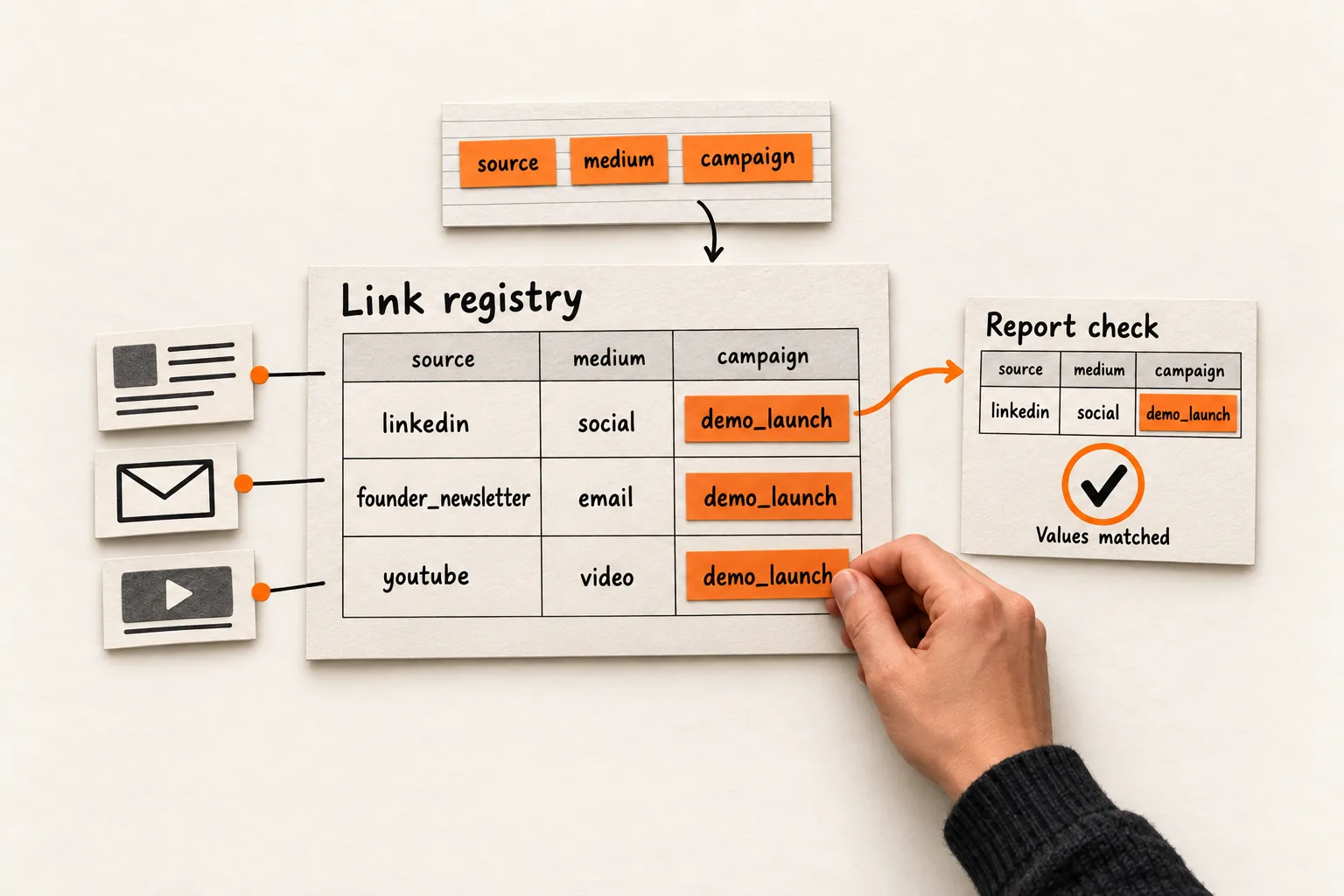
Give each distribution link three consistent labels: source, medium, and campaign. Add content when you need to distinguish placements, and save the finished URL in a shared spreadsheet.
That gives a solo founder a manageable UTM naming convention for unpaid posts, emails, and videos. A LinkedIn post, newsletter button, and YouTube description can promote the same demo while keeping their traffic distinguishable in reports. The worksheet below covers manually tagged links to your website.
Give each UTM field one job
UTM parameters are labels appended to a destination URL. Google Analytics can use them to identify incoming campaign traffic. Google recommends including utm_source, utm_medium, and utm_campaign; utm_content distinguishes creative variations or links. Parameter values are case sensitive. Google’s campaign URL documentation
Use this working dictionary:
| Field | Question it answers | Example |
|---|---|---|
utm_source |
Where did you place the link? | linkedin |
utm_medium |
What kind of distribution was it? | social |
utm_campaign |
Which initiative does it belong to? | demo_launch |
utm_content |
Which asset or placement does this link identify? | walkthrough_post_01 |
Treat the first three as required in your workflow. Add content when you expect to compare multiple links within an initiative. Leave utm_term out of this starter system; Google defines it as a paid keyword field. Google’s parameter definitions
Keep the campaign name stable across channels. A LinkedIn post and an email promoting the same demo can both use demo_launch. Their source and medium distinguish how you distributed them.
Choose a new campaign when the initiative changes, such as a separate launch. If you intend to evaluate a recurring promotion separately each month, use a name such as demo_series_2026_10. You do not need a new campaign for every post.
Write a dictionary small enough to remember
Create a spreadsheet tab called Dictionary. Start with the places you use:
| Placement | Source | Medium |
|---|---|---|
| Unpaid LinkedIn post | linkedin |
social |
| Your founder newsletter | founder_newsletter |
email |
| Unpaid YouTube description | youtube |
video |
These medium choices match Google’s published manual traffic rules: social is a recognized Organic Social medium, email can identify Email traffic, and a medium containing video can identify Organic Video traffic. Classification also considers source and other rules, so check the resulting channel in your property. GA4 default channel definitions
Use lowercase letters and numbers, with underscores between words. Lowercase prevents avoidable case differences; underscores are a house style. Keep hyphens if you already use them consistently.
Choose one spelling per source, such as linkedin, and reuse it. Give campaigns descriptive names that will make sense a month later. Put asset detail in content: walkthrough_description_01 tells you more than link_1.
Avoid creating a medium such as founder_post or launch_email to describe an asset. Put that detail in content so the medium dictionary stays small.
Keep personal information out of every value. A recipient’s email address should never become a campaign or content label. Google prohibits sending personally identifiable information through campaign parameters. Google’s guidance on PII
Copy a registry for your approved links
Add a second tab called Links. Each row represents one destination and placement combination. Copy this CSV header and sample row into a sheet. The example domain is illustrative; replace it with your destination before testing.
link_id,planned_date,destination_url,utm_source,utm_medium,utm_campaign,utm_content,final_url,placement_reference,verification_status,notes
demo_li_01,,https://example.com/demo,linkedin,social,demo_launch,walkthrough_post_01,https://example.com/demo?utm_source=linkedin&utm_medium=social&utm_campaign=demo_launch&utm_content=walkthrough_post_01,,untested,
Use dropdowns for source and medium, drawing from the dictionary. Copy campaign names from an existing row when the initiative is unchanged. A solo founder can manage this without an approval column or a separate owner for every link.
Give verification status three options:
| Status | Completion condition |
|---|---|
untested |
The link is assembled but has not been checked. |
destination_checked |
The distributed version opens the intended page with its campaign parameters intact. |
report_checked |
The expected campaign, source, medium, and any content value have been found in analytics. |
Keep the clean destination and tagged URL in separate cells. Copy final_url when preparing a post or email. Add the live post URL or email reference to placement_reference when available, and record test dates and findings in notes.
If you discover a naming mistake, correct future links and record the old value as an alias in your notes, along with the correction date. Changing the spreadsheet does not update links you already distributed. Use the placement reference to find links you can still repair.
Work through one demo across three placements
Suppose you run an AI tool that summarizes customer interviews. You plan to share a new demo through LinkedIn, your newsletter, and YouTube. This is a hypothetical campaign, with all three links pointing to https://example.com/demo.
Use demo_launch as the campaign on every row:
| Placement | Source / medium | Content |
|---|---|---|
| LinkedIn walkthrough | linkedin / social |
walkthrough_post_01 |
| Newsletter main button | founder_newsletter / email |
demo_button_01 |
| YouTube description | youtube / video |
walkthrough_description_01 |
The LinkedIn URL becomes:
https://example.com/demo?utm_source=linkedin&utm_medium=social&utm_campaign=demo_launch&utm_content=walkthrough_post_01A URL builder can assemble your real version. Preserve any existing query parameters and check the complete URL before sharing it. Google’s documentation explains manual construction and links to URL builders. Campaign URL setup
Prepare the registry alongside the content. The FindVex guide to adapting one insight for LinkedIn, email, and a community can help you plan the variations.
For a reporting exercise, assume you have tested a signup event that fires once per completed signup. The following numbers are invented for illustration. They represent sessions and signup event counts grouped by session source and medium, filtered to the same campaign and reporting period.
| Session source / medium | Sessions | Signup event count |
|---|---|---|
linkedin / social |
80 | 4 |
founder_newsletter / email |
40 | 6 |
youtube / video |
25 | 1 |
The newsletter row has the most recorded signup events in this example. That observation alone cannot establish your best acquisition channel. Newsletter readers may already know the product, the audiences were not randomly assigned, and the table does not explain why someone signed up.
A reasonable follow-up would be to repeat the newsletter placement while reviewing whether the LinkedIn post and landing page make the same promise. The table does not establish a landing-page problem. Keep the campaign definition and signup measurement consistent, and use the next reporting period to decide whether either action deserves more work.
Verify the destination and analytics values separately
Before distributing each link, check:
- Source and medium match the dictionary exactly.
- Campaign matches the other links in the initiative.
- Content distinguishes the placement you intend to compare.
- The URL contains no personal information or duplicate UTM fields.
- The final link opens the intended destination.
- Any redirect, email wrapper, or short link preserves the intended campaign parameters when the landing page loads.
- Analytics collection and the signup event have been tested.
Test the actual version you will distribute. Start in a fresh browser context, account for consent settings and analytics filters, and note the test time in the registry. Completing this destination check earns destination_checked; leave the report check pending until you can find the values.
After processing, open GA4’s Traffic acquisition report. Inspect Session source / medium and Session campaign, and check the session channel grouping. Traffic acquisition covers sessions from both new and returning users; User acquisition focuses on their first acquisition. Google’s Traffic acquisition guide
For placement comparisons, also inspect Session manual ad content in a report or exploration. Google maps utm_content to that dimension. Finding the campaign alone does not verify the content label. Google’s manual tagging dimensions
To reproduce the signup comparison, select your tested signup event in the Event count selector. Keep the same campaign filter, date range, and session dimensions across rows. An all-events total includes other interactions and cannot stand in for completed signups. Google’s scope documentation explains how selecting a specific event changes the count shown alongside session dimensions. Traffic-source scopes and event counts
If an expected row is missing, inspect the URL, collection settings, filters, date range, and report scope before changing the naming convention. Google says processing can take 24 to 48 hours, during which report values may change. GA4 data freshness
Once the expected values appear, set the row to report_checked and record where you found them. That confirms the tagging check; it does not validate every aspect of signup tracking.
Know what consistent tags cannot tell you
A tagged URL carries the labels you assigned. If someone forwards your newsletter link into a group chat unchanged, those labels still describe the newsletter placement. UTMs cannot reconstruct every conversation or exposure that influenced a visit.
Keep this system focused on external distribution. Use click events to measure navigation within your own site. GA4 distinguishes user, session, and event attribution; campaign information encountered during a session can affect event attribution without changing that session’s source. Google’s explanation of traffic-source scopes
This three-field starting point also leaves some dimensions unpopulated. Google recommends setting all relevant parameters, including utm_id and utm_source_platform; missing parameters can produce (not set) values. Add fields when your reporting or integration requires them. Google’s UTM guidance Paid campaigns and advertising integrations need a separate review before you apply this manual workflow.
Set up and test your next three links
Create the dictionary and enter three planned placements in the registry. Check each destination, then follow one test through to its campaign, source, medium, and content values in analytics.
Your first completion target is three registered links and one verified report row. Put a review date in the sheet. At that review, fix naming errors and choose one distribution task based on the recorded sessions and signup events, keeping the limits of the comparison beside the decision.