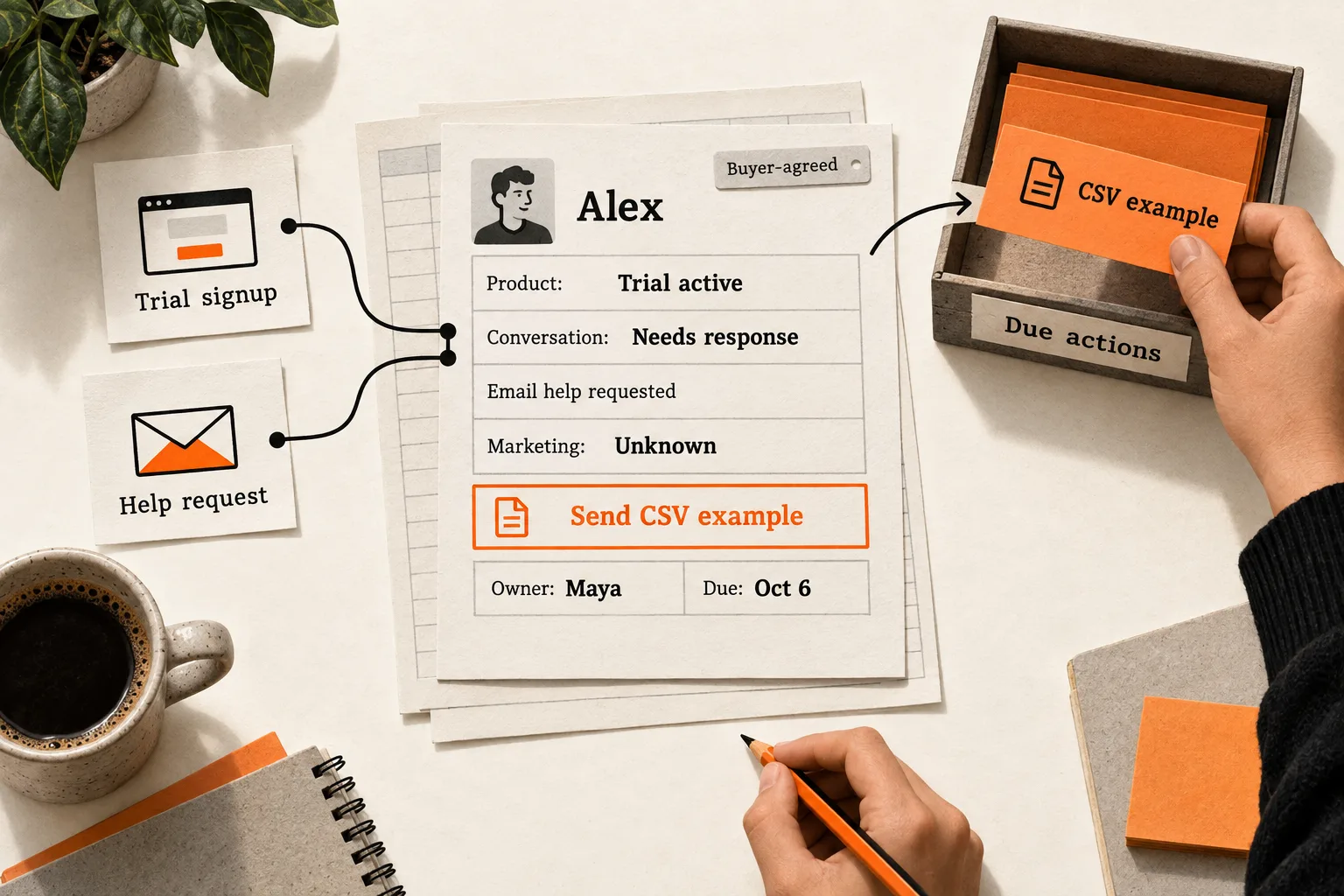
A trial signup tracking spreadsheet gives your team one place to see who needs a response, what you promised, and who owns the next step. Start with the contacts you are actively helping or evaluating, using Google Sheets or another spreadsheet your team already uses.
Keep product activity separate from the conversation. A person can have an active trial, need import help, and have no interest in a sales call. Your record should make those distinctions clear before anyone sends another message.
Give each contact one working record
Use one row per person, with an account or workspace ID to connect people from the same company. Assign a stable contact ID so an email address change does not create a second person.
Before adding a signup or reply, search for an existing record. If someone first replied to outreach and later started a trial, update that row. Preserve the original source and add the trial details. Otherwise, two owners may send unrelated messages to the same person.
Do not merge people just because they share a company domain. A product evaluator and a purchasing contact may have different questions and commitments. When several people share one trial, use the same workspace ID and count that workspace once in account-level reporting.
Use the spreadsheet for the current summary. Link to the email thread and product record instead of copying entire conversations into cells. If you need a change history, add an activity tab with contact ID, date, event, and author.
Copy the contact tracking template
Use these column names for your first sheet. Each name separated by a comma is a separate column; the block can also serve as the header row of a CSV file.
Contact ID,Email,Workspace ID,First source,First seen,Trial start,Trial end,Product state,Activation evidence,Conversation state,Contact scope,Contact scope evidence,Marketing preference,Marketing preference evidence,Owner,Last exchange,Thread link,Next action,Commitment,Due date,Updated atThe fields have different jobs:
| Fields | What to record |
|---|---|
| Contact ID; Email; Workspace ID | Stable identifiers and the address used in the conversation |
| First source; First seen | Where the contact entered your process and when |
| Trial start; Trial end | Actual product dates; leave blank when no trial exists |
| Product state | No trial, trial active, trial ended, or paid |
| Activation evidence | The observed useful action, its date, and a product-record link; use unknown when evidence is missing |
| Conversation state | Needs response, waiting on contact, scheduled, paused, or closed |
| Contact scope; Contact scope evidence | What communication was requested or accepted, plus dated evidence and a source link |
| Marketing preference; Marketing preference evidence | Opted in, opted out, or unknown, plus dated evidence and a source link when available |
| Owner | One named teammate responsible for the record |
| Last exchange; Thread link | Date of the most recent meaningful exchange and where to read it |
| Next action; Commitment | A specific task, labeled buyer-agreed or internal |
| Due date; Updated at | When the task is due and when someone last checked the row |
Product state and conversation state answer different questions. Someone can be paid and still need a response. Another person can have an active trial but no sales conversation.
Define activation for your product before filling that field. For an AI reporting tool, it might mean generating and saving a usable report from the user’s own data. Record the observed event separately from your interpretation of buying interest. An attempted import is evidence of an attempt; it does not establish that the user got a useful result.
In Google Sheets, use dropdowns for fields with fixed options. Data validation can reject entries outside the list, helping you avoid labels such as waiting, pending, and awaiting reply for the same state. See Google’s dropdown instructions.
Write next actions so another teammate can carry them out. Send the CSV import example Alex requested gives them a task. Follow up requires them to reconstruct the conversation.
Record contact scope without guessing
A request for import help, a newsletter subscription, and an agreement to review pricing are different events. Record each accurately. As a team rule, do not treat a trial signup or a helpful reply as a newsletter opt-in.
Useful contact-scope entries include Requested import help by email, Agreed to a pricing call, and No follow-up agreement recorded. Put the date and supporting link in the evidence field. Use unknown for a marketing preference you cannot verify.
US commercial email rules apply to business-to-business messages. The FTC distinguishes commercial messages from narrowly defined transactional or relationship messages by their primary purpose. An existing account does not automatically make every email transactional. Its guidance requires honoring marketing opt-outs within 10 business days. These fields support recordkeeping; they are not a complete compliance system. See the FTC’s CAN-SPAM guide.
Process opt-outs as soon as you see them. Update the sending system as well as the sheet, cancel queued promotional follow-ups, and preserve the suppression status when importing records again. Changing a spreadsheet cell alone does not stop another tool from sending.
Make ownership survive a handoff
Assign one owner even when two people contribute. That person checks that the next action happened and updates the record after the exchange.
Separate commitments made with the buyer from your team’s internal reminders. If a prospect asks you to reconnect next Tuesday, record that agreement. If you decide to review a quiet trial on Tuesday, label it an internal review. Your reminder is not evidence that the prospect wants a call.
When work changes hands, have the receiving teammate acknowledge ownership. Until then, the current owner remains responsible. Include the question being answered, the promised deliverable, and the due date in the handoff.
Use a shared date convention, such as YYYY-MM-DD. Add a time zone whenever a commitment includes a specific time.
Worked example: one person, two entry points
In this hypothetical example, Maya runs a small AI reporting SaaS with her cofounder, Ben. Alex replies to Maya’s outreach asking whether the product can handle a particular CSV layout. Two days later, Alex starts a trial using the same email address.
Maya finds the existing contact and adds the trial dates. She keeps the first source as founder outreach. The product shows that Alex attempted an import but has not saved a report, so she records that observation without marking activation complete.
Alex requests a sample mapping file, and Maya agrees to send it on October 6. Ben prepares the file while Maya remains responsible for sending it. The record changes as follows:
| Field | Before Maya sends the file | After Maya sends the file |
|---|---|---|
| Product state | Trial active | Trial active |
| Conversation state | Needs response | Waiting on contact |
| Contact scope | Requested CSV mapping help by email | Requested CSV mapping help by email |
| Marketing preference | Unknown | Unknown |
| Owner | Maya | Maya |
| Next action | Send mapping example for Alex’s CSV layout | Review thread and import activity |
| Commitment | Buyer-agreed | Internal |
| Due date | 2026-10-06 | 2026-10-08 |
Maya records the completed delivery in the activity tab before replacing the next action. She updates Last exchange, the thread link, and Updated at. Her October 8 reminder does not mean Alex promised to reply by then.
If Alex later saves a report, Maya updates the activation evidence. She changes product state to paid only when the billing record supports it. A reply, a successful import, and a purchase remain separate observations.
To decide what help belongs in the message, use the related guide to triggering an onboarding email from a missing activation step.
Build a daily queue with clear conditions
Create views that answer specific questions:
| View | Records to include |
|---|---|
| Due actions | A nonblank due date on or before today; conversation state is neither paused nor closed |
| Unanswered replies | Conversation state is needs response, including records without a due date |
| Missing details | Needs response, waiting on contact, or scheduled, with a missing owner, next action, commitment label, or due date |
| Paused conversations | Conversation state is paused; review separately from the daily action queue |
For the missing-details check, inspect each required field for blanks, or use a helper column to flag any missing field. Filtering all those fields to blank at once would miss rows with only one gap.
Google Sheets filter views let teammates save named views and use different filters simultaneously. On a computer, choose Data → Create filter view, set the conditions, and save the view. Google’s filter-view documentation explains the controls.
Each workday, reconcile new trial signups and replies with existing contacts. Process preference changes first, then check due actions against the latest thread. After completing a task, record the result and set the next action or close the conversation. Fix incomplete records before they disappear from attention.
A closed conversation means no action is currently planned. Keep its contact preferences and history. For a paused conversation, record why it is paused and when you will review it; that review is an internal task, not permission to send another message.
Once a week, inspect overdue promises and a few closed conversations. Keep the customer’s stated obstacle separate from your explanation for it. Several import questions may justify investigating onboarding, but a small contact list cannot establish how common that problem is across your market.
If you measure trial conversion, define the cohort and counting unit first. For example, count unique workspaces starting a trial in one week, then observe which became paid within a fixed window. Keep sales replies outside that denominator and give every cohort the same observation period. A sheet containing only contacts you actively help is not a complete trial cohort; use the full product records for that calculation.
Limit access and recognize when you need a CRM
Limit access to people who need these records. In Google Drive, Restricted access limits opening the file to people with access, and sharing roles distinguish viewers, commenters, and editors. Check the parent folder too, because folder permissions are inherited. See Google’s sharing guidance.
Keep passwords, payment details, and unnecessary customer data out of the sheet. Link to the systems that already hold that information.
Consider moving to a CRM when duplicate outreach keeps recurring, ownership changes are hard to track, or several contacts and opportunities make rows ambiguous. Manual updates that consume more attention than the conversations themselves are another reason to reconsider. Requirements for tighter access controls or reliable automation may justify moving earlier.
Start with ten active contacts
Enter ten contacts you are actively helping or evaluating. Give each one an owner, accurate contact preferences, and either a dated action or an explicit closed state. Label internal reminders so they cannot be mistaken for buyer commitments.
Open the due-action view tomorrow. For each row, check whether you can identify the task, the responsible person, and the reason for contacting the customer without rereading the entire thread. Fix the first row that leaves you guessing.