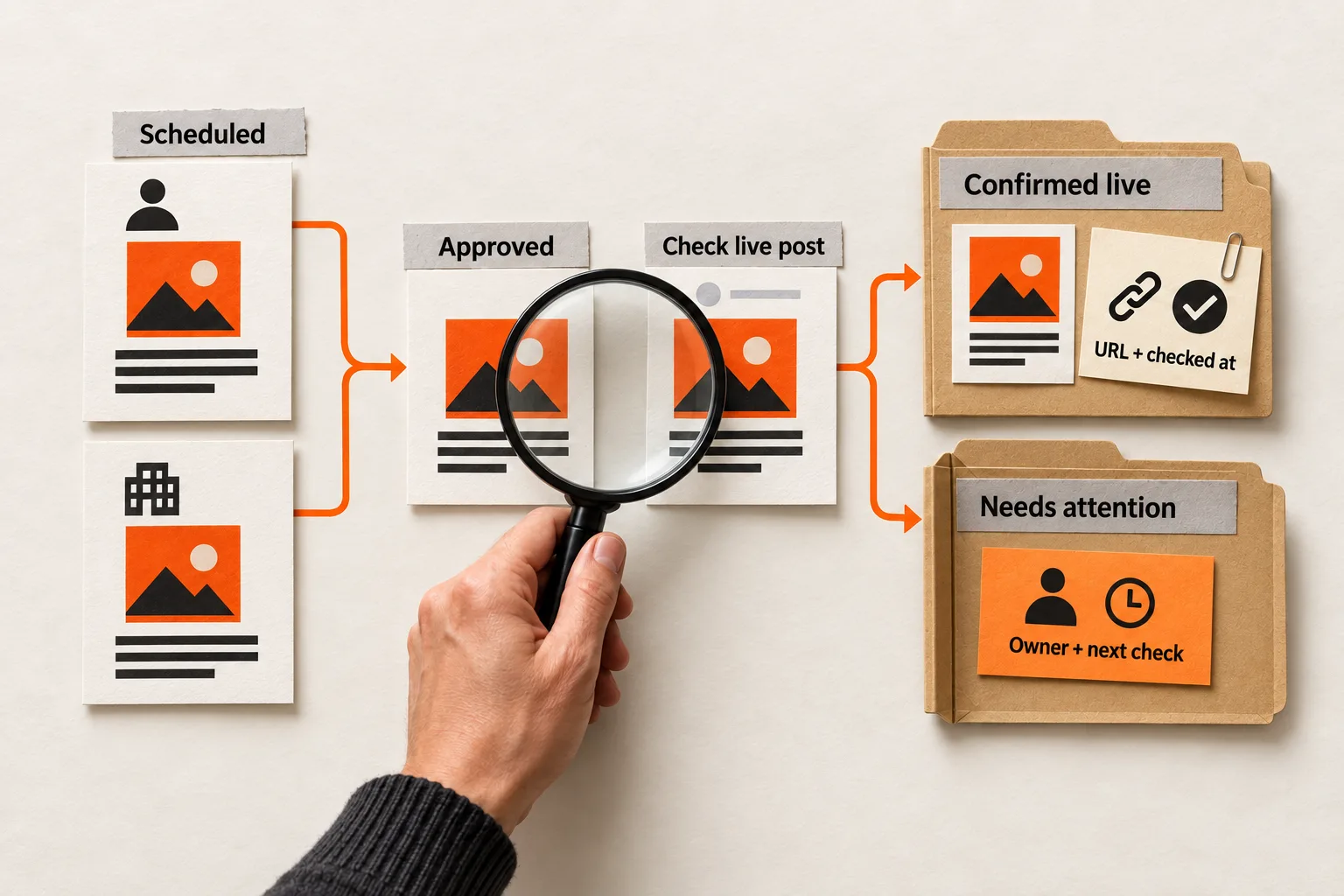
A scheduled announcement still needs a publication check. For a small AI or SaaS team, a shared sheet can record the approved version, the destination account, and the evidence that the intended post appeared.
Social media publication status tracking starts with one row per destination. Assign someone to check each post, and keep the record open until it has either publication evidence or a specific next action.
Give every destination its own record
Track one row per intended post on one account. A founder’s LinkedIn profile and the company LinkedIn Page need separate rows, even when they share an announcement. Connect them with a campaign ID so an individual failure remains visible within the release.
Attach the approved content version to each row. A link to an editable document leaves an unanswered question: which version did the reviewer approve? Use a saved revision, dated snapshot, or version number.
Buffer follows a similar separation: once content for multiple channels has been scheduled, each becomes a separate post that must be edited individually. Buffer’s scheduling documentation
Start with destination account, content version, owner, status, scheduled time and time zone, next check, and publication evidence. Add fields when they help someone resolve a recurring problem.
Define what permits each status change
Use these as your team’s operating definitions. Scheduler labels may differ.
| Status | Evidence required to enter it |
|---|---|
| Draft | A working content version exists. |
| In review | A reviewer has the exact version and a review deadline. |
| Approved | Approval is recorded for that version and destination. |
| Scheduled | The publishing tool shows the correct account, date, and time. |
| Awaiting confirmation | The scheduled time has arrived or publication was attempted; verification is pending. |
| Confirmed live | Someone checked the post on the platform against the approved version and saved evidence. |
| Needs attention | An error, overdue check, or content mismatch requires action. |
| Canceled | The owner recorded a decision to stop publication. |
Keep the tool’s status in a separate field. Buffer’s API documentation distinguishes Scheduled, Sent, and Error. Your tracker can retain a reported Sent status while the team status remains Awaiting confirmation until someone checks the result. Buffer’s post lifecycle documentation
Approval can also trigger scheduling. In Buffer’s approval workflow, Add to Queue uses the next available slot, while Schedule Post uses a preset day and time. Check the resulting schedule when you approve a post. Buffer’s approval documentation
A rejected draft returns to Draft. A substantive change to approved copy, media, claims, or destination returns to In review. If that post is already queued, the owner should pause or remove the pending attempt before seeking approval again; changing the tracker alone does not change the publishing schedule.
After correcting a failure, move the record to Scheduled or Awaiting confirmation according to the next action. Clicking Retry does not satisfy the evidence requirement for Confirmed live.
Set a concrete standard for confirmed live
For an ordinary feed post, save its native URL, the verification time, and the checker’s name. Record the platform post ID if your tool exposes it, keeping it distinct from the scheduler’s internal record ID.
Open the post on the platform and check that it:
- Appears on the intended account with the intended audience setting.
- Contains the approved copy and essential media.
- Includes any required follow-up comment or thread content.
- Sends readers to the intended destination when the link is clickable.
A preview screenshot records the plan. A screenshot of the live post records what the checker saw. Keep the URL too, when available, so someone can inspect the post later.
For temporary formats or posts without a usable permalink, record the native location, account, format, verification time, and a screenshot. State what that evidence captures.
Keep publication time and verification time separate. If the available evidence does not establish when the post appeared, mark publication timing unknown. A check completed at noon does not establish that a post scheduled for 9 a.m. appeared late.
Confirmation establishes availability in the checked context at that time. It does not establish reach, permanent availability, or business impact. If the post is later removed, retain its publication history and add a removal note.
Handle failed, incomplete, and uncertain attempts
Save the tool’s exact error text, then put your diagnosis in a separate field. An authorization error is an observation; a theory about who changed permissions still needs checking.
Before retrying an uncertain attempt, inspect the native account. Buffer documents a specific Facebook error where a post marked failed may already be live, sometimes without its image. Its guidance directs users to check Facebook. This example establishes a reason to inspect that error; it does not show how often other failed statuses conceal successful publication. Buffer’s Facebook error library
Use this recovery sequence:
- Check the native destination and capture what you find.
- If the correct post exists, save its evidence and resolve any remaining queued or failed record according to the scheduler’s instructions.
- If a post exists but is missing required content, keep it in Needs attention. Record the mismatch and have the owner choose a correction or replacement. Check the corrected result before closing the record.
- If publication clearly failed, address the documented cause before another attempt. If the outcome remains unknown, assign another check or a support escalation.
- Before posting manually, inspect and cancel any pending automatic attempt where possible. If you cannot determine whether another attempt is pending, keep the outcome unresolved while you investigate.
Set a retry limit. One deliberate retry after a correctable issue is a possible starting policy for a small team. After that, the owner decides whether to investigate further, reschedule, publish manually, or cancel. Follow any specific waiting guidance from the platform or scheduler.
Every unresolved row needs an owner and a next-check time.
Work through a hypothetical launch
Suppose a two-person SaaS team plans an announcement for a founder’s LinkedIn profile and a company Facebook Page at 9 a.m. Eastern. Maya approves version 3 the previous afternoon. Luis owns publication and verification.
The tracker has two rows under one campaign ID. Each records its destination, approved version, scheduled time, and a 9:15 a.m. verification deadline. That interval is the team’s chosen policy.
At 9:05, Luis opens the LinkedIn post. The account, audience setting, copy, and image match the approved record, and the product link opens correctly. He saves the native URL and verification time, then marks the row Confirmed live.
The Facebook row shows the documented warning that the post may already be live. Luis moves it to Needs attention, saves the message, and checks the Page before retrying. In this hypothetical case, the post is complete and matches the approved record. He saves the URL, marks it Confirmed live, and follows Buffer’s instructions to delete the failed item from the Buffer queue. He retains the error and action in the tracker.
At 9:15, the campaign has two confirmed destinations and one logged publishing discrepancy. Both verification checks met the team’s deadline. Any claim about whether publication itself was on time still depends on evidence of when each post appeared.
If the Facebook post had been missing its image, it would remain in Needs attention until Luis resolved the mismatch. If he could not establish whether it appeared at all, the campaign would show one confirmed destination and one unresolved destination.
Copy this publication record for your next post
Use this template as a sheet row, task description, or database record:
Campaign ID:
Post record ID:
Platform and exact destination account:
Content version / saved revision:
Approved by and approval time:
Publication owner / backup:
Publishing method or tool:
Scheduler record link or ID:
Original scheduled date, time, and time zone:
Current scheduled date, time, and time zone:
Verification deadline:
Tool-reported status:
Team status:
Native post URL / platform post ID:
Publication time and supporting evidence, or unknown:
Verified by and verification time:
Copy, media, audience, and link checks:
Exact error or observed discrepancy:
Diagnosis, if established:
Attempt history:
Next action, owner, and check time:
Cancellation decision and time / later removal note:
For each new attempt, append its time, action, and result to the history. Preserve the original scheduled time when you reschedule so delays remain visible.
A solo founder can combine reviewer and owner roles while still recording approval and verification separately. Put the verification task into your weekly LinkedIn routine so it has a place on the calendar.
Review delivery before judging the content
At the weekly review, record a reporting cutoff and select destination posts whose original scheduled times fell within the period. Keep retries under their original post records.
For a simple delivery measure, divide the number of those posts confirmed by the cutoff by the number due in the period. Exclude cancellations recorded before the original scheduled time from both counts. Keep later cancellations in the denominator and report them separately. If no posts were due, report the measure as not applicable.
For example, suppose five destination posts were due, none was canceled in advance, and four were confirmed by the cutoff. The confirmed share is 4/5, or 80%. The fifth record remains unresolved. This is hypothetical arithmetic, not a performance benchmark.
Within confirmed posts, show known late publication separately from unknown publication timing. Also count overdue verification checks. Those distinctions help you decide whether to fix publishing or follow-through. Use the same counting rules each week and date any later updates to unresolved records.
Evaluate audience response separately, after establishing which posts appeared. The delivery measure describes publishing operations; it cannot explain whether the content persuaded anyone.
Checking every post takes time. A small team may choose to verify each one. If you later sample posts or automate status collection, keep manually verified posts distinct from tool-reported successes.
Start with the next five scheduled posts. Copy the record, assign each a verification deadline and owner, and close each with native evidence or a specific unresolved action.