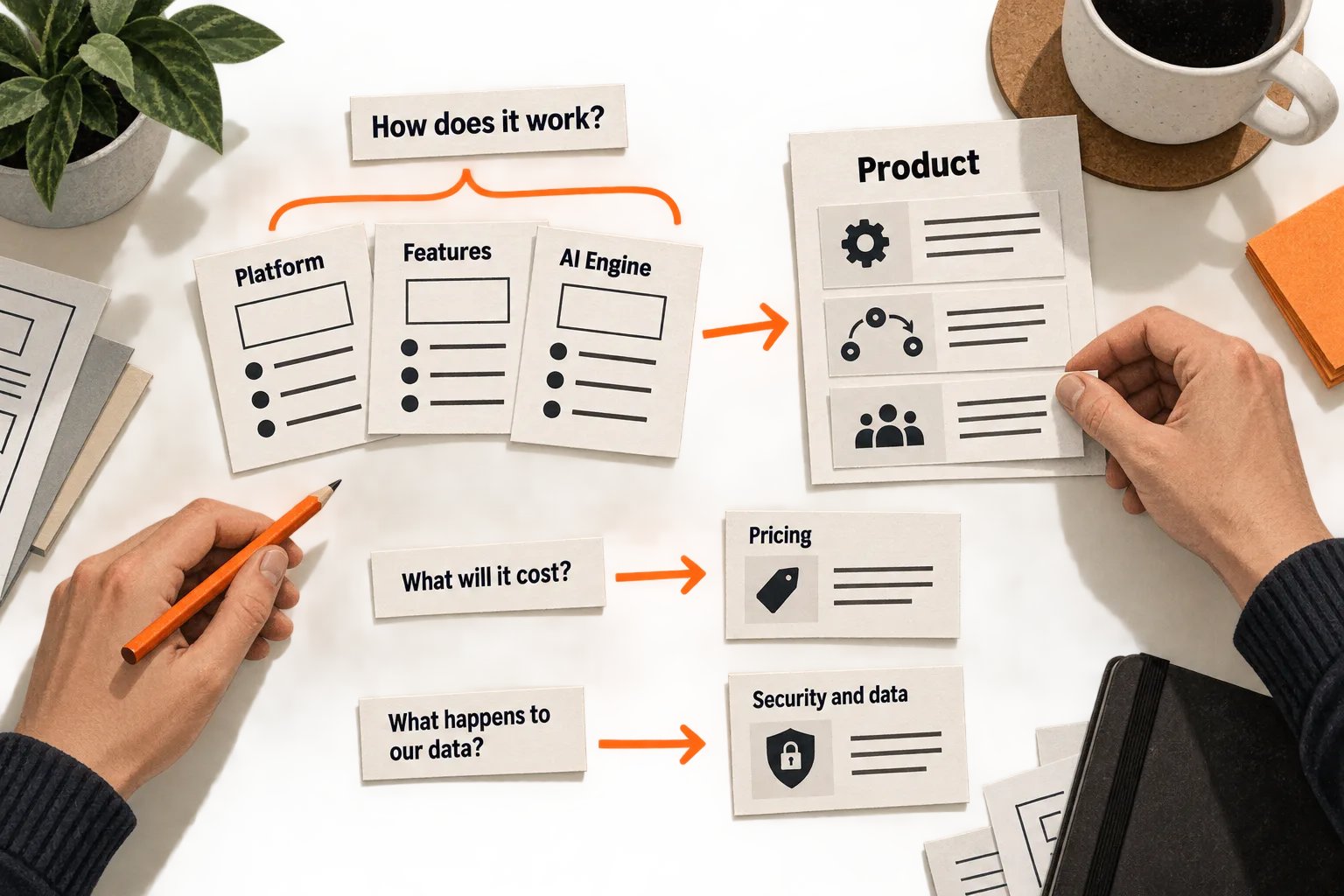
Before writing a Platform, Product, Features, or AI Engine page, put one buyer question beside each proposed destination. If three pages all answer “What does this product do?”, compare their outlines and combine the overlap.
For a small team, SaaS website sitemap planning should produce a page list with a clear purpose for each destination, links between related answers, and an owner who can keep the information current.
Here, “sitemap” means a plan of your website’s pages and their relationships. An XML sitemap is a separate file that helps search engines discover URLs; it does not guarantee crawling or indexing. Google’s sitemap documentation explains that technical use.
Collect questions before naming pages
Choose the buyer and situation the website needs to serve. A developer evaluating an API needs different answers from an operations manager evaluating a tool their team will use without engineering support.
Write a starting statement: “This website helps [buyer] decide whether [product] can handle [task] under [constraint].” Add what they use today, whether that’s a spreadsheet, an existing product, or a manual process.
Collect questions from conversations, support requests, product evaluations, and relevant public discussions. Keep the original wording separate from your interpretation. Record who asked, the context, and the source. A single public comment can suggest a question to investigate; it cannot establish how common that question is among your buyers.
Useful starting questions include:
- Can this handle the work I need to do?
- What would using it involve?
- Does it work with our existing tools?
- What happens to the information we upload?
- What will it cost at our expected usage?
- How can we evaluate it before committing?
Label questions without direct evidence as assumptions. FindVex’s pain-point evidence sheet guide can help you organize observations before turning them into a page plan.
Decide whether each answer needs a page or a section
Assign every question a primary home. Other pages can summarize the answer and link there, but the team should know where the full explanation belongs.
Give a question its own page when the answer needs substantial explanation, distinct evidence, or a destination a buyer would reasonably share directly. Pricing, integration requirements, and data handling can meet those conditions. A minor feature may need only a section within a product walkthrough.
Compare the outlines of any two proposed pages. If their audience, explanation, screenshots, and next step are nearly identical, combine them for the first version.
A Platform page and a Product page can coexist when they do different work. One might explain technical architecture for an engineering evaluator while the other demonstrates a user workflow. If you cannot describe that difference, revisit the page split before writing either one.
A migration guide may deserve its own URL because it must cover prerequisites, transfer steps, and limitations. Those details could be hard to find inside a general product page.
Both choices have costs. Separate pages require more updates and can repeat explanations. Combining everything can bury specific answers in a long page. Choose the structure that gives each important question a clear, maintainable home.
Worked example: consolidate an AI proposal tool’s pages
Suppose a two-person startup is building an AI tool that helps small agencies draft proposals from approved service descriptions. Its initial plan includes Platform, AI Writer, Templates, Brand Voice, Collaboration, Integrations, Pricing, and Security.
In this hypothetical exercise, the tool supports one document integration and requires a person to review drafts before sending them. The founders map their proposed pages to buyer questions:
| Buyer question | Destination | Planning decision |
|---|---|---|
| Is this useful for an agency like ours? | Home | Introduce the task, buyer, and product limits. |
| How do we get from a brief to a reviewed proposal? | Product | Combine Platform, AI Writer, Templates, Brand Voice, and Collaboration into one walkthrough. |
| Can it use our existing documents? | Integrations | Keep a separate explanation of compatibility and setup requirements. |
| What happens to client information? | Security and data | Keep a separate destination for data handling questions. |
| What would our team pay? | Pricing | Explain the cost at relevant usage levels. |
The Product page follows one workflow: supply approved material, generate a draft, adjust it, and review it. Each section explains its part in that process instead of repeating a general promise about faster writing. The former Platform outline contributes any technical explanation needed to understand that workflow.
Integrations stays separate because compatibility could determine whether a buyer continues. With only one supported integration, the page should name it plainly and explain its requirements and limits. An integration directory can wait until there is more to browse.
Security and data needs concrete answers about storage, access, retention, and any use of submitted content for model training. Missing answers become product questions the team must resolve before writing claims.
The resulting plan distinguishes standalone pages from sections:
Home
Product
  Sections: AI Writer, Templates, Brand Voice, Collaboration
Integrations
Security and data
Pricing
Start a trial
About and contact
Help
Privacy
Terms
This structure fits the hypothetical product; it is not a required page count. A tool that needs a guided evaluation could use a demo request instead of a trial. An API product might need documentation much earlier in the buyer’s path.
The team postpones separate industry pages until it can explain a different workflow or requirement for each industry. Changing only the audience name would leave the pages with the same purpose.
Build navigation around the answers buyers need to find
A page can belong on the website without appearing in the header menu.
For the proposal tool, the header could contain Product, Integrations, Pricing, and a trial action. Security and data could be linked from relevant product sections and the footer. If research shows data handling is an early evaluation requirement, test placing it in the main menu.
Use labels that help buyers predict the destination. If “Platform” leaves people unsure whether they will find a demonstration or technical documentation, try a more specific label and observe where they look.
Keep the wording, destination, and order of visible menu items consistent across screen sizes. W3C’s menu structure guidance recommends that consistency and explains how semantic markup conveys menu structure to assistive technology.
Plan links within pages, too. Someone reading about a supported integration may next need setup instructions or pricing restrictions. Put those links beside the relevant explanation. Google recommends descriptive link text and at least one internal link to every page you consider important. Google’s link guidance covers this implementation detail.
Test the page tree before designing the whole site
Show prospective buyers a hierarchy of page labels and ask them to find information for a realistic task. Tree testing evaluates whether people can locate resources in that hierarchy before you build the layouts or write the full content. Prepare the labels, tasks, and intended destination for each task. Nielsen Norman Group’s tree-testing guide explains the method.
For the proposal tool, a task could be: “You need to check whether uploaded client material is used to train models. Where would you look?” Keep the intended destination, Security and data, in your notes rather than naming it in the question.
Record the participant’s first choice, final destination, backtracking, and explanation. A few relevant participants can reveal misunderstandings, but their results do not establish a reliable success rate for your entire market.
Use each observation to choose a specific revision. If people repeatedly choose Product for the data question, consider a prominent link from that page to Security and data. If they reach the intended page in a later prototype walkthrough but cannot find the answer, revise the content or its placement.
Tree testing leaves out layout, actual copy, and interactions. Follow it with a walkthrough of the built pages, including the mobile menu and keyboard navigation.
Copy this page-planning worksheet
Create one record for each proposed page. The example below continues the hypothetical proposal tool; its evidence field deliberately remains an assumption.
| Field | Fill in for your page | Hypothetical example |
|---|---|---|
| Page label and proposed URL | [Label and path] | Security and data; /security/ |
| Buyer and evaluation situation | [Who is deciding what?] | Agency owner evaluating use with client material |
| Primary question | [One question] | What happens to client information? |
| Evidence that this matters | [Source and context, or assumption] | Assumption to investigate with prospective buyers |
| Answer or proof available | [Material you can verify; gaps] | Storage, access, retention, and training details still need verification |
| Related questions handled as sections | [Supporting questions] | Who can access uploads? How long are they retained? |
| Reason for a separate page | [Why a section is insufficient] | A focused destination an evaluator can share with a colleague |
| Where visitors will find its link | [Menu or referring pages] | Product page and footer; test whether the header also needs it |
| Useful next destination or action | [Next question or task] | Contact the team about an unanswered requirement |
| Content owner and update trigger | [Named person and change to watch] | Assign the founder responsible for data handling; review when practices change |
| Decision | [Keep, combine, or postpone, with reason] | Keep in the plan; resolve missing answers before writing claims |
Review the records together. Every important question should have a home, and every proposed page should have a reason to exist. Assign unresolved claims to someone who can verify them. Make sure pricing changes, new integrations, and product limitations have clear update owners.
Revise one overlapping pair of pages
Take your current page list and write the buyer question beside each item. Choose the pair with the most overlap, compare their outlines, and decide whether to combine them or sharpen their separate purposes.
Complete the worksheet for the resulting page or pages. Then give a prospective buyer a task that depends on finding one of those answers. Record where they look and the specific change their behavior suggests.


