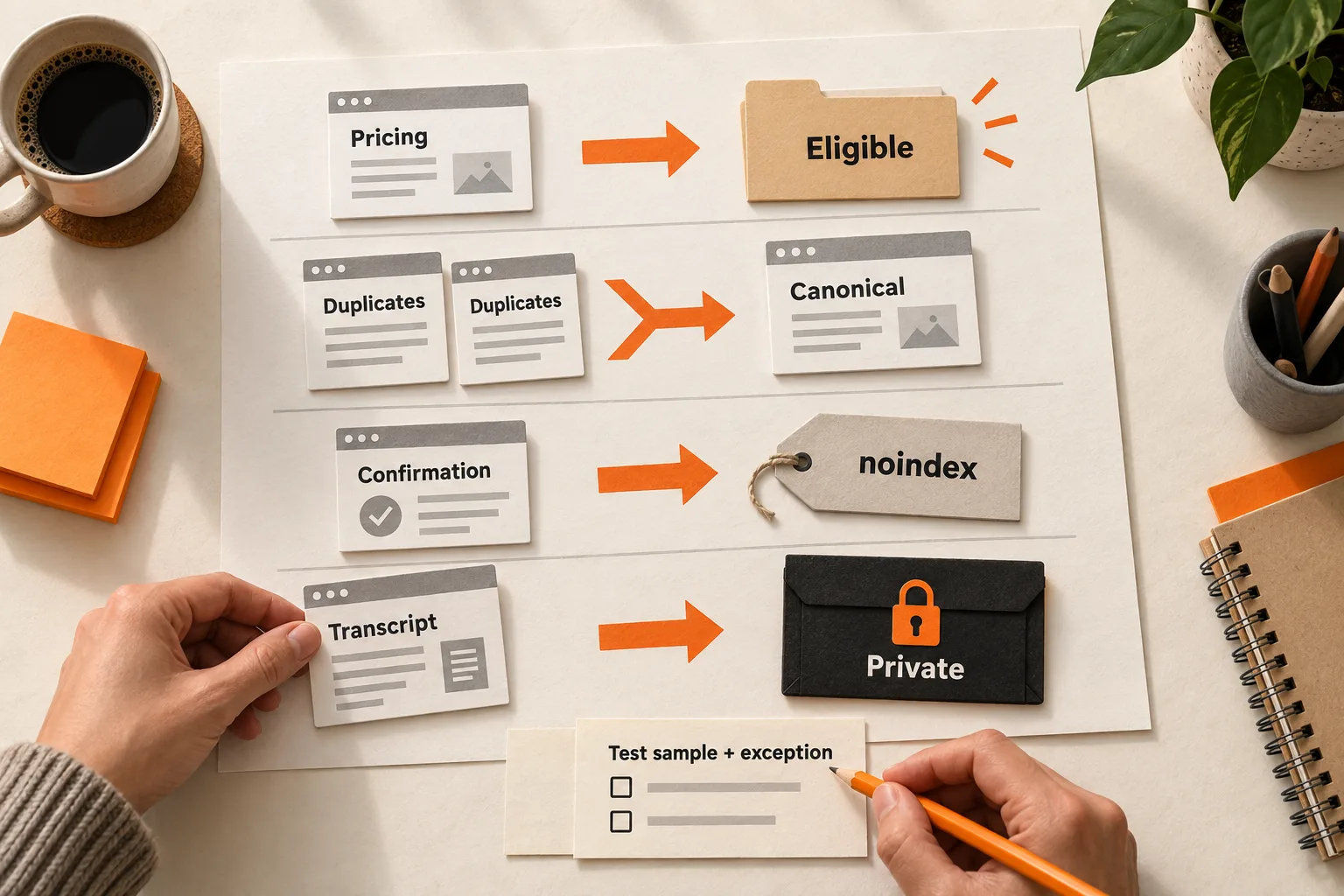
Make useful public pages eligible for search, consolidate equivalent URLs, exclude public utility screens, and require appropriate access for private content. Those decisions need different controls.
Your pricing page, a customer’s saved AI transcript, and a signup confirmation screen can all have working URLs. Start by assigning a search policy to each page type, then check whether the site implements it correctly. This SaaS indexable pages checklist gives a small team a decision table, a worked example, and a worksheet for that task.
Decide what a search visitor should be able to land on
For each page type, write one sentence explaining its purpose to someone arriving directly from search. A pricing page helps a buyer assess cost. A documentation page explains a supported workflow. A confirmation screen acknowledges an action that already happened.
Ask whether the content is public, useful outside an existing session, and substantially different from another page. Keep supporting evidence beside the answer: a support question, a buyer interview, or a specific product task. Label the source and audience. One request can justify investigating a page; it does not establish widespread demand.
If your team cannot name the reader’s task, use the guide to mapping SaaS keywords to buyer decisions before creating more public pages.
Making a URL eligible for indexing does not guarantee inclusion. Even a successful live URL test cannot guarantee that Google will index it. Google’s URL Inspection documentation explains that limitation.
Set a default for each SaaS page type
These defaults are editorial recommendations. Adjust them to the content and intended audience. “Eligible” means you want Google to consider the page for search; it is not a report of its current index status.
| Page type | Recommended default | Exception to examine |
|---|---|---|
| Homepage, pricing, product pages | Eligible | An unfinished or duplicate variant |
| Integration and comparison pages | Eligible when substantive | Pages that only swap a product name |
| Public docs and help articles | Eligible | Private setup details or obsolete instructions |
| Useful template or tool pages | Eligible | Empty shells or output tied to a user’s session |
| Internal search results | Exclude with noindex |
Review crawl control separately for large URL families |
| Signup confirmation and password-reset screens | Exclude public utility screens with noindex |
Protect personal data and account actions separately |
| Login page | Decide based on its purpose | A stable login page may serve branded navigation |
| Tracking-parameter duplicates | Consolidate | Parameters that materially change the content |
| Filter combinations | Review as a URL family | A useful, maintained category may merit search visibility |
| Customer workspaces and private AI outputs | Require authentication and authorization | Explicitly public sharing needs a separate policy |
Directory names alone are a poor basis for these decisions. A /templates/ directory might contain both public examples and private customer drafts. Older documentation may still help people using a supported earlier version.
For generated pages, review what varies beyond the title. An integration page should explain the connection, its limitations, and the setup process. Keep unfinished pages out of search until they serve their intended reader. Page length alone does not establish usefulness.
Match the control to the decision
Private transcripts, reports, and account records need access controls. A hidden link or crawler rule does not protect them. Google says robots.txt is not a security mechanism and recommends password protection for private files. Google’s robots.txt guidance.
For accessible pages that should stay out of search, use noindex through a robots meta tag or an X-Robots-Tag HTTP response header. Google must crawl the resource to read the rule. A robots.txt block can prevent that, and Google does not support putting noindex inside robots.txt. Google’s noindex documentation.
For duplicate or very similar content, declare a preferred canonical URL and use that URL consistently in internal links. A campaign URL showing the same pricing page can point to the clean pricing URL. If you are retiring a duplicate, a permanent redirect may be appropriate. Canonical signals express a preference; Google makes the selection. Google also advises against using noindex to force canonical selection within a site. Google’s canonicalization guidance.
Use robots.txt when the objective is to control crawling. Google can still show a disallowed URL in search if it discovers the URL elsewhere, so a crawl block alone cannot reliably exclude a confirmation screen. Google’s robots.txt limitations.
Write the intended outcome in the developer ticket: exclude a public utility page, consolidate equivalent URLs, protect private content, or reduce crawling of a large URL family. Then specify the control that matches it.
Handle parameters according to what they change
A question mark in a URL tells you little about its value. A tracking parameter may leave the content unchanged. A filter may select a useful subset. A session parameter may refer to private user state. Classify the behavior before applying a blanket rule.
Filter combinations deserve attention when each selection creates more crawlable URLs. Google warns that these combinations can create enormous URL spaces, consume server resources, and slow discovery of useful pages. Its faceted-navigation guidance recommends preventing crawling when those URLs do not need search visibility.
Choose the control according to the problem you need to solve. If a public URL must stay out of search, keep it crawlable so Google can read its noindex rule. If the aim is to reduce fetching of filter combinations, consider crawl prevention while accepting that a blocked URL may still appear in search. A previous noindex observation does not turn a later crawl block into a reliable exclusion rule. These limits follow from Google’s noindex requirements and robots.txt guidance.
Preserve selected category pages you want searchable. Test the proposed rule against unwanted combinations and useful exceptions before applying it across a directory.
Worked example: an AI meeting-notes app
Suppose a fictional app, MeetingDraft, has marketing pages, a template library, and customer transcripts. Its founder and developer agree on the following policy. The checks describe expected behavior, not measured results.
| Example route | Decision | Expected check |
|---|---|---|
/pricing/ |
Eligible | Public content is accessible and has no noindex directive |
/pricing/?utm_source=newsletter |
Consolidate | Content matches the clean pricing page; the canonical declaration points to it |
/signup/complete/ |
Exclude | The generic confirmation screen returns noindex and is crawlable |
/app/transcripts/482/ |
Private | An unauthenticated request does not return the transcript; access requires authorization |
/templates/weekly-team-meeting/ |
Eligible | The complete agenda is public and remains unaffected by utility-page exclusions |
/templates/?team=sales&sort=newest |
Review crawl control | Any proposed block matches this filter family while preserving individual template pages |
For the confirmation screen, the ticket should name both the target and the exception: apply noindex to the generic signup confirmation, then check that the public agenda page still has no exclusion directive. If a shared layout adds noindex to both, the implementation fails the agreed policy.
The sitemap should include the preferred public URLs and omit private routes, excluded utilities, and tracking duplicates. Google recommends listing the canonical URLs you want shown in search. Removing a URL from a sitemap alone does not exclude it from search. Google’s sitemap guide.
Verify the policy with a small sample
Choose a normal URL and an edge case from each affected page type. Whenever you test a broad exclusion rule, include a page that must remain eligible.
Check the HTTP response and redirects, robots directives in the page and response headers, the declared canonical, and content available without a login. Test private routes without authentication to confirm that they do not expose customer content. Keep their access controls in place throughout testing.
In Search Console, compare indexed information with a live test. Record the last crawl date alongside the implementation date so an older observation does not look like a failed change. Inspect the Google-selected canonical in indexed data; the live test cannot predict that selection. Google’s inspection guide distinguishes these views.
Record technical behavior and business performance separately. A lower indexed-page count may match your policy if unwanted utilities disappear. That count alone does not prove improved discovery, signups, or revenue.
Copy this page-type policy worksheet
Create one record per page type. Fill in the expected behavior before implementation, then record observations without overwriting the original decision.
Page type:
Representative URL:
Edge case or exception URL:
Reader task:
Supporting evidence, source, and audience:
Intended audience: public / restricted
Search decision: eligible / consolidate / exclude / private
Control and canonical target, if applicable:
Sitemap inclusion:
Expected behavior for the representative URL:
Expected behavior for the exception:
Owner and implementation date:
Observed response, redirects, directives, and access behavior:
Observation date:
Search Console status, last crawl, and selected canonical:
Mismatch or unresolved question:
Next action, owner, and check date:
Before closing the implementation task, confirm that private content requires appropriate access, Google can read any noindex rule you rely on, and canonical targets represent equivalent content. Check that sitemap entries match your preferred public URLs and that broad rules preserve useful exceptions. Leave any pending Google observation clearly marked.
Start with one page family
Choose one family whose current behavior conflicts with its intended use. Complete its worksheet, assign the change, and test a representative URL plus an exception. Record the result and the next check before extending the rule to more pages.