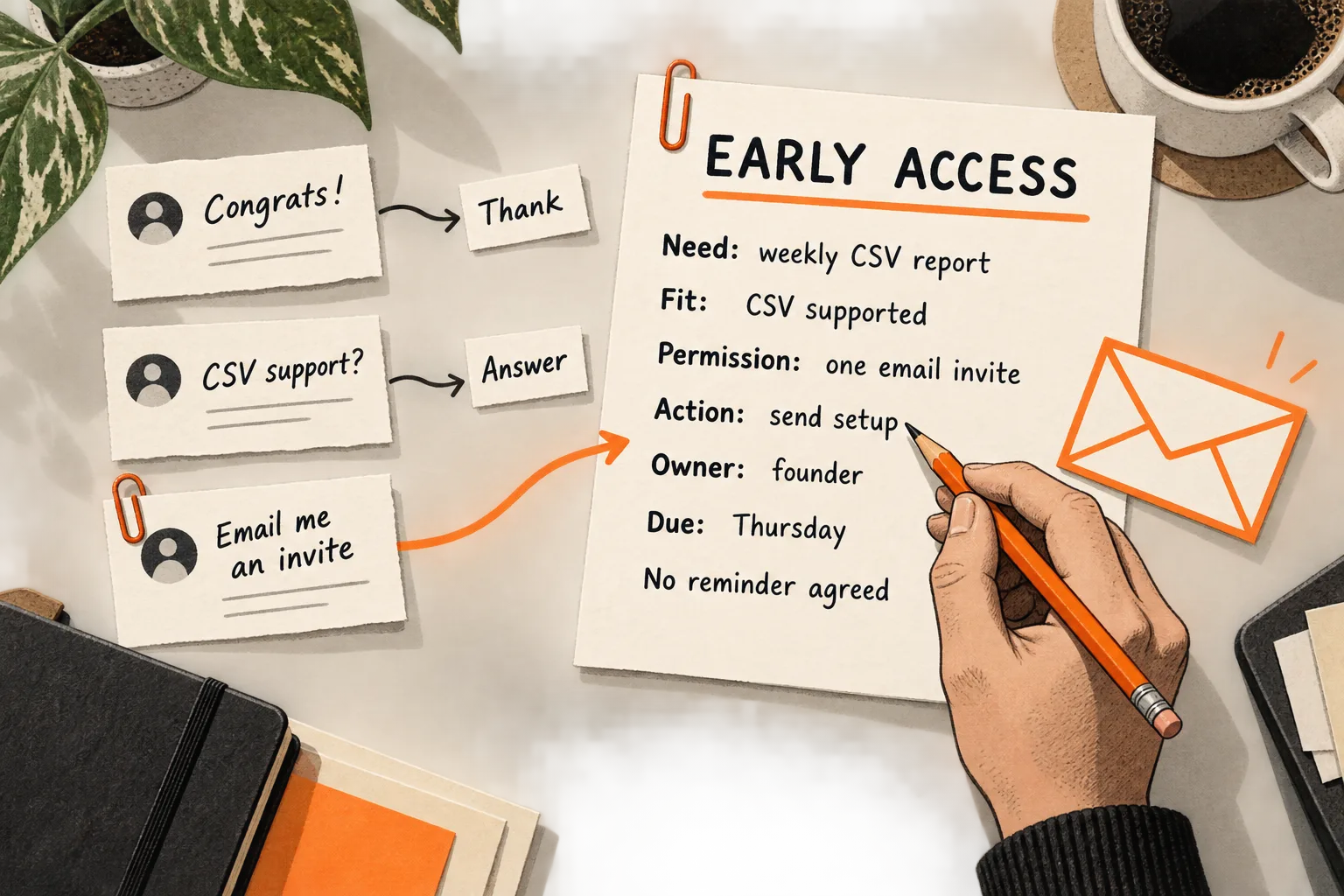
A support lead describes a problem under your launch post. Another commenter asks for an invitation. Both give you something to act on, but they need different replies.
Build your early-access follow-up plan around three separate questions: What did this person express? Does their task fit the current product? What contact did they request? Record the answers, then assign one next action, an owner, and a date. A spreadsheet is enough to start.
Separate curiosity, need, and permission
Someone can have a strong need without wanting follow-up. Someone else can request access before you know whether the product fits. Keep those distinctions visible.
| Response | What it establishes | Useful next step |
|---|---|---|
| “Congrats!” | Encouragement | Thank them; leave it there |
| “Does it work with CSV exports?” | A specific question | Answer it; clarify the task if needed |
| “We do this manually every Friday” | A possible recurring need | Ask about the current workflow |
| “Send me an invite here” | A request for a specific message | Record the request and fulfill it |
These are illustrative responses, not customer quotations. A like, a compliment, or a job title alone leaves both fit and permission uncertain. Save a tracker row when there is a question to answer, a relevant problem to understand, or a request to fulfill. Encouragement alone may need no individual record.
Keep permission narrow. A request for one invitation in a direct message does not establish permission for a recurring email newsletter. As a working rule, ask before changing channels or adding ongoing updates. Mailchimp requires permission under its terms, defines it as express, verifiable consent to marketing communications, and recommends retaining a record. Mailchimp’s permission guidance
Establish fit with one concrete question
Before sending invitations, describe who can benefit from the current version:
This early-access version helps [person responsible for a task] do [specific job] using [supported input], with [important limitation].
For a hypothetical AI tool that groups support tickets, that could mean support leads working with English-language CSV exports. Someone who needs a live integration in another language could have a serious problem and still be a poor fit for this batch.
Start with the person’s current approach. April Dunford’s positioning method examines what customers would do without the product, including manual processes and maintaining their current approach. Use that question to understand what your product would need to improve. Dunford’s positioning guide
Connect your question to their comment:
“You mentioned grouping tickets manually. How did you handle that in your most recent reporting cycle?”
Their answer may reveal the input, frequency, workaround, and person responsible. Ask for more detail only when it changes the invitation decision; a casual comment does not call for a full questionnaire.
Record their wording separately from your interpretation. “Exported tickets into a spreadsheet last Friday” describes an action. “Urgent buyer with budget” adds assumptions unless they said more. For a fuller way to organize those observations, use the pain-point evidence sheet.
Copy a tracker with a clear next action
Use one row per person and merge duplicate conversations. Keep the original thread link so a teammate can find the context without asking the person to repeat it.
Use these fields as spreadsheet columns, or duplicate the block for each person:
Person or handle:
Source link and response date:
Their wording:
Current workaround and constraints:
Fit: unknown / fits this version / blocked
Reason for fit assessment:
Permission: unknown / requested / declined or withdrawn
Requested channel and message scope:
Permission date and evidence link:
Progress: question open / waiting for access / invited / tried task / closed
Next action:
Owner:
Due date:
Reminder agreement and limit:
Outcome or reason closed:
Keep fit and permission visible after an invitation goes out. “Invited” records your team’s action; use “tried task” only when you have evidence that the person started.
Write actions such as “Send CSV requirements Tuesday” or “Answer question about deleting uploads.” Labels such as “Nurture” and “Follow up soon” leave the work undefined.
A spreadsheet works while someone can review every open row and keep replies, dates, and stop requests current. If multiple teammates contact people, assign a single owner before sending anything.
Match each message to the request
Answer incoming questions in your next planned response block. If someone asks for access, explain whether it is available. If it is not, give the next date you can credibly update them. Promise an update only when you can deliver it.
Before inviting someone, explain the task they can try, the setup, current limitations, any price, and the feedback you hope to receive. For an AI product, clarify what data the test requires and offer sample data when that is sufficient to evaluate the workflow.
For the hypothetical ticket tool, an invitation could read:
“You asked to try the ticket-grouping tool. Here’s the setup link: [link]. The current version accepts English CSV exports and doesn’t connect directly to your help desk. You can start with the sample file. Access is free for this two-week test. We’d like to hear whether the themes help you prepare your weekly report.”
Replace every detail with terms you can honor. This example assumes the person already requested the link in that channel. If they only asked a product question, answer that question first.
Set any reminder policy within the contact they agreed to. If they requested only one invitation, fulfill it and leave the next move to them. If they agreed to a check-in, one reminder after five business days could be a starting policy. That interval is an operating choice, not a conversion benchmark.
A reminder could say:
“You said a check-in would be useful. Did you get access, or should I close this out for now?”
After that reminder, close the active follow-up if there is no reply, unless you agreed on a different date. Stop immediately if they decline or ask you to stop. Record silence as no response; it does not explain why they stopped replying.
Once someone begins using the product, focus on the task they are trying to complete. The guide to triggering an onboarding email from a missing activation step covers that next stage.
Worked example: an AI support-ticket tool
Suppose a two-person SaaS team posts a demo of a tool that groups support tickets into themes. Twelve distinct people respond: five offer congratulations, four describe a relevant workflow, and three request access. For this hypothetical example, the groups do not overlap.
The team thanks the five supporters without adding them to an outreach queue. It answers the four workflow comments and asks one relevant question in each conversation. The three access requests get tracker rows recording where and how each person asked to receive an invitation.
One of the workflow commenters, Morgan, explains that they manually group CSV exports every Friday. After the founder answers a file-format question, Morgan requests one invitation by email. The actionable part of the row reads:
| Field | Hypothetical entry |
|---|---|
| Stated need | Group weekly CSV exports for a support report |
| Fit | Fits the input format; usefulness still untested |
| Permission | One invitation by email; retain the request link and date |
| Progress | Waiting for access |
| Next action | Founder sends setup instructions Thursday |
| Reminder agreement | None; no reminder scheduled |
| Outcome | Pending |
The team now has four explicit access requests, including Morgan’s. It confirms that all four can use the current version and sends the invitations. Suppose three later try a file and two complete a report they consider useful.
Record those results separately: four invited, three tried the task, and two reported a useful result. Other comments remain context rather than additional trial users. The two useful reports still leave willingness to pay and repeat use unresolved. All counts here illustrate how to keep records; they are not observed results or target conversion rates.
If the team cannot support four tests at once, it can invite a smaller batch and agree on a later date with the others. That reduces immediate support work but delays what the team can learn.
Review the batch without overstating results
Choose an observable first result before invitations go out. For the hypothetical tool, it could be completing a theme report and checking its categories against the original tickets. Uploading a file would be an earlier step.
Review the same invitation batch over a stated period. Count invitations, task attempts, useful results, and blockers separately. Include founder time and note which tests required manual help. A useful report produced with extensive assistance leaves different questions from one completed independently.
Use replies and task completion alongside email reporting. Mailchimp documents that automated activity, including security scans and privacy tools, can inflate opens and clicks. An open or click alone cannot establish that someone evaluated the product. Mailchimp’s explanation of bot activity
Inspect stalled conversations before changing the sequence. Missing access, an unsupported input, unclear setup, and changed priorities call for different actions. Leave the reason unknown when you have no explanation. A small batch cannot establish a universal cadence or a reliable conversion forecast.
Your next 30-minute task
Open your most recent launch thread and copy the tracker. Work through the responses:
- Separate encouragement, concrete needs, and explicit requests.
- Save the person’s wording and source link for actionable rows.
- Check fit against the current version’s eligibility and limitations; leave missing information unknown.
- Record the requested channel, contact scope, and any reminder agreement.
- Give each open row one action, owner, and date; close rows with stop requests.
- Define the first useful product result and a batch review date.
Finish by answering the oldest unresolved question or fulfilling the oldest access request you can support.