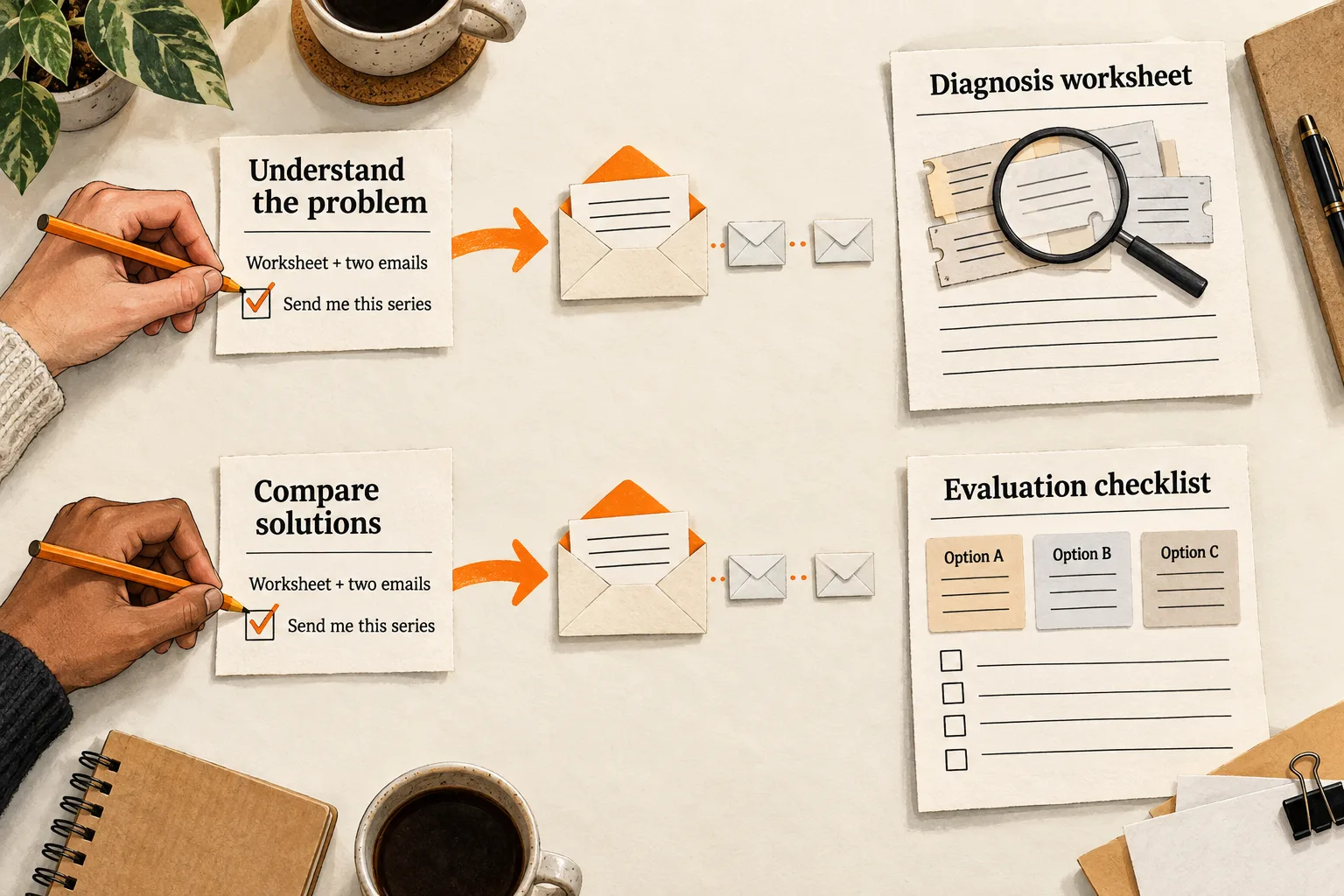
A reader trying to diagnose slow customer onboarding needs a different resource from someone comparing onboarding tools. Sending both the same welcome sequence can leave one facing a premature pricing pitch and the other waiting through lessons they already understand.
Start with two optional email paths: understanding the problem and comparing solutions. Ask subscribers which task they want help with, explain what each series includes, and deliver a resource that helps them make progress. This is a practical approach to content intent email segmentation for a small AI or SaaS team.
Separate the article’s purpose from the subscriber’s choice
An article tells you what someone encountered. It does not establish why they read it, whether they have purchasing authority, or whether they want more email. An existing customer might read an introductory guide while helping a colleague.
Keep three pieces of information separate:
- The source article or form where the person subscribed.
- The task they selected, such as understanding the problem or comparing options.
- The email follow-up they agreed to receive.
Use the article’s subject to choose which resource to offer beside it. Let the subscriber’s explicit choice determine which series they receive.
To write those choices, review questions from customer conversations, support requests, and subscriber replies. Preserve people’s actual wording separately from your interpretation. A question about implementation effort may suggest a migration worksheet; it does not establish that the person wants a sales call.
If your articles do not yet have clear reader tasks, use FindVex’s guide to mapping SaaS keywords to the buyer’s next decision. It can help you choose the resource offered beside each article.
Build two paths you can maintain
Choose one topic where you already have useful material. Map the first resource and its follow-up before extending the approach across your library.
| Reader’s selected task | First useful resource | Possible follow-up |
|---|---|---|
| Understand the problem | Diagnostic worksheet | A worked diagnosis |
| Compare approaches | Evaluation checklist | A tradeoff example |
The learning path should help readers describe the problem well enough to decide what to do. The evaluation path should help them judge options against a constraint such as setup effort, data handling, or total cost.
If both paths would receive the same resource, keep one sequence until you have a useful reason to split it. A subscriber who skips the task question should receive only the general follow-up they requested. If they requested none, leave them out of both series.
You can start with a preference field and filtered sends. Mailchimp, for example, supports groups that subscribers select through signup forms, profile forms, or a preferences center. These groups can form the basis of targeted segments. Its documentation distinguishes these subscriber preferences from tags used for internal organization. Mailchimp’s guide to groups
Make the follow-up promise visible before signup
Ask a short question: “What are you working on?” Use choices such as “Understanding the problem” and “Comparing solutions,” adapted to your topic.
Show the email promise for the selected path before the reader submits the form. For example:
Send me the onboarding diagnosis worksheet and two follow-up examples over the next week. I can unsubscribe at any time.
Choose a schedule your team can maintain. If someone requests only a resource, deliver that resource and offer an ongoing newsletter separately.
Record the form, signup time, selected preference, and version of the promise. You should be able to reconstruct what the person requested without guessing from an old tag.
Explicit opt-in means agreeing to the stated emails. Double opt-in adds a confirmation step. In Mailchimp’s documented email flow, someone submits a form, receives a confirmation message, and clicks its link before becoming a subscribed contact. Its double opt-in setting applies to Mailchimp signup forms; check external form integrations separately. Mailchimp’s double opt-in documentation
If you use confirmation, test the message and make the next action clear. Some readers may leave signup unfinished, so check that unconfirmed contacts stay out of the series. The signup promise still needs to explain what you will send.
Worked example: two paths for an AI support tool
Consider a hypothetical company building an AI assistant for support teams. It has two articles: one about identifying repetitive support work and another about comparing AI support tools. It offers two optional resource series. The messages, timing, and routing below are proposed design choices, with no measured results implied.
A reader choosing “Understand our support workload” opts into a worksheet plus two examples. The first email delivers a worksheet for classifying a small sample of tickets by request type, handling effort, and need for human judgment. Suggested opening:
You asked for the support workload worksheet. Start with a small batch of tickets and mark which requests repeat. Keep sensitive customer information out of anything you share back.
Three days later, the reader receives a worked classification example. On day seven, the final email helps them decide whether to improve documentation, adjust a process, or evaluate automation. The series ends there.
A reader choosing “Compare AI support tools” opts into an evaluation worksheet and two examples. Their worksheet covers required integrations, human handoff, data restrictions, and a task to test across shortlisted products. Suggested opening:
You asked for the evaluation worksheet. Choose one recurring support task and write down what an acceptable answer must include before testing any tool.
The next emails show how to compare handoff behavior and document tradeoffs. The reader’s next action is to complete an evaluation. They can request a conversation if they want help.
Someone arriving from either article can choose either path. Store the article as context and use the selected series to route the emails.
If an evaluator wants to switch to learning, show the learning series promise before they confirm the switch. Then stop the remaining evaluation emails and begin the requested learning series. When either series ends, send further marketing email only if the subscriber separately requested it.
Set entry and stop rules before automating
For this initial setup, use one active resource series per subscriber. A new explicit request can replace the current series; a page visit or link click should not make that change on its own.
Write down how you will handle these cases:
| Event | Rule for this setup |
|---|---|
| Subscriber requests a series | Check subscription eligibility and the recorded promise before starting it. |
| Subscriber confirms a switch | Stop pending messages from the old series before starting the new one. |
| Subscriber repeats the same signup | Avoid restarting an active series or sending duplicate resource emails. |
| Subscriber unsubscribes | Stop pending marketing messages; a preference value must not override the unsubscribe. |
| Subscriber requests direct help | Assign someone to respond and decide whether to pause the resource series. |
| Series ends | End its sends; continue only other email the subscriber separately requested. |
Check eligibility before each scheduled send. Give existing subscribers a way to choose through an email they already agreed to receive. If they make no selection, keep their current arrangement.
Use a submitted preference form to request a switch. A bare email click is a weak signal: Mailchimp documents that antivirus scans, security services, and link previews can create nonhuman opens and clicks. Its filtering identifies most bot activity, so filtered clicks still do not establish a reader’s choice. Mailchimp’s explanation of bot activity
Test these rules with your own addresses before enrolling readers. Include a missing preference, a confirmed switch, a repeated signup, and an unsubscribe while an email is waiting to send. Check the resulting send queue as well as the saved preference.
Measure whether the resource helped
Choose an outcome that matches each path. For the learning series, count replies that identify a specific problem after using the worksheet. For the evaluation series, count submitted criteria or completed evaluations when you can observe them. Keep reported completion separate from work you have actually reviewed.
Track delivered messages, useful responses, unsubscribes, and complaints alongside the selected path and sequence version. Opens and clicks may help you investigate resource access, but neither proves that someone completed the task.
Learning subscribers and evaluation subscribers selected different tasks. A difference between their results does not establish that segmentation caused it. To test an email variation, compare it within the same path while keeping the promise and other conditions consistent.
A small list may provide too little evidence for a reliable numerical winner. Record counts and use replies to find confusing wording or missing resources. A few favorable responses do not support a revenue forecast.
Copy this follow-up map
Complete one copy for each path before configuring your email tool:
- Topic and source articles:
- Reader’s task, in their own language:
- Signup choice shown to the reader:
- Exact email promise and cadence:
- Location of the signup and permission record:
- First resource and the task it helps complete:
- Remaining messages and their purpose:
- Entry condition, including subscription eligibility:
- Rules for missing preferences, confirmed switches, and repeated signups:
- Stop conditions and end-of-series behavior:
- Useful outcome and how it will be observed:
- Owner and review date:
Your next task: test one pair of paths
Choose two articles and two resources you already have. Complete the maps, write the signup promises, and send the full test sequences to yourself. Confirm that switching paths stops the old messages and that unsubscribing stops pending sends. Before adding another segment, check that each first resource helps with the task selected on the form.